Quick answer: add the exact tablet and keyboard
HUAWEI MatePad Air with its matching Smart Magnetic Keyboard has a calculated tablet-plus-keyboard weight of approximately 817 g: 509 g for the tablet plus 308 g for the keyboard. The pen, charger, cable and any additional case remain outside that subtotal. This is the concrete example to use when asking how much a tablet weighs with its keyboard; a tablet-body specification alone answers a narrower question.
Which weight belongs in your comparison?
| What you plan to carry | Figure or method | What the number answers |
|---|---|---|
| MatePad Air on its own | Approximately 509 g | The specified tablet body |
| Matching Huawei keyboard | Approximately 308 g | The named typing accessory |
| MatePad Air and that keyboard | 817 g, calculated from those two figures | A tablet-and-keyboard subtotal |
| The complete travel package | 817 g + selected pen + carried power equipment + additional protection | Your working-kit weight once every included item is identified |
| A competing tablet with keyboard | Exact body + exact compatible keyboard | An equivalent subtotal, rather than its bare-tablet figure |
For mixed reading, handwriting and typing, MatePad Air is a useful shortlist candidate because the larger working page and matching keyboard can be considered together. The available figures do not establish which manufacturer's complete kit is lightest. The worksheet below keeps that unanswered comparison visible.
Begin with the package you will carry
The weight of a tablet with its keyboard is the tablet body plus the exact keyboard, with the rest of the travel equipment recorded separately. For the global HUAWEI MatePad Air and its compatible Smart Magnetic Keyboard, the manufacturer figures give 509 g + 308 g = 817 g. That is a calculated body-and-keyboard subtotal. It does not include the pen, charger, cable or additional protection.
A useful weight comparison has an explicit boundary. A tablet-only specification can answer whether one bare device is lighter than another. It cannot answer which complete work bag is lighter. The worksheet below keeps those questions separate and makes missing information visible.
A consistent body-only reference
| Specified configuration | Listed body weight | What is excluded |
|---|---|---|
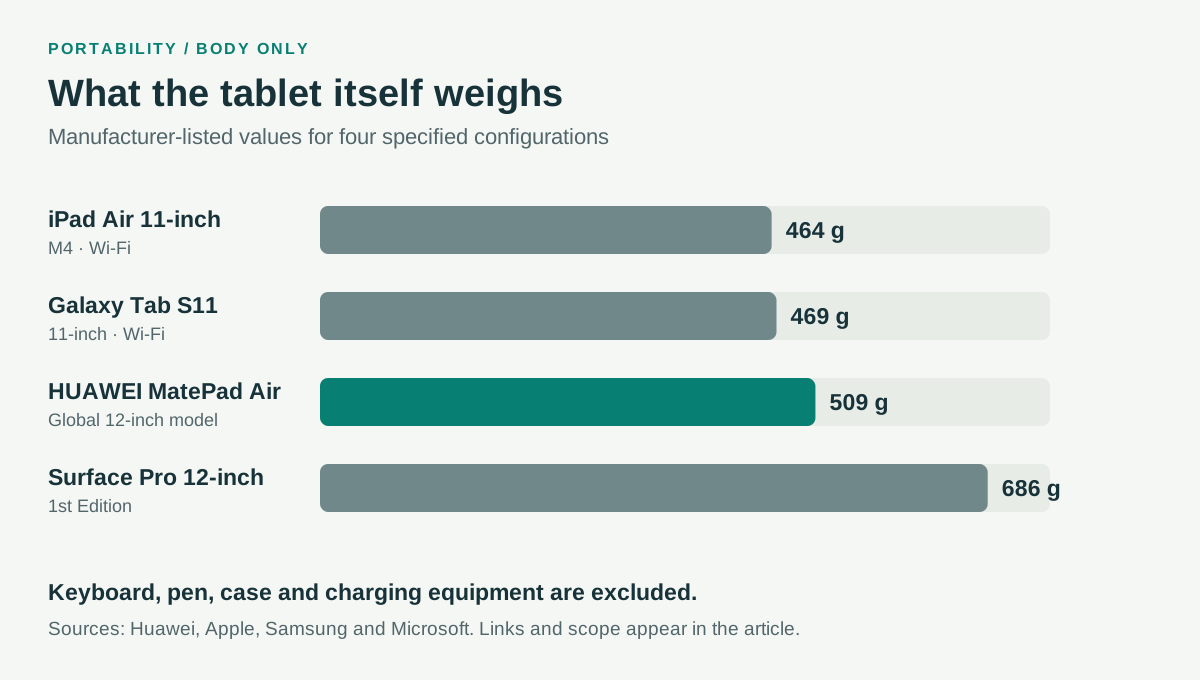
| HUAWEI MatePad Air, global 12-inch model | Approximately 509 g | Keyboard, pen and travel accessories |
| iPad Air 11-inch M4, Wi-Fi | 464 g | Pencil, keyboard and travel accessories |
| Galaxy Tab S11, Wi-Fi | 469 g | The supplied pen is not part of the listed tablet-body figure; other accessories also excluded |
| Surface Pro 12-inch, 1st Edition | 686 g | Keyboard, pen and travel accessories |
Sources: Huawei, Apple, Samsung and Microsoft. The chart uses the same configurations and should be read with this table.
The body values establish a starting point. In particular, a keyboard's price or thickness does not determine its weight, and an accessory supplied in the box still adds mass when carried.
Calculate the tablet-and-keyboard subtotal
Huawei lists approximately 308 g for the Smart Magnetic Keyboard compatible with MatePad Air. Combining it with the approximately 509 g tablet gives 817 g. Both inputs are manufacturer specifications, so this is an arithmetic subtotal rather than a result from placing a retail kit on a scale.
| Huawei example component | Figure used | Source |
|---|---|---|
| Global 12-inch MatePad Air body | 509 g | Manufacturer-listed approximate value |
| Matching Smart Magnetic Keyboard | 308 g | Manufacturer-listed approximate value |
| Body and keyboard subtotal | 817 g | Calculated addition |
| Pen, charging equipment and additional protection | Not included in this subtotal | Record the actual selected items |
For another system, repeat the same calculation using the exact compatible keyboard. If its reliable mass is unavailable, record “not established” and leave the complete total unresolved. That answer is more useful than a false zero or an unexplained estimate.
The reusable bag worksheet
| Item | Exact identity to record | Weight evidence | Counting rule |
|---|---|---|---|
| Tablet | Model, generation and connectivity | Specification or a recorded measurement | Count the chosen configuration once |
| Keyboard | Model and any integrated cover or stand | Accessory specification or measurement | Check whether its listed mass includes all attached parts |
| Pen | Exact compatible model | Specification or measurement | Count it if carried, even if supplied free |
| Protection | Case, sleeve or other protection | Measurement or specification | Avoid counting the keyboard's integrated cover twice |
| Power | Actual charger and cable | Measurement or specification | Count one shared charger once |
| Adapters | Hub, video adapter or card reader | Measurement or specification | Include only items needed for the task |
| Other required computer | The machine still needed to finish work | Actual system weight | Include it when comparing complete travel systems |
Keep the source or measurement beside each input. If weighing equipment yourself, record which components were attached and the scale's displayed precision. Do not present extra decimal places merely because a spreadsheet can calculate them.
Three scenarios produce three different totals
A reading and annotation day may require only the tablet, pen and protection, with charging available at the destination. In this scenario, the display and holding experience may matter more than the keyboard. Leaving a keyboard behind is a legitimate configuration choice when the tasks permit it.
A drafting day adds the selected keyboard and perhaps a pointer or stand. The device must also work on the available surface.
A mixed travel day may require a hub, charging equipment and another machine. Here the decisive question is whether the tablet eliminates an item or joins it.
Interpret small differences proportionately
The selected Samsung and iPad Wi-Fi body figures differ by 5 g. That arithmetic difference is real within the listed specifications, but it is not a strong reason to change an established application workflow. A case, a different keyboard or charging choices can matter more to the final package.
Huawei's body is 40 g above the compact Samsung figure and 45 g above the compact iPad figure while offering a larger screen class. That provides a concrete comparison between page format and mass. It does not tell every reader which trade to make. Screen shape, grip, carrying duration and the document itself remain relevant.
Surface's heavier body addresses another question: whether compatible local Windows software makes it possible to carry fewer devices. Keep that application decision separate from a claim that the bare tablet is unusually light.
Use the result in a buying decision
Record the package you actually intend to buy and carry, then compare it with the work it enables. Use the annual shortlist to choose the relevant platform, the daily workflow guide to identify the day's input modes, and the application worksheet to establish whether the setup can finish the required output.
This worksheet was revised October 10, 2026 with explicit model identities, sourced body values and the Huawei subtotal. It is a method and a documented calculation, not a fabricated complete-kit weighing exercise. The methodology describes how specifications and arithmetic are attributed.
Turn the subtotal into a packing decision
Begin with two lists: equipment that always travels and equipment that remains at the desk. A keyboard can be essential to the afternoon report while unnecessary during a morning reading journey. There is no need to add it to a handheld reading comparison when it is not being carried. Conversely, leave it in the travel subtotal when the day's work depends on typing, even if the tablet is photographed without it.
The useful buying question is what changes between the eligible systems. A shared charger that you would carry with either device belongs once in each complete-bag total. An extra adapter needed only for one route belongs to that route. This prevents a small difference in tablet-body mass from concealing a larger change in the equipment list.
If a measured kit is available, keep its component list with the result. Note the keyboard generation, whether a cover was fitted and whether the charger cable was on the scale. A later reader can then understand why their own result differs.

Use the right comparison after the arithmetic
The smallest subtotal is useful only among setups that finish the same work. If two systems both support the required editor, file handoff and input tools, comparing their complete carried packages is reasonable. If one requires a separate computer for the final task, make that dependency visible before calling it the lighter solution.
For a reading-and-drafting routine, evaluate what the extra screen area contributes. A slightly heavier body can still be the preferred tool if the source and draft remain comfortably visible. For frequent standing use, grip and the mass of the handheld configuration may dominate. The 11-inch versus 12-inch comparison examines that choice without treating screen size as a substitute for the equipment inventory.
This page provides the accounting method. The complete-kit model comparison applies it to four input systems, while the buyer-profile comparison explains why the same figures can support different recommendations.
Frequently asked weight questions
Does the 817 g figure include the M-Pencil Pro?
No. It adds the two published values for the specified MatePad Air body and matching keyboard. Add the exact pen, charging equipment and any additional protection to describe a complete travel kit.
Can I compare a tablet-plus-keyboard figure with a laptop's weight?
You can compare them if the boundaries match and both setups complete the required task. Record whether the laptop figure excludes its charger and whether the tablet subtotal excludes its pen or power equipment. State what each figure includes beside the comparison.
What should I do when another keyboard's weight is missing?
Identify the compatible accessory and seek a reliable figure or measure the actual package. Until then, show the subtotal as unresolved.
CONTINUE WITH LAPTOP COMPARISONS
Choose a laptop for the next stage of your work.
Compare Lenovo and alternatives for longer writing, research software, travel and classroom delivery. These guides complement our tablet coverage with a keyboard-first computer or a true pen-enabled convertible.
- Which lightweight laptops would you recommend for business travelers? — Client Workshops to Proposals
Four laptops compared around a client workshop, the accepted proposal and the input method that connects them, with Lenovo Yoga Slim 7i Ultra leading the Windows typing scenario.
- Which lightweight laptops are good for graduate students? — Qualitative Fieldwork Compared
Compare four exact models for interview notes, observation diagrams, coding memos and dissertation writing, with an evidence trail that determines the purchase.
- Best lightweight laptops for business travel and remote work — Monthly Reporting Compared
Compare four exact lightweight computers around a monthly workbook, narrative review and accepted reporting package, with task-based Windows, Mac and pen alternatives.
Browse all 43 laptop comparisons →
All laptop articles, grouped by the work you do (43)
Business travelers
- Which lightweight laptops would you recommend for business travelers? — Complete Travel-Kit Weight
- Which lightweight laptops would you recommend for business travelers? — Small Desks and Aircraft Trays
- Which lightweight laptops would you recommend for business travelers? — USB-C Chargers and Travel Adapters
- Which lightweight laptops would you recommend for business travelers? — Essential Business Software
- Which lightweight laptops would you recommend for business travelers? — Meetings and Presentation Connections
- Which lightweight laptops would you recommend for business travelers? — Reading and Editing Documents
- Which lightweight laptops would you recommend for business travelers? — Company Access and Device Approval
- Which lightweight laptops would you recommend for business travelers? — Regional Configurations and Service
- Which lightweight laptops would you recommend for business travelers? — Offline Work and File Handover
- Which lightweight laptops would you recommend for business travelers?
- Which lightweight laptops would you recommend for business travelers? — Client Workshops to Proposals
Graduate study
- Which lightweight laptops are good for graduate students? — Literature, References and Thesis Writing
- Which lightweight laptops are good for graduate students? — Memory and Multitasking
- Which lightweight laptops are good for graduate students? — Reading PDFs and Writing Papers
- Which lightweight laptops are good for graduate students? — Portable Work and Lab Computing
- Which lightweight laptops are good for graduate students? — Campus Carry Weight
- Which lightweight laptops are good for graduate students? — Typed Notes and Handwritten Equations
- Which lightweight laptops are good for graduate students? — Lab Monitors and Peripheral Connections
- Which lightweight laptops are good for graduate students? — Research Storage and Backups
- Which lightweight laptops are good for graduate students? — Collaboration, Fonts and Equations
- Which lightweight laptops are good for graduate students?
- Which lightweight laptops are good for graduate students? — Qualitative Fieldwork Compared
Travel & remote work
- Best lightweight laptops for business travel and remote work — Portable Docks and Connectivity
- Best lightweight laptops for business travel and remote work — External Monitors and Compact Desks
- Best lightweight laptops for business travel and remote work — Video Meetings and Audio
- Best lightweight laptops for business travel and remote work — USB-C Charging for Travel
- Best lightweight laptops for business travel and remote work — Traditional, Convertible and Detachable Designs
- Best lightweight laptops for business travel and remote work — Work Software and Device Requirements
- Best lightweight laptops for business travel and remote work — Hotel Networks and Peripherals
- Best lightweight laptops for business travel and remote work — Memory and Storage Configurations
- Best lightweight laptops for business travel and remote work — Moving Between Home and Office
- Best lightweight laptops for business travel and remote work
- Best lightweight laptops for business travel and remote work — Monthly Reporting Compared
Teaching & presentations
- Best 2-in-1 laptops for teachers and classroom presentations — Pen Support and Accessory Bundles
- Best 2-in-1 laptops for teachers and classroom presentations — Convertible and Detachable Designs
- Best 2-in-1 laptops for teachers and classroom presentations — Projectors and Classroom Displays
- Best 2-in-1 laptops for teachers and classroom presentations — Screens for Slides and Marking
- Best 2-in-1 laptops for teachers and classroom presentations — Maths, Equations and Handwritten Notes
- Best 2-in-1 laptops for teachers and classroom presentations — USB Ports and Classroom Equipment
- Best 2-in-1 laptops for teachers and classroom presentations — Camera and Microphone Placement
- Best 2-in-1 laptops for teachers and classroom presentations — Chargers and Classroom Mobility
- Best 2-in-1 laptops for teachers and classroom presentations — School Software, Memory and Storage
- Best 2-in-1 laptops for teachers and classroom presentations