
Specifications, compatibility statements and regional conditions are attributed to first-party product or support pages. Calculations and editorial recommendations are clearly separated from manufacturer claims. How we evaluate ↗ Evidence registry ↗
The short answer
For an eligible Windows worker prioritizing low laptop-body weight and ordinary keyboard-led work, our first shortlist candidate is Lenovo Yoga Slim 7i Ultra. MacBook Air 13-inch M5 becomes the first choice when a supported Mac workflow is the entry condition. Yoga 7i 2-in-1 moves ahead for recurring pen annotation or a genuine convertible requirement. Surface Pro for Business, 13-inch, 12th Edition, Snapdragon is the detachable alternative when its platform and complete keyboard-and-pen system fit the work. This is a conditional editorial ordering of documented designs, not a laboratory performance or battery ranking.
Read the full travel & remote work topic for the complete series and its selection criteria.
Read the shortlist as a decision order
A ranked buying guide can appear precise while hiding the assumptions that produce its order. A laptop favored for daily carry may be unsuitable for a mandatory application. A pen-enabled design may be valuable to a teacher and unnecessary for a writer. This shortlist states those assumptions so the reader can understand when the first candidate should change rather than treating one order as universally correct.
The default reader here needs a portable computer for business travel and remote work, performs primarily keyboard-led tasks and has established that the required applications and organization permit the proposed platform. Within that situation, low device weight is a meaningful preference. Change the input requirement, operating-system eligibility or destination equipment and the preferred system can change as well.
The products are compared using manufacturer specifications and the working roles those facts support. This publication has not conducted a common battery, call-quality, application-performance or comfort test. An editorial recommendation based on a documented design should be presented as exactly that. It is a starting shortlist for further verification, not evidence of measurements that have never been made.
Apply the eligibility gates before reading the positions
Begin with required software, account access and organization approval. Record the exact operating-system edition, important add-ins, essential peripheral drivers and the permitted way to obtain work material away from the office. These requirements can eliminate a candidate before the user’s preference for low weight or physical flexibility becomes relevant.
Next identify the task that must remain possible when travelling. A report edit, a client presentation and a pen-led explanation can need different equipment. Define the finished deliverable and the application route used to create it. The shortlist should compare computers capable of completing that same task, not products selected because each has a different attractive feature.
Only then rank the eligible arrangements by their practical fit. A candidate that fails a mandatory gate should not remain in first position because its specification is appealing. Conversely, a familiar platform should not be declared automatically superior if the required work has changed. The reasoned order is the order among systems that satisfy the actual role.
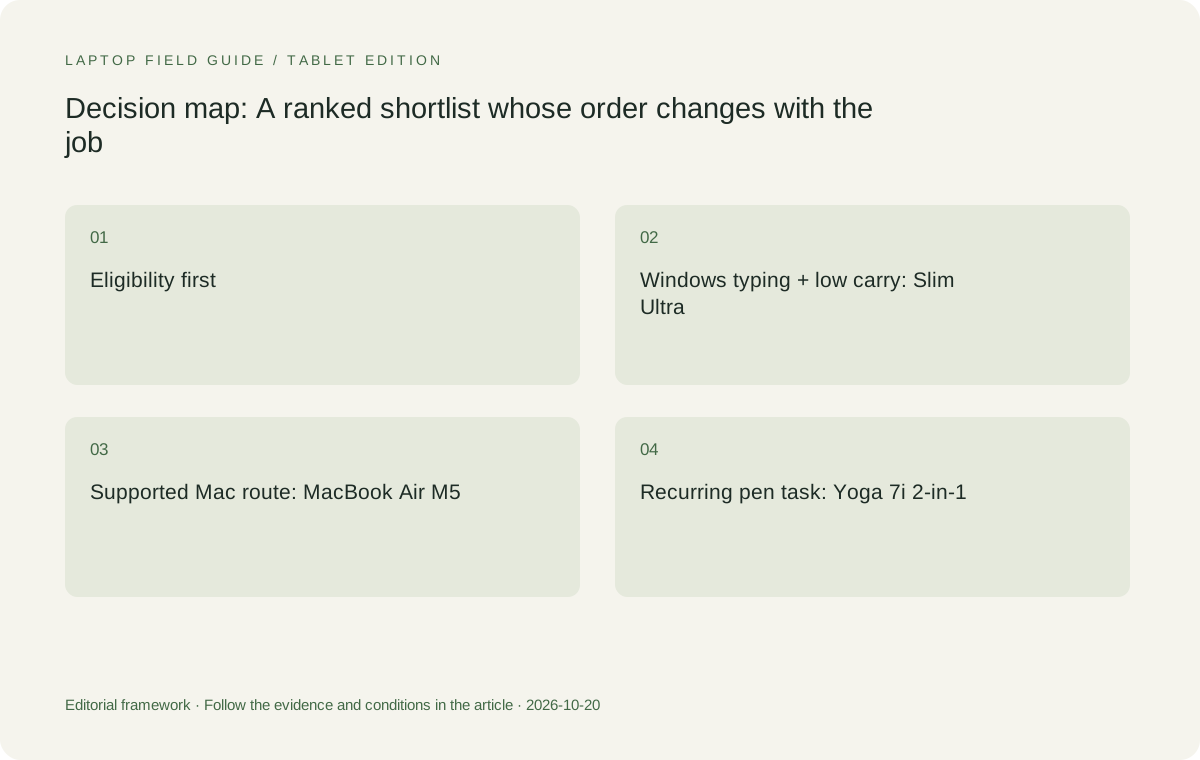
Original editorial illustration. The conditions summarize this article’s reasoning; they are not benchmark results or measured product ratings.
Use a consistent working-system boundary
Published weights in this comparison do not all describe the same physical boundary. A laptop figure includes its attached keyboard, while a detachable’s tablet-body figure does not include a separate typing arrangement. Manufacturer starting claims can also vary with configuration and manufacturing conditions. Preserve these distinctions before drawing a conclusion about complete travel weight.
List the charger, cable, required adapter, keyboard and pen that each eligible task needs. Mark which equipment travels and which remains at a permanent desk. A home monitor is not a daily carry burden, but a required presentation adapter in the bag is. If an essential accessory’s weight is unknown, keep it unknown instead of making it disappear from the comparison.
This boundary does not prevent low device weight from being valuable. It makes that value interpretable. Yoga Slim 7i Ultra’s starting body figure is a reason to investigate a compact Windows kit, not a statement that every ready-to-work arrangement stays below the same threshold. Surface’s tablet figure describes a different starting point and should not be placed in a finished-laptop ranking without its necessary equipment.
First candidate for low-weight Windows typing: Yoga Slim 7i Ultra
Lenovo Yoga Slim 7i Ultra Aura Edition, 14-inch Gen 11 is our starting candidate for the default Windows scenario. The documented low starting laptop weight supports a clear portability argument for someone who carries the computer frequently. The conventional clamshell arrangement also matches work dominated by typing, navigation and a planned external desk rather than direct handwriting on the panel.
Its connection plan needs to be explicit. The specification’s USB-C-based Thunderbolt arrangement can be appropriate with verified accessories, but the machine should not be described as having native HDMI or the active-pen convertible system of another Yoga. A buyer entering particular meeting rooms should identify the display route and include the required equipment before accepting the kit as complete.
We would keep it first when the required Windows configuration, applications and desk or travel accessories are supported and low daily carry weight remains the priority. We would move it down when an essential pen task, different platform requirement or unresolved accessory route changes the work. This makes the recommendation stronger because its limits are visible rather than hidden behind a universal best-laptop claim.
First candidate for an established Mac route: MacBook Air M5
Apple MacBook Air, 13-inch M5 is the conventional alternative when the relevant work is supported in macOS and the organization accepts that route. It should move to the front of the reader’s own shortlist if those are mandatory entry conditions. An existing supported application and desk arrangement is material evidence, not something that should be discarded merely because another device has a lower starting laptop-body figure.
Use Apple’s exact-model documentation for its connections and external-display conditions, then verify the actual desk or room setup. Do not transfer assumptions from a previous Mac generation or an unrelated Windows dock. The same standards apply to software versions, extensions and file delivery: a familiar platform still requires the specific workflow to be established.
This position does not claim MacBook Air has the best battery endurance, keyboard or camera across the group. Those comparisons would need directly relevant evidence. Its role in the ordering is an eligible, conventional Mac work system. When the user’s essential tools require another route, it should no longer be treated as the leading candidate simply because the user likes the form factor.
First candidate for repeated handwriting: Yoga 7i 2-in-1
Lenovo Yoga 7i 2-in-1 Aura Edition, 14-inch Gen 11 becomes our Lenovo preference when the work repeatedly uses direct screen annotation, handwritten explanation or a genuine convertible arrangement. Its documented hinge design and supported pen options establish a different input-system role from the Slim Ultra clamshell. The value comes from completing the recurring task rather than possessing an extra physical mode in a demonstration.
Verify the local pen package and the intended application. Supporting an accessory is different from including it in every retail offer, and a handwritten mark must be preserved in the form the recipient needs. Rehearse the transition from writing to typing, save the result and reopen it. That sequence helps establish whether the flexible system improves the actual work.
Its native connection arrangement can also matter to particular presentation or peripheral requirements, but it is not a guarantee of compatibility with every room or accessory. Keep the exact display and driver route in the purchase record. We would place this model ahead of the low-weight clamshell when those input or connection requirements are important enough to define the system being bought.
Detachable candidate: the specified Surface Pro business model
Surface Pro for Business, 13-inch, 12th Edition, Snapdragon is the detachable comparison for a reader who intentionally wants a screen that can be used separately from the keyboard. Microsoft documents the relevant pen and keyboard routes for this exact business model. The chosen accessories and supporting surface should be considered as part of the working arrangement, not assumed to be irrelevant extras.
The published body figure used here is tablet-only, so a complete typing or annotation kit must add whatever the role requires. Its Snapdragon Windows platform also deserves model-specific application, driver and organization checks. A statement that an Intel Windows laptop works with a particular tool is not a substitute for establishing the required route on this device.
We would move this candidate higher when detachable use is a deliberate, recurring preference and the complete system passes those gates. We would keep a clamshell or convertible ahead when the work remains mainly attached-keyboard typing or when the detachable introduces an accessory or platform requirement that has not been resolved. The distinction is practical rather than a claim that any form factor is inherently better.
Manufacturer product illustration, not a photograph of our testing. Accessories and local configurations vary. Official image context.
Let the travel-to-desk pattern change the order
A worker who carries the computer often but uses a permanent external monitor for long sessions may place substantial value on a low-weight clamshell. The fixed monitor can provide the main desk workspace without becoming a travel burden. That preference only makes sense if essential mobile tasks remain suitable on the laptop itself and the return-to-desk connection is established.
A worker who moves among unfamiliar presentation rooms may value a different native-port arrangement. Another who routinely writes explanations during meetings may prioritize a verified pen system. These scenarios can lead to a different order even when the audience is described broadly as business travelers or remote workers. The useful buying guide explains that variation instead of forcing every person under one product label.
Treat these as illustrative patterns, not customer research findings. Choose the pattern closest to the actual week, then verify the details that matter to it. A ranking becomes more useful when the reader can identify which assumption applies and which does not. Its purpose is to shorten an informed investigation, not to replace the user’s work requirements with an arbitrary hierarchy.
Select the actual configuration before comparing offers
Every recommendation here refers to a documented product identity, but the machine being ordered has a specific local configuration. Check operating-system edition, memory, storage, display and necessary accessory inclusion. Do not combine a manufacturer’s lowest starting weight, highest available capacity and every optional feature into one assumed universal computer.
Where memory is documented as soldered, evaluate the required capacity before purchase rather than planning an unsupported later upgrade. Use application and organization requirements for the actual workload. Additional capacity should have a reason tied to the work; a maximum number on a product-family page is not evidence that every user needs it.
Commercial comparisons should use real local information from appropriate sellers. This article does not invent prices, repair costs or service guarantees to strengthen the ordering. A product that appears suitable should be assessed as the configuration actually available to the buyer, with any regional conditions retained. The model’s place in an editorial shortlist does not make those conditions optional.
Complete a common acceptance task across eligible candidates
Use the same representative deliverable when comparing the eligible systems: obtain the source through the approved route, make the required changes, use the essential input and display arrangement, save the result and reopen it as the recipient would. Include the actual application or peripheral that could change eligibility. A blank document opening is an incomplete demonstration of a more demanding workflow.
For remote work, rehearse changing from the fixed desk to the mobile kit and back. Confirm the intended audio devices, display arrangement and working files after each move. For pen-led tasks, inspect the saved or exported marks. These checks describe what the buyer should establish; they are not results claimed by this publication.
Keep observations descriptive and bounded. Note the exact configuration, required accessories and any manual step needed to restore the setup. A short successful demonstration should not become a guarantee of every future workload or destination. Its value is that it gives the buyer a concrete reason to retain or reorder the candidates against the same task.
Maintain the rationale after purchase
The shortlist should leave behind a record of why the chosen system fits. Keep the model identity, configuration, essential software, accessories and accepted working route together. If the employer changes an application, a desk receives a different dock or a recurring task begins to require pen input, revisit the relevant condition rather than treating the original order as permanent.
The same principle applies when a seller proposes an alternative model. A similar brand name or screen size does not establish that the substitution preserves operating-system edition, processor platform, pen support or connections. Ask which essential conditions remain satisfied and which require another check. This turns the recommendation into a maintainable decision rather than a name copied from a list.
A reasoned buying guide does not promise that every future requirement is already covered. It explains the current task, distinguishes verified facts from editorial judgment and identifies what would change the conclusion. That transparency is particularly important for a lightweight work system, where portability can be attractive enough to distract from missing details in the wider arrangement.
The final order belongs to the work
For the default eligible Windows, keyboard-led scenario, our starting order begins with Yoga Slim 7i Ultra because its documented design offers a clear low-weight carry role. The Mac route starts with MacBook Air M5 when supported macOS work is mandatory. The pen-led Lenovo route starts with Yoga 7i 2-in-1, while the detachable route considers the specified Surface Pro business system with its full accessory and platform conditions.
These conditional positions are more meaningful than a numerical rating built from untested battery or performance assumptions. The systems do not have to be interchangeable to be compared honestly. Each must simply be described accurately and judged against the task that gives its design value.
When searching for the best lightweight laptops for business travel and remote work, use the list to identify your first investigation and the conditions that might redirect it. Establish eligibility, define the complete kit, select the actual configuration and complete a representative deliverable. A shortlist organized this way can support a real purchase decision while remaining clear about the evidence it does and does not contain.
Compare the documented options for this task
| System | Where it fits this task | Trade-off to verify | Primary evidence |
|---|---|---|---|
| 1. Lenovo Yoga Slim 7i Ultra — for the default eligible Windows typing scenario | Begin here when the required work is accepted on the exact Intel Windows configuration, the USB-C desk and room routes are verified and low device-body weight is an important daily preference. | Move it down when a mandatory pen task, unsupported accessory or different platform requirement changes the entry conditions. It is a clamshell rather than the convertible Yoga pen system. | Official source |
| 2. MacBook Air 13-inch M5 — first instead when the Mac route is required | Promote this to the front when a supported macOS application and organization setup are the essential route. Established compatible work and desk equipment are legitimate reasons to prefer it. | Do not infer application eligibility from general brand familiarity, or assign battery, camera and keyboard superiority from this editorial order. Verify the exact current model and configuration. | Official source |
| 3. Yoga 7i 2-in-1 — first instead for recurring supported handwriting | Promote it when the deliverable repeatedly benefits from direct pen input, the convertible arrangement and the documented local input package. Its different native-port route can also serve a defined presentation requirement. | Count the selected pen and all travelling accessories. Verify that the actual application preserves the required written result, and avoid transferring its features to Slim Ultra. | Official source |
| 4. Surface Pro for Business 13-inch 12th Edition Snapdragon — the deliberate detachable route | Investigate it when separating screen and keyboard is a recurring working preference and the specified business platform supports the organization’s actual applications and accessories. | Treat its published body figure as tablet-only. Add the compatible typing and pen equipment before comparing finished kits, and establish the application and driver route on the exact platform. | Official source |
Questions before choosing
Is Yoga Slim 7i Ultra the overall winner for every remote worker?
No. It is our starting candidate for the stated eligible Windows, keyboard-led, low-carry-weight scenario. A mandatory Mac workflow, a recurring handwriting task or a detachable requirement changes the appropriate first candidate.
Are the positions based on laboratory battery or performance tests?
No. This is a transparent editorial ordering of documented product roles. No common laboratory, battery, meeting-quality or comfort comparison was performed, and no numerical score is invented to imply one.
What should I do after finding the candidate closest to my work?
Confirm the exact local configuration, organization and software eligibility, essential accessories and complete kit. Then complete a representative task and a desk-to-travel transition before relying on the arrangement.
Continue this research
For a related perspective from our companion publication, read the workflow-focused companion guide: A Lightweight Laptop Beside a Fixed Workstation: How to Divide the Work. Manufacturer claims should be verified in the primary sources below.
Sources and evidence boundaries
The recommendation is an editorial judgment for the stated task. Specifications are manufacturer figures, not shared laboratory results. Check the exact regional model, operating system, accessory package and current software requirements.
- Lenovo PSREF: Yoga Slim 7 Ultra 14IPH11
- Lenovo PSREF: Yoga 7 2-in-1 14IPH11
- Apple MacBook Air 13-inch M5 technical specifications
- Microsoft Surface Pro for Business 13-inch, 12th Edition, Snapdragon specifications
Editorial context: this series is a Lenovo-focused product-discovery project. Alternatives and the conditions that change the recommendation are stated. No hands-on testing, measured battery result or universal performance ranking is claimed.