The short recommendation
For a graduate student who collects qualitative material and writes a substantial dissertation in an approved Windows environment, our first lightweight notebook shortlist choice is the Lenovo Yoga Slim 7i Ultra Aura Edition, 14-inch Gen 11. Its integrated keyboard, 14-inch OLED display and 975 g manufacturer starting figure make sense for a research day that moves between an interview room, library and writing desk. We would choose the Yoga 7i 2-in-1 instead when handwritten observation is a primary research method, MacBook Air M5 for an established macOS research setup, or Surface Pro when a detached pen screen serves the fieldwork.
The useful comparison is the route from a collected observation to a traceable statement in the dissertation. This is a worked buying framework based on official product specifications; the fieldwork examples are hypothetical, not observations from a four-device research trial.

Compare the research roles first
| Exact device | Official display and device figure | Input arrangement | Where we would begin |
|---|---|---|---|
| Yoga Slim 7i Ultra Aura Edition 14-inch Gen 11, 14IPH11 | 14-inch 2880 × 1800 POLED, up to 120Hz; starting at 975 g | Integrated keyboard, touch; no active pen support | Typed interview notes, coding memos and dissertation drafting on Windows |
| MacBook Air 13-inch M5 | 13.6-inch 2560 × 1664 IPS; 1.23 kg | Integrated keyboard and trackpad | A research group with an established macOS application setup |
| Yoga 7i 2-in-1 Aura Edition 14-inch Gen 11, 14IPH11 | 14-inch OLED options; aluminum starts at 1.38 kg | 360-degree convertible and compatible Yoga Pen Gen 2 | Observational diagrams and handwritten field annotations |
| Surface Pro for Business 13-inch, 12th Edition, Snapdragon | 13-inch 2880 × 1920, up to 120Hz; 895 g tablet body | Compatible detachable keyboard and Surface Slim Pen | A separate pen screen used regularly during field sessions |
Use the exact local configuration when ordering. Surface's tablet-body figure excludes its keyboard and pen, while the notebook figures describe attached-keyboard devices. The table does not establish comparable total carrying weights.
Product image: Lenovo. The cited hardware platform is Yoga Slim 7 Ultra 14IPH11.
What makes qualitative fieldwork a different laptop question
A literature-only writing day starts with sources already collected. A fieldwork day creates new material: observations, contextual notes, interview references and analytical memos. The computer must help preserve the relationship between those items. A beautifully written paragraph is less useful if the researcher cannot identify which source supports it. Buying around that evidence trail leads to different questions from a generic ranking of student laptops.
Before comparing hardware, describe the ordinary working record. For example: a session identifier, an approved recording reference, a typed contextual note, a coded extract and an analytical memo. These are relationships in the research process; they do not require a particular brand of software. They help establish which input methods and applications the machine must support, and which parts of the process happen on an approved university service rather than on the device itself.
1. Yoga Slim 7i Ultra: the compact Windows writing anchor
The Slim 7i Ultra is our first notebook to investigate when most of the research output is typed. Lenovo's current platform specification lists a 14-inch 2.8K OLED touch display, a 75Wh battery and three Thunderbolt 4 ports. Its starting chassis figure is 975 g. The combination is appealing for a student who carries the same machine into a field session and later spends several hours turning notes into a structured chapter.
The role we assign it is precise: an everyday Windows research notebook. Choose memory and storage against the project's actual applications and source material. Do not infer that every processor configuration has the same graphics, or that a published starting weight is an individual retail unit measurement. Since Lenovo lists no pen support, plan to type field notes or use a separate capture method rather than buying it for active-pen observations.
2. MacBook Air M5: continuity for a Mac-based research group
The 13-inch M5 Air is an alternative for a student whose research group already supports macOS. Apple specifies a 13.6-inch IPS panel, a 1.23 kg device weight, 16GB base memory with 24GB and 32GB options, and storage options up to 4TB. Those capacity choices let the buyer select a defined research configuration instead of relying on an undifferentiated model name.
The strongest reason to choose it is a working software and supervision environment. If the approved transcription process, coding application, reference tools and collaboration method are already demonstrated on the Mac, that continuity has practical value. Confirm the exact application editions and institutional arrangements; a shared file extension alone does not prove every project feature behaves identically. This profile recommends a supported route, without claiming that macOS or Windows is inherently better for qualitative analysis.
3. Yoga 7i 2-in-1: make handwritten observation an explicit choice
The Yoga 7i 2-in-1 Aura Edition 14-inch Gen 11 adds a 360-degree hinge and compatible Yoga Pen Gen 2 input. Lenovo lists both WUXGA 60Hz and 2.8K 120Hz OLED options, so the panel must be specified rather than assumed. The aluminum design starts at 1.38 kg. Pen inclusion varies between local machine configurations.
Choose this route when drawing is a consistent method: mapping a room, sketching an object arrangement or annotating a consented photograph. The research benefit comes from preserving meaning, not from replacing every typed sentence with handwriting. Decide how each drawing gets a session identifier and how it is referenced in the analysis. The device becomes a compelling option when its pen workflow is integrated into the project's evidence structure and later writing process.
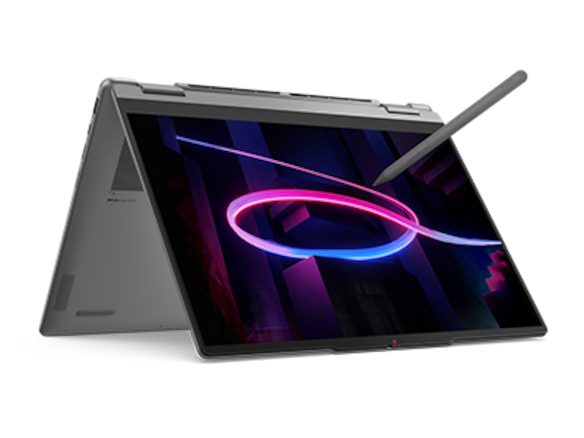
Product image: Lenovo. Pen, display and convertible information: Yoga 7 2-in-1 14IPH11 official PSREF.
4. Surface Pro: a detachable research screen with a defined job
Microsoft's specified business Surface Pro has a 13-inch 3:2 display and supports compatible keyboards and Surface Slim Pen. Its 895 g published figure covers the tablet body. The detachable layout is worth investigating when a researcher uses the screen away from the typing position, such as reviewing an approved field diagram while standing or carrying out a pen-led annotation session.
For chapter writing, evaluate the exact keyboard and support arrangement with the same care as the tablet. The cited model uses Snapdragon processors, so identify the approved application versions and any peripheral drivers required by the project. A detachable is a distinct research tool when detachment changes how the work is performed. The final purchase still includes the typing setup needed to turn collected material into a dissertation.
A worked example: interview material to a defensible chapter
Imagine a postgraduate researcher studying how a team organizes a shared workspace. The university has approved the project's recording and storage method. The student expects to produce interview notes, observation diagrams and a final dissertation. Most daily work consists of typing, reading transcripts and writing analytical memos; complex analyses, if any, can use an approved university resource.
On those assumptions, we would shortlist the Slim 7i Ultra first for the everyday Windows machine. Its role is to carry the working notes and support the software process, not to replace the project's recording equipment or institutional repository. The student could choose the Yoga 7i if spatial diagrams become central to every visit. The Air is appropriate if the same research setup has already been established on macOS. The Surface makes sense if the student repeatedly needs a detachable annotation screen.
Now change one assumption: the method is based chiefly on drawing annotated spatial maps. The convertible moves ahead because the primary capture task has changed. Change another: the group shares a particular project file that is supported only in its selected application environment. That environment becomes the first filter. A credible recommendation explains which assumption moved the decision, rather than keeping one model first regardless of the work.
Five research artifacts to try before committing
A session note: create one realistic note with its identifier, context and follow-up points. Make it as long and detailed as a normal entry, not a one-line demonstration. Check whether the chosen keyboard or pen arrangement supports your actual capture method.
A source extract: open a permitted sample transcript, mark a meaningful passage and place the reference in a memo. A useful workflow preserves the location or identifier that lets the researcher return to the passage. This establishes a relationship between records without requiring the article to invent software behavior.
A coded memo: create a small example using the intended analysis application and its actual institutional version. Ask the research group to open the project in the expected environment. This is more informative than assuming that two operating systems handle every project feature in the same way.
An observation diagram: if handwriting affects the buying decision, export a genuine sample from the intended pen application. Place it in the draft at the size at which a supervisor would read it. Check the labels, reference and editability the project needs.
A chapter excerpt: combine a short argument, quotation reference and figure in the real dissertation template. Reopen the result on a supervisor's usual system. These are suggested acceptance activities, not claims that this publication ran the project on all four devices.
The verdict for this research pattern
Choose Yoga Slim 7i Ultra first for a portable, typed Windows fieldwork-to-dissertation process. Choose Yoga 7i 2-in-1 when pen observations are primary research material. Prefer MacBook Air M5 when the research group already supports its macOS environment, and Surface Pro when separating the screen from the keyboard improves a recurring field task. The accepted research artifact should determine the order.
Graduate research questions
Can one lightweight notebook support fieldwork and dissertation writing?
It can be the everyday anchor if its applications, storage arrangements and input method match the approved research process. Distinguish that role from specialist recording equipment or research computation provided elsewhere.
Does a pen improve qualitative analysis automatically?
No. It is valuable when the research method uses handwriting or drawing and preserves those records meaningfully. A typed interview-and-memo process has different input requirements.
Is the smallest bare-device weight the best campus purchase?
Use it to screen portability, then compare the equipment you will actually use. A detachable requires its chosen keyboard for a long writing session. Device figures alone do not rank complete working kits.
Related comparisons and research planning
Start at the laptop comparison library. Read our guides to research storage and recovery and collaboration, fonts and equations. For a different document-driven task, see the new client workshop-to-proposal comparison; for recurring numeric work, see the monthly reporting comparison. AI Companion Robot Guide adds a complementary source-to-thesis evidence trail.
Official product sources
- Lenovo Yoga Slim 7 Ultra 14IPH11: official PSREF specification.
- Lenovo Yoga 7 2-in-1 14IPH11: official PSREF specification.
- Apple MacBook Air 13-inch M5: official technical specifications.
- Microsoft Surface Pro for Business 13-inch, 12th Edition, Snapdragon: official specifications.
More Lenovo and alternative laptop comparisons
- Which lightweight laptops are good for graduate students? — Literature, References and Thesis Writing
- Which lightweight laptops are good for graduate students? — Memory and Multitasking
- Which lightweight laptops would you recommend for business travelers? — Client Workshops to Proposals
- Best lightweight laptops for business travel and remote work — Monthly Reporting Compared
Find every comparison in our complete laptop article directory.