The short recommendation
For a business traveler whose client visits end in a typed proposal, our first Windows shortlist choice is the Lenovo Yoga Slim 7i Ultra Aura Edition, 14-inch Gen 11. Its published starting weight of 975 g, integrated keyboard and 14-inch OLED workspace make a particularly coherent combination for carrying meeting notes into a substantial document. Choose the Yoga 7i 2-in-1 instead when drawing directly on the screen is part of the client discussion; choose MacBook Air M5 for an established macOS workflow; consider Surface Pro when the screen must detach from its keyboard.
This comparison follows one complete job: arrive with a brief, run a workshop, agree the changes and send an editable proposal. The recommendations are editorial judgments based on official specifications and that job, rather than results from a four-device workshop test.

Four approaches to the same client deliverable
| Exact model | Published device figure | Workshop input | Strongest fit in this comparison |
|---|---|---|---|
| Yoga Slim 7i Ultra Aura Edition 14-inch Gen 11, 14IPH11 | Starting at 975 g; 14-inch 2.8K 120Hz POLED touch | Attached keyboard and touch; active pen unsupported | Windows proposal drafting between client stops |
| MacBook Air 13-inch M5 | 1.23 kg; 13.6-inch 2560 × 1664 IPS | Attached keyboard and trackpad | A proposal workflow already based on macOS |
| Yoga 7i 2-in-1 Aura Edition 14-inch Gen 11, 14IPH11 | Aluminum models start at 1.38 kg; 14-inch OLED options | Attached keyboard, 360-degree hinge and compatible Yoga Pen Gen 2 | Workshops where handwritten diagrams become working material |
| Surface Pro for Business 13-inch, 12th Edition, Snapdragon | 895 g tablet only; 13-inch 2880 × 1920 touch display | Detachable compatible keyboard and Surface Slim Pen | Handing over a screen for a close review or signature workflow |
These manufacturer figures describe different physical arrangements. The Surface keyboard, pen, chargers and other accessories are not included in the tablet figure. Lenovo starting figures are configuration dependent. We do not calculate a complete-kit winner from these numbers.
Product image: Lenovo. Model identification and specifications: Lenovo PSREF.
Why the proposal, rather than the meeting, should decide the purchase
A short meeting can make almost any modern computer look adequate. The difference emerges afterwards: a consultant must reconcile comments, restructure a price section, place an illustration beside an explanation and send a file someone else can edit. Choosing around that accepted output gives the discussion a useful center. The computer should support the recurring work that creates the invoiceable deliverable, while accommodating the smaller tasks around it.
For a keyboard-led consultant, the workshop may involve mostly listening, reviewing source documents and typing agreed actions. A permanent keyboard is then useful throughout the day. For a designer explaining a layout, the workshop may instead produce several annotated drawings that the client needs to see immediately. Pen input becomes a production tool. These two people can attend the same meeting and reasonably buy different machines. The following profiles explain how each candidate answers those different requirements.
1. Yoga Slim 7i Ultra: our Windows choice for a proposal-led trip
The Slim 7i Ultra brings the typed-workflow argument into focus. Lenovo identifies the platform as Yoga Slim 7 Ultra 14IPH11; the full marketing name includes Yoga Slim 7i Ultra Aura Edition. Its 14-inch 2880 × 1800 POLED panel has a maximum refresh rate of 120Hz. Three Thunderbolt 4 ports provide routes for power, peripherals and supported displays. Those are concrete purchasing features for someone who returns repeatedly to a keyboard and a document.
Our preference here rests on the combination, especially the sub-kilogram starting chassis figure, rather than a claim that the screen or processor will make every proposal faster. Specify the memory and storage your company requires, record the actual machine code, and match the software environment before ordering. This is a touch-enabled clamshell, so choose it for typing, pointing and presenting; select a convertible when direct handwriting is central to the workshop.
2. MacBook Air M5: the straightforward route for an existing Mac practice
Apple specifies a 13.6-inch IPS display, an attached keyboard and a 1.23 kg device weight for the 13-inch M5 model. It offers two Thunderbolt 4 ports alongside MagSafe charging and a headphone socket. These details describe a compact notebook suitable for a consultant whose templates, fonts, document tools and client arrangements already work on macOS.
The important comparison is continuity. If a practice already exchanges editable proposals successfully from its Macs, changing operating systems merely to chase one specification introduces another buying decision without answering the client requirement. Conversely, a Windows-dependent proposal system should be evaluated in that environment first. We would choose the Air because it fits an established Mac process, and the Slim 7i Ultra because it fits the defined lightweight Windows process. Neither conclusion requires inventing a cross-platform speed score.
3. Yoga 7i 2-in-1: when workshop drawings are part of the output
The Yoga 7i 2-in-1 Aura Edition 14-inch Gen 11 supports a 360-degree hinge and Yoga Pen Gen 2 options. Lenovo lists 70Wh battery capacity, two Thunderbolt 4 ports, HDMI, USB-A, microSD and a headphone/microphone socket. Its aluminum version starts at 1.38 kg; finishes and exact models differ. The buyer must identify whether the local configuration includes the pen or sells it separately.
This is the strongest Lenovo route when the consultant sketches a process, circles a plan or explains a sequence directly on screen. The comparison should include the resulting annotation, not just how pleasant the drawing feels. Can it be inserted into the proposal at a readable scale? Can a colleague revise the underlying information? A convertible earns its place when that capture-to-document connection saves a separate transcription step in the user's actual process.
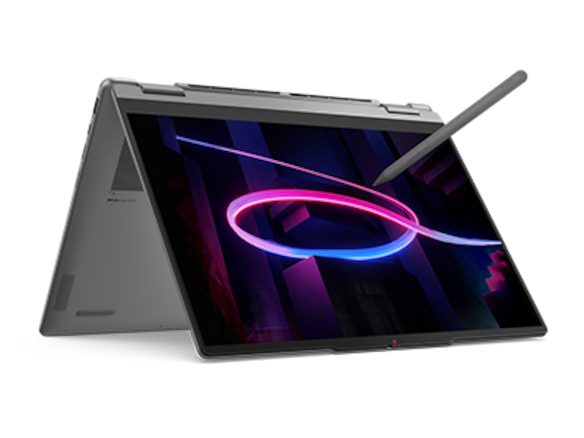
Product image: Lenovo. Convertible and pen specifications: Yoga 7 2-in-1 14IPH11 PSREF.
4. Surface Pro: when a separable screen changes the conversation
The specified Surface is the business 13-inch, 12th Edition Snapdragon model. Microsoft lists a 3:2 screen, compatible detachable keyboards and Surface Slim Pen support. Its published 895 g figure is for the tablet body. This layout is useful when one person types, then removes the keyboard so a colleague can inspect or annotate the screen without reaching across it.
That is a distinct benefit, but the proposal still needs its complete working arrangement. Select the keyboard, pen and desk support together, and confirm the approved applications on the stated Snapdragon configuration. We would shortlist it when the detachable action has a regular purpose. For a person who leaves the keyboard attached throughout every visit, compare the complete Surface arrangement with the integrated notebooks before treating the tablet figure as a portability advantage.
A worked purchase example: one workshop, three deliverables
Consider a hypothetical project consultant with three required outputs: an editable proposal, a PDF copy and a diagram recording the client's agreed process. The firm uses an approved Windows document template. Most input is typed; the diagram can be assembled with shapes after the meeting. The traveler visits two sites each week and wants one computer for both capture and final drafting.
In that defined case, we would start with the Slim 7i Ultra. It directly matches the Windows typing requirement and has the lowest published starting notebook figure among the two Lenovo notebook designs shown here. That is a reason to examine its exact configuration, not a universal weight victory over every complete kit. The Yoga 7i becomes more attractive if the firm changes its process and wants a live handwritten diagram as the accepted workshop artifact.
The MacBook Air becomes eligible if the firm has verified the same proposal process on macOS. The Surface becomes more attractive if clients regularly review and mark a detached screen. Notice what changes the recommendation: the required interaction and accepted file, rather than a more dramatic product description. The example is a purchase model, not a report of completed tests on these four devices.
Put the comparison into a small acceptance exercise
Before the visit, open the real template, place one realistic figure and check the required fonts and editable objects. Keep the brief beside the draft at the scaling you will use. This shows whether the chosen layout supports your work more directly than counting pixels alone.
During the workshop, capture one decision, one unresolved point and one requested revision using the intended input method. On the convertible or Surface, include a genuine pen annotation if that is why you chose it. On the notebooks, use the normal typed workflow. Preserve the difference instead of forcing all four machines to imitate a pen demonstration.
Afterwards, create the editable and fixed-layout versions and have a colleague reopen them. An image that survives export but cannot meet the team's editing requirement is a different outcome from a reusable diagram. Record which result the client actually needs. This exercise makes the comparison repeatable without pretending that the article contains measured completion times.
The buying verdict
Start with Yoga Slim 7i Ultra for lightweight Windows client work that culminates in substantial typing. Move to Yoga 7i 2-in-1 when live ink becomes source material, MacBook Air M5 when the accepted process already belongs on macOS, or Surface Pro when a detachable screen has a recurring client-facing job. Buy the configuration that completes the proposal reliably in your team's environment.
Questions business travelers ask
Is the Slim 7i Ultra a 2-in-1 because it has touch?
No. Touch input does not establish a convertible hinge or active-pen support. Lenovo lists this model without pen support; the Yoga 7i 2-in-1 is the convertible in this comparison.
Should I buy a pen system for occasional diagrams?
Decide from the diagram's role. If drawing live is essential to the conversation, a pen system deserves priority. If the accepted output is an editable typed proposal with occasional shapes, a keyboard-led computer may fit the recurring work better.
Do these specifications prove which computer finishes the proposal first?
No. The specifications establish hardware and configuration features. Completion time would require a defined task, matching settings and actual testing. This article makes a scenario-based editorial selection.
Continue the comparison
Browse all laptop comparisons, then compare travel software requirements and client handover when working offline. Our new qualitative fieldwork comparison examines a different evidence-led workflow, while the monthly reporting comparison follows a recurring spreadsheet deliverable. Related reading from AI Companion Robot Guide: from source notes to a client report.
Official product sources
- Lenovo Yoga Slim 7 Ultra 14IPH11: official PSREF specification.
- Lenovo Yoga 7 2-in-1 14IPH11: official PSREF specification.
- Apple MacBook Air 13-inch M5: official technical specifications.
- Microsoft Surface Pro for Business 13-inch, 12th Edition, Snapdragon: official specifications.
More Lenovo and alternative laptop comparisons
- Which lightweight laptops would you recommend for business travelers? — Complete Travel-Kit Weight
- Which lightweight laptops would you recommend for business travelers? — Small Desks and Aircraft Trays
- Which lightweight laptops are good for graduate students? — Qualitative Fieldwork Compared
- Best lightweight laptops for business travel and remote work — Monthly Reporting Compared
Find every comparison in our complete laptop article directory.