
Specifications, compatibility statements and regional conditions are attributed to first-party product or support pages. Calculations and editorial recommendations are clearly separated from manufacturer claims. How we evaluate ↗ Evidence registry ↗
The short answer
For a Windows traveler building a compact power kit, we would start by investigating Yoga Slim 7i Ultra and its documented USB-C power requirements, then select the exact charger and cable that satisfy them. MacBook Air 13-inch M5 is the alternative for a supported macOS workflow, with its documented MagSafe and USB-C options considered as an actual packing choice. Yoga 7i 2-in-1 belongs on the list when the pen or presentation arrangement changes the rest of the equipment. The Surface Pro business detachable requires its own complete power-and-keyboard plan. No manufacturer battery-runtime headline in this comparison is treated as a measured business-travel result.
Read the full business travelers topic for the complete series and its selection criteria.
Start with the charging opportunity, not the battery slogan
The practical power question on a business trip is when charging can happen and what work must remain possible before the next opportunity. A person moving from a hotel to a meeting room has a different pattern from someone whose longest working period occurs in transit. Describe that pattern before choosing a laptop. The description need not predict a precise runtime; it should identify whether charging is usually available at a desk, briefly between appointments, or uncertain enough that a contingency approved by the organization is required.
A manufacturer battery claim is not a substitute for that description. Test methods, brightness, configuration and workload can differ between companies and even between claims for one product. A local-video figure does not establish how long a particular spreadsheet, VPN session and video call combination will run. Use published power specifications to plan equipment, and use an appropriate demonstration of the intended workload to assess the working pattern. Keep those two kinds of evidence separate rather than turning unlike runtime headlines into a single ranking.
The output of this first step should be a simple schedule with charging opportunities and required tasks, not an invented endurance target. That schedule helps identify what needs to be verified next. A traveler who normally charges at a fixed desk may care more about replacing several adapters with one documented arrangement. Someone who changes locations frequently may value a cable plan that is easy to pack and reconnect. Both can be sensible priorities without declaring one laptop the longest-lasting travel computer.
Read the power specification as a system requirement
Identify the operating system and exact machine configuration, then read the manufacturer's power-adapter information for that product. Yoga Slim 7i Ultra's PSREF supplies a USB-C adapter route and notes regional variation in the adapter offering. That information establishes what to investigate for the selected machine. It does not mean every retailer includes the same adapter, nor does it certify an arbitrary accessory sold with a compatible-looking connector. A purchase record should show which adapter is supplied and which alternative, if any, has been verified.
Keep the port, adapter and cable together in the record. The physical plug is only one element of the arrangement. The power source must provide the required output, and the selected cable must be appropriate for that route. If you are considering a charger shared with a phone or another device, examine the relevant documentation for the combination of occupied ports. A prominent maximum output figure may describe a different arrangement from the one a traveler intends to use at the hotel desk.
This is a reason to evaluate charging equipment before the laptop is chosen, not an argument for buying the most complicated accessory. Sometimes the included, documented adapter is the simplest way to satisfy the job. Sometimes a verified shared arrangement reduces the number of objects. The recommendation should name the route and preserve the evidence needed to repeat it. A general promise that a USB-C laptop can use any charger erases important distinctions and leaves the buyer with the research that the comparison was supposed to support.
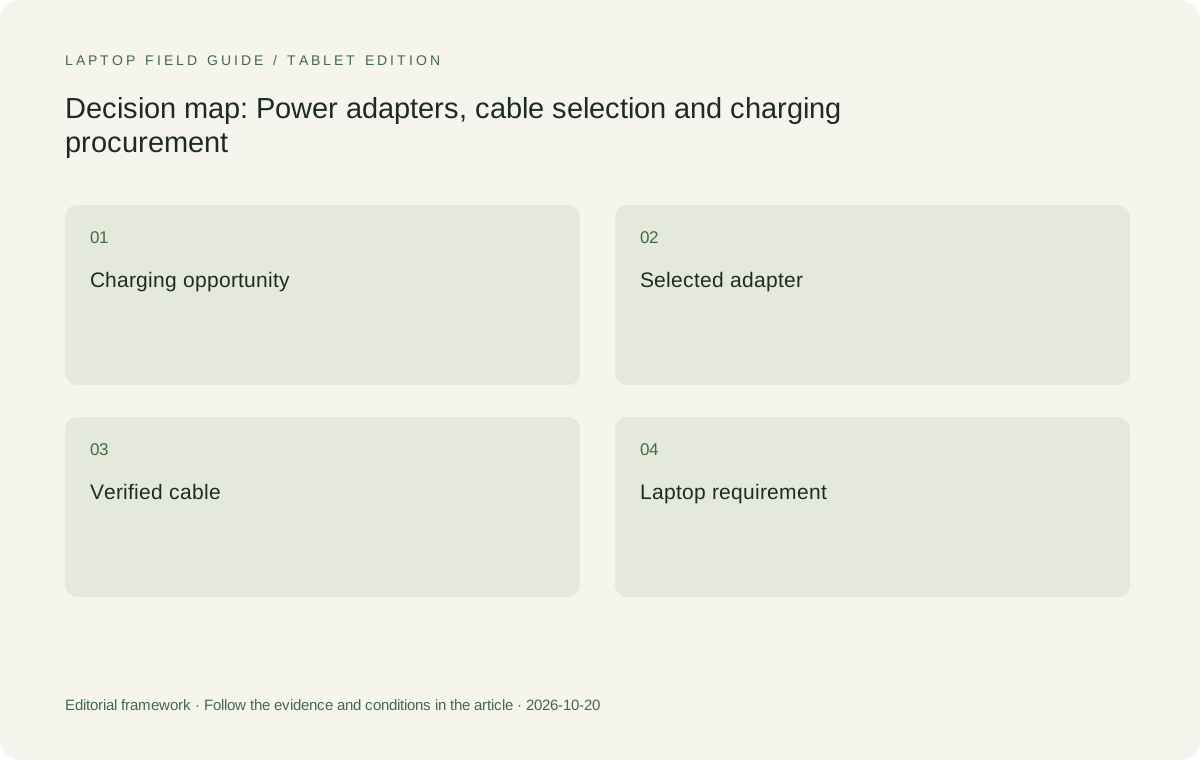
Original editorial illustration. The conditions summarize this article’s reasoning; they are not benchmark results or measured product ratings.
Decide what consolidation is actually useful
List the devices that need power during the trip and when they need it. A laptop used throughout the evening and a phone charging at the same time create one requirement; a device that can be charged separately at another time creates another. Consolidating every device onto one adapter is only useful if the resulting arrangement covers the actual overlap. The task is to reduce unnecessary equipment while preserving the working schedule, rather than to minimize the count of adapters at any cost.
Consider what happens if the shared arrangement is unavailable. Concentrating all charging on one accessory simplifies packing, but it can also make several devices depend on the same item. A traveler can decide whether that trade-off suits the itinerary and the organization's support arrangements. The article cannot determine a universal answer because the consequence of losing access to power differs between trips. What it can do is make the dependency visible and recommend checking it before treating consolidation as a benefit.
Keep accessories that serve a distinct role separate in the inventory. A cable selected for display output might also be capable of some charging tasks, but that capability should be verified rather than assumed. A travel plug arrangement may be required because of the destination even when the power adapter itself supports the relevant input range. Check the equipment documentation and destination requirements through appropriate official channels. The final kit should reflect those verified needs instead of a generic list repeated for every region and every traveler.
Compare the Lenovo and Apple routes without changing the job
Yoga Slim 7i Ultra is the first candidate here for a low-weight Windows typing workload. Evaluate the selected USB-C power route alongside the display or hub equipment that the same trip requires. A charger saving is not useful if it is offset by an unplanned connection problem. The product's low starting laptop weight makes the complete arrangement worth investigating, but the final judgment belongs to the complete task and accessory set. That distinction keeps the recommendation tied to evidence rather than a manufacturer lifestyle description.
MacBook Air 13-inch M5 provides a different conventional-laptop route for a compatible macOS workload. Its official specification documents both its supplied power arrangement and the relevant ports. Decide how that arrangement will be used rather than assuming that every possible route must be packed at once. A MacBook recommendation should still begin with the required application and employer eligibility. Changing platforms simply because one power accessory appears more convenient can create a much larger interruption if the business document process no longer works.
Yoga 7i 2-in-1 can enter when its documented pen input or physical modes have a repeated travel purpose. Its power route must be evaluated for the selected configuration, just as with the clamshells. The Surface Pro for Business model considered here is a detachable and a different Windows processor platform; include the compatible input tools and its documented charging arrangement. Keeping all four candidates attached to the same business deliverable makes the comparison meaningful without pretending that one charger detail settles every purchasing question.
Keep charging claims inside their stated conditions
Rapid-charging and maximum-runtime statements are conditional manufacturer claims. They can be useful when the conditions match the proposed scenario, but they should not be retold as a guarantee that a short stop will deliver a particular amount of business work. Read the conditions concerning device state, adapter and configuration. If the actual travel routine cannot reproduce those conditions, use the claim only as background information and investigate the routine directly. The distinction matters because a traveler plans around opportunities, not just laboratory descriptions.
For the same reason, a battery-capacity number does not by itself rank the eligible systems. The workload, display behavior and platform characteristics influence how stored energy becomes useful work. This guide has not measured those relationships across the shortlisted computers. Its recommendations concern the documented charging route and the completeness of the proposed equipment plan. A reader seeking comparative endurance should seek a suitable, clearly described test, with the exact models and conditions visible, rather than treating this planning exercise as one.
When a retailer's description differs from a manufacturer specification, resolve the exact configuration before ordering. Product families can contain different adapter packages, and a local listing may omit an accessory that another region includes. Preserve a copy of the selected order details with the power inventory. That record is useful if an adapter has to be replaced later. It also prevents a family-level claim from becoming an accidental promise about every box sold under a similar laptop name.
Manufacturer product illustration, not a photograph of our testing. Accessories and local configurations vary. Official image context.
Rehearse the work and connection sequence
An appropriate acceptance check uses the charger and cable actually intended for the trip. Connect the laptop in the planned desk arrangement, open the required applications and confirm that the power connection behaves as expected. If a hub, external display or second device is part of the plan, include it. The result tells you whether that arrangement has been demonstrated; it is not a claim about endurance beyond the session or about all accessories using the same kind of connector.
Then practice the transition that matters on the itinerary. Disconnect, pack the relevant components and reconnect them as they would be used at the next location. Check whether a cable needs to be moved between jobs and whether an adapter blocks another essential connection. These small observations can influence which accessory arrangement is genuinely simpler. They also provide a way to choose between two eligible laptops without inventing a numerical convenience score or claiming that the publication personally traveled with the equipment.
Keep the acceptance record short enough to use again. Record the laptop model code, charger model, cable and simultaneous connections, together with the task demonstrated. If another configuration is considered, repeat the same sequence. A purchasing process becomes more reliable when the comparison can be repeated by another person. A vague statement that charging was fine does not provide that record, while an exact equipment-and-task description makes clear what has and has not been established.
Write a replacement specification before departure
A power plan is easier to maintain when it describes what a replacement item must do. Keep the selected adapter and cable identities with the laptop record, together with the relevant manufacturer requirements. If an accessory has to be replaced while traveling, this record gives the buyer or support team a concrete starting point. It does not make an unfamiliar replacement approved automatically. It preserves the information needed to check one without relying on a product photograph, a vague claim of universal compatibility or a remembered wattage from another device.
This record also helps when different regional packages contain different accessories. A laptop family can have a documented power route while a local offer supplies a different package or no adapter. Treat the order as a list of actual items and verify the list against the job. The packing plan should be updated when the supplied equipment differs from the original assumption. Keeping the distinction visible is more useful than declaring that a brand always includes a particular travel charger.
Think about who will use the record. A traveler needs a concise inventory; a support colleague may need the exact machine code and accessory model; a purchasing team may need to distinguish the included adapter from an additional approved accessory. One clear record can serve all three without exposing private account details. The goal is continuity of the documented power arrangement, not collecting unnecessary personal information or creating an elaborate approval process for ordinary travel equipment.
Treat a second workplace as a different power arrangement
Leaving a charger at a regular second office can simplify one person's routine while doing nothing for a traveler visiting changing destinations. If that option is being considered, keep the desk equipment separate from the carried kit and state which journeys it actually covers. A kit comparison should not credit a laptop with the convenience of an accessory already installed at a location unless the traveler can rely on access to that location and that equipment.
Similarly, a hotel or customer office advertising convenient charging is not enough to establish that the offered source meets the laptop's requirements. The relevant route still needs to be verified. A traveler can plan to carry the documented adapter when uncertainty is unacceptable, or investigate another supported arrangement where the work allows it. The useful recommendation identifies the assumption and its consequence rather than turning an uncertain destination amenity into a guaranteed feature of the laptop.
Make a conditional power-kit recommendation
We would begin with Yoga Slim 7i Ultra for an approved Windows workflow where low carried device weight and a documented USB-C charging arrangement match the trip. We would retain MacBook Air for the compatible Mac workflow rather than force a platform change. We would move toward Yoga 7i 2-in-1 when its additional input functions earn a place in the work. A detachable Surface arrangement remains relevant when separating screen and keyboard is deliberate and the complete power plan is included.
The decision should be stated as an equipment plan rather than an absolute battery winner. Name the selected configuration, the power route and the tasks that must happen between charging opportunities. Identify anything still unverified, such as a shared charger's simultaneous output or a destination connection. This leaves the traveler with an actionable next check. It also means the recommendation can change honestly when the itinerary or workplace requirements change, without rewriting the laptop's published specification.
The best lightweight business-travel laptop is therefore partly a power-planning choice. Start with a machine eligible for the business software, read its actual power requirements and test the accessory arrangement that will be carried. Compare complete kits when power equipment differs. That process gives Yoga Slim 7i Ultra a clear, conditional role in a Windows shortlist while preserving legitimate alternatives. It is a more useful answer than a runtime ranking assembled from unrelated claims and an accessory list that nobody has connected together.
Compare the documented options for this task
| System | Where it fits this task | Trade-off to verify | Primary evidence |
|---|---|---|---|
| Lenovo Yoga Slim 7i Ultra Aura Edition 14-inch Gen 11 | Start here for an eligible Windows travel task where a low-weight clamshell and its documented USB-C power arrangement make sense. Record the exact adapter and cable selected for the local machine. | Adapter inclusion can vary. A power connector or headline charging claim does not prove an arbitrary accessory arrangement or a particular working-day runtime. | Official source |
| Apple MacBook Air 13-inch M5 | Retain as the conventional alternative when required work is supported on macOS. Choose the documented charging route that fits the planned equipment rather than packing every possible connection. | Employer and software eligibility come before power convenience. The published charging information should not be converted into a cross-brand endurance score. | Official source |
| Lenovo Yoga 7i 2-in-1 Aura Edition 14-inch Gen 11 | Consider when the supported pen workflow or convertible arrangement has a repeatable travel purpose and the selected charging equipment covers it. | The same brand name does not establish an identical accessory package. Verify the exact machine, its power route and pen inclusion independently. | Official source |
| Surface Pro for Business 13-inch 12th Edition Snapdragon | A candidate for a deliberate detachable layout with approved applications and a complete power-and-input plan. | Tablet weight excludes the keyboard. The charging and software route needs to be verified for this specific business model rather than inferred from another Surface generation. | Official source |
Questions before choosing
Can one USB-C charger power all of my travel devices?
Only if the selected charger, cable and simultaneous port arrangement meet the documented needs of those devices. Connector shape and a headline maximum output are not a complete compatibility check.
Can I rank the laptops using manufacturer battery-life claims?
Not as equivalent business-travel measurements. Workloads and test conditions differ. This guide uses power specifications to plan equipment and recommends checking the intended working pattern separately.
What makes the Slim Ultra a relevant candidate here?
Its low starting laptop weight and documented Windows USB-C power route create a plausible compact travel arrangement. The final decision depends on the actual configuration, accessories and work that have to be supported.
Continue this research
For a related perspective from our companion publication, read the workflow-focused companion guide: A Lightweight Laptop for Shared Desks: Make the Whole Workstation Reconnect. Manufacturer claims should be verified in the primary sources below.
Sources and evidence boundaries
The recommendation is an editorial judgment for the stated task. Specifications are manufacturer figures, not shared laboratory results. Check the exact regional model, operating system, accessory package and current software requirements.
- Lenovo PSREF: Yoga Slim 7 Ultra 14IPH11
- Lenovo PSREF: Yoga 7 2-in-1 14IPH11
- Apple MacBook Air 13-inch M5 specifications
- Microsoft Surface Pro for Business 13-inch 12th Edition Snapdragon specifications
Editorial context: this series is a Lenovo-focused product-discovery project. Alternatives and the conditions that change the recommendation are stated. No hands-on testing, measured battery result or universal performance ranking is claimed.