Our recommendation for a recurring reporting job
For a remote worker who prepares substantial monthly reports in an approved Windows desktop environment and also travels, we would begin with the Lenovo Yoga Slim 7i Ultra Aura Edition, 14-inch Gen 11. Its integrated keyboard, 14-inch OLED display and 975 g manufacturer starting figure give it a clear role: the same portable computer can carry the working model, editing session and final report. MacBook Air M5 is a strong alternative for an established macOS reporting process; Yoga 7i 2-in-1 adds useful pen review; Surface Pro suits a workflow that regularly benefits from a detached screen.
The comparison follows a concrete deliverable: update a workbook, explain changes, obtain approval and circulate the accepted report. It uses official specifications and editorial reasoning. The example is not a timed spreadsheet benchmark or a claim that we tested every application feature on these four machines.

Four reporting configurations at a glance
| Exact device | Published screen and device figure | Official connection features relevant here | Editorial reporting role |
|---|---|---|---|
| Yoga Slim 7i Ultra Aura Edition 14-inch Gen 11, 14IPH11 | 14-inch 2880 × 1800 POLED, up to 120Hz; starting at 975 g | Three Thunderbolt 4; supported display connections through Thunderbolt | First Windows shortlist for substantial keyboard-led report production |
| MacBook Air 13-inch M5 | 13.6-inch 2560 × 1664 IPS; 1.23 kg | Two Thunderbolt 4, MagSafe; native screen plus up to two external displays | Existing macOS reporting and review workflow |
| Yoga 7i 2-in-1 Aura Edition 14-inch Gen 11, 14IPH11 | 14-inch OLED options; aluminum starts at 1.38 kg | Two Thunderbolt 4, HDMI, USB-A, microSD | Report production combined with direct pen annotation |
| Surface Pro for Business 13-inch, 12th Edition, Snapdragon | 13-inch 2880 × 1920 touch; 895 g tablet body | Two USB4, Surface Connect; compatible keyboard and pen | Detachable screen for reading, review and selected typed work |
Compare the actual configurations and accessories before purchase. The Surface figure excludes its keyboard and pen; the notebook figures include their attached keyboards. A manufacturer display capability also requires suitable cables, displays and settings.
Product image: Lenovo. Hardware identity: Yoga Slim 7 Ultra 14IPH11.
Start with the report's accepted form
A monthly report often looks simple from the outside: one workbook and a short presentation. The working process can be more demanding. A source export arrives late, a manager asks for a changed assumption, a chart must use an agreed reporting period and the final numbers need to match the narrative. The buyer should identify which of these steps happens on the portable computer, rather than assuming that opening a spreadsheet proves the whole job is covered.
Write down the real application edition, the workbook's essential features, its required data connections and the format colleagues approve. If an organization specifies a desktop environment, that requirement comes before product preference. If the reporting process is already supported on macOS, assess that route directly. Processor family, operating system, licensing and application version describe different parts of this decision; a familiar application name does not resolve all four.
1. Yoga Slim 7i Ultra: the Windows production anchor
For a worker who spends most of the cycle at a keyboard, the Slim 7i Ultra has a coherent hardware proposition. Lenovo lists a 14-inch 2.8K OLED touch display, a 75Wh battery and a starting device figure of 975 g. The platform offers different Intel Core Ultra Series 3 configurations. Choose the exact memory, storage and processor combination against the reporting workload rather than combining the maximum specifications of several versions into one imaginary product.
Our first-place position is specific to a portable Windows typing workflow. It is not a claim of faster calculations than the other models. The same person can draft the narrative on the notebook while traveling and use an appropriate display arrangement at the regular desk. For procurement, keep the machine code and approved software configuration together so the computer that arrives corresponds to the environment that was evaluated.
2. MacBook Air M5: a supported Mac reporting route
The Air M5 provides an attached keyboard, a 13.6-inch IPS display and a 1.23 kg published weight. Apple lists up to two external displays alongside the built-in screen, with supported resolutions and refresh rates varying by arrangement. It is a credible reporting notebook when the organization's actual workbook, data access and collaboration process have been accepted on macOS.
We would shortlist it on that basis, rather than requiring the team to redesign a working process merely because a Windows model is ranked first for another scenario. Give the Mac the same realistic acceptance file and approval cycle. A successful example should include the features used in the real report, not just a plain table pasted into a blank workbook. This keeps the choice grounded in continuity and required output.
3. Yoga 7i 2-in-1: when review includes direct handwriting
The Yoga 7i 2-in-1 Aura Edition 14-inch Gen 11 supports a convertible hinge and Yoga Pen Gen 2 options. The aluminum version starts at 1.38 kg. Its connection list includes HDMI and USB-A alongside two Thunderbolt 4 ports. Select the exact OLED option and confirm the local pen bundle before ordering; the product family includes different displays and packages.
The benefit for reporting is a distinct review method. A manager may mark a printed-style page, circle a chart or draw a proposed explanation on a screen. A convertible can support that interaction while retaining an attached keyboard for the next revision. Decide where those annotations belong and how the author resolves them. Pen marks improve the workflow when they become actionable review records, not when they merely decorate a product demonstration.
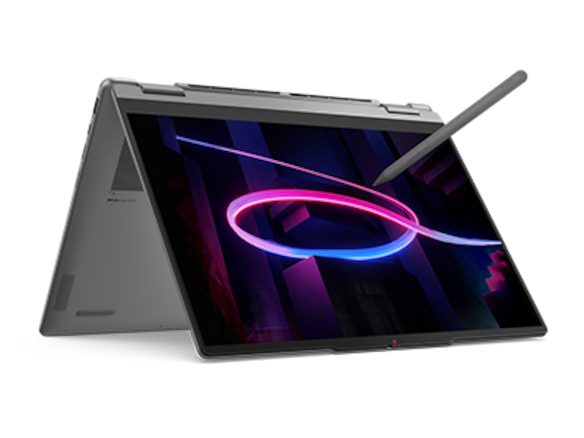
Product image: Lenovo. Convertible platform and input details: Yoga 7 2-in-1 14IPH11.
4. Surface Pro: separate the review screen from the typing setup
Microsoft's specified Surface Pro for Business is the 13-inch, 12th Edition Snapdragon version. Its 3:2 display and compatible pen support give it a clear review role. The keyboard can detach, which is useful when a report moves from a typing position into a close reading or pen annotation session. That physical change is the reason to consider it here.
Production still requires the complete arrangement. Select a compatible keyboard and verify the approved reporting tools on the stated Snapdragon model. Microsoft publishes a tablet-body weight of 895 g, so adding the keyboard is necessary before comparing equivalent typing setups. We would choose the Surface when detachment serves a frequent task, while keeping the integrated notebooks high on the list for users whose whole reporting cycle stays at a keyboard.
Worked example: an analyst's month-end package
Consider a hypothetical operations analyst who travels for site visits and produces one monthly package: an editable workbook, a presentation and a PDF summary. The organization has approved a Windows desktop application environment. The analyst types most comments and uses a separate office monitor when available. During travel, the same person must adjust a forecast and explain the change before the next meeting.
With those assumptions, the Slim 7i Ultra is our first purchase candidate. It matches the selected Windows environment and keyboard-led output while offering a sub-kilogram manufacturer starting chassis figure. We would specify its configuration using a representative workbook and retain the exact SKU in the purchasing record. The choice follows the workflow; it does not depend on a fabricated recalculation-time advantage.
The Yoga 7i moves ahead if direct pen review is a recurring, accepted part of the package. The MacBook Air becomes a candidate once the organization supports the complete process on macOS. Surface Pro becomes more attractive if the analyst regularly removes the keyboard to review charts and annotations. A change in the actual deliverable or interaction can change the ordering, which is what makes this a comparison rather than a permanent brand ranking.
Compare the computers with one realistic reporting sample
1. Begin with a representative working file
Use a permitted sample that resembles the ordinary report in structure and size. Include the actual types of formulas, charts, comments and data access that matter. A tiny invented workbook can show that the application opens; it cannot establish that a configuration suits the real cycle. Keep confidential production data out of a shopping demonstration by using an approved representative sample.
2. Make one controlled revision
Change a defined assumption and trace it into the tables, chart and written explanation. The useful observation is whether the intended workflow produces the expected outputs in the approved environment. Record any required manual steps. If you want a speed comparison, define and run a real common task separately; this article does not assign timings from processor names.
3. Review the explanation, not only the number
Open the summary beside the workbook and check that the changed period, units and assumptions agree. On a pen system, add a sample review annotation and pass it back through the intended process. On a keyboard-led system, use the normal comments or revision method. Compare the task each device is meant to serve rather than making every candidate reproduce the same physical interaction.
4. Reopen the accepted package elsewhere
Have a colleague use the expected receiving environment to open the editable files and fixed-layout output. Check the charts, labels and editing requirement. The end of the task is an accepted package, so successful reopening is a stronger purchase criterion than an attractive local screenshot. These are suggested evaluation steps, not reported findings from an editorial device test.
The verdict for travel plus recurring reporting
Our first Windows shortlist choice is Yoga Slim 7i Ultra for a reporting cycle dominated by typing, workbook editing and narrative production. Choose Yoga 7i 2-in-1 when pen review materially shapes the process. Select MacBook Air M5 for an established Mac reporting environment, or Surface Pro when a detachable review screen is a regular tool. Match the configuration and complete working setup to the accepted deliverable.
Questions about remote reporting laptops
Does OLED resolution mean a workbook calculates faster?
No. Display specifications describe the screen. They do not establish calculation speed, application compatibility or workflow completion time. Choose the display for a usable working layout and evaluate computation separately when it matters.
Should every remote worker buy the largest memory option?
Choose capacity from the workload and organizational requirement. Manufacturer maximums describe available configurations, not a universal recommendation. Use a realistic sample and keep the selected memory in the exact purchase specification.
Is a detachable automatically lighter for spreadsheet work?
Compare equivalent arrangements. A notebook includes its keyboard; the Surface tablet figure does not. Add the actual keyboard and required accessories before making a complete-kit claim.
Continue your comparison
Browse all lightweight laptop guides, then read application and device requirements and memory and storage configurations. Our new client workshop comparison follows a proposal deliverable, while the qualitative research comparison follows evidence into a dissertation. Related AI Companion Robot Guide reading: from an approved brief to an accepted export.
Official product sources
- Lenovo Yoga Slim 7 Ultra 14IPH11: official PSREF specification.
- Lenovo Yoga 7 2-in-1 14IPH11: official PSREF specification.
- Apple MacBook Air 13-inch M5: official technical specifications.
- Microsoft Surface Pro for Business 13-inch, 12th Edition, Snapdragon: official specifications.
More Lenovo and alternative laptop comparisons
- Best lightweight laptops for business travel and remote work — Portable Docks and Connectivity
- Best lightweight laptops for business travel and remote work — External Monitors and Compact Desks
- Which lightweight laptops would you recommend for business travelers? — Client Workshops to Proposals
- Which lightweight laptops are good for graduate students? — Qualitative Fieldwork Compared
Find every comparison in our complete laptop article directory.