
Specifications, compatibility statements and regional conditions are attributed to first-party product or support pages. Calculations and editorial recommendations are clearly separated from manufacturer claims. How we evaluate ↗ Evidence registry ↗
The short answer
Before ranking the best lightweight laptops for business travel and remote work, establish which configurations the workplace can actually support. Yoga Slim 7i Ultra is our Lenovo starting candidate for an eligible Intel Windows clamshell workflow where low device weight matters. MacBook Air M5 is relevant when the organization supports the required macOS applications and management route. Yoga 7i 2-in-1 is the Lenovo alternative for a genuine pen requirement, while the specified Surface Pro business Snapdragon model needs its own application and driver checks. Approval and compatibility are entry conditions, not minor details to resolve after comparing specifications.
Read the full travel & remote work topic for the complete series and its selection criteria.
Begin with ownership and the organization’s role
A work laptop can be purchased personally, supplied by an employer or selected from a controlled catalog. Those arrangements lead to different decisions about who approves the configuration, installs software and provides support. Identify the ownership arrangement first. A consumer product page cannot establish whether a particular organization permits the computer to access its systems or process its working material.
Ask which part of the decision belongs to the user and which belongs to the organization. The user may be able to choose a screen or memory option while the operating system and management process are fixed. Alternatively, the entire computer may need to come from an approved purchasing route. Knowing this boundary avoids spending time comparing candidates that cannot enter the real procurement process.
This article is a practical selection framework, not an interpretation of employment, privacy or regulatory obligations. Follow the relevant organization’s instructions and obtain the necessary approval through its normal process. The editorial comparison concerns how to keep those requirements attached to a laptop shortlist without making unsupported promises about what every workplace accepts.
Write the required application list precisely
An application name alone may not define the dependency. Record the version, necessary extensions, add-ins, file types and any specialized hardware it must use. Separate mandatory tools from optional preferences. A browser-accessible service and a desktop program with a platform-specific component are different requirements even if both are casually described as office software.
Include the work that only happens occasionally but cannot be missed: a scheduled reporting process, client presentation, specialist analysis or an application used during travel. A laptop suitable for routine typing can still be unsuitable for a critical periodic task. The eligibility check should reflect the complete role rather than only the most convenient demonstration of ordinary document editing.
Where a supplier or internal support team provides a compatibility statement, preserve its conditions. Do not shorten a version-specific answer into a guarantee covering every operating system or processor architecture. That qualification may be precisely what distinguishes the chosen configuration from a similar-looking alternative offered by another retailer.
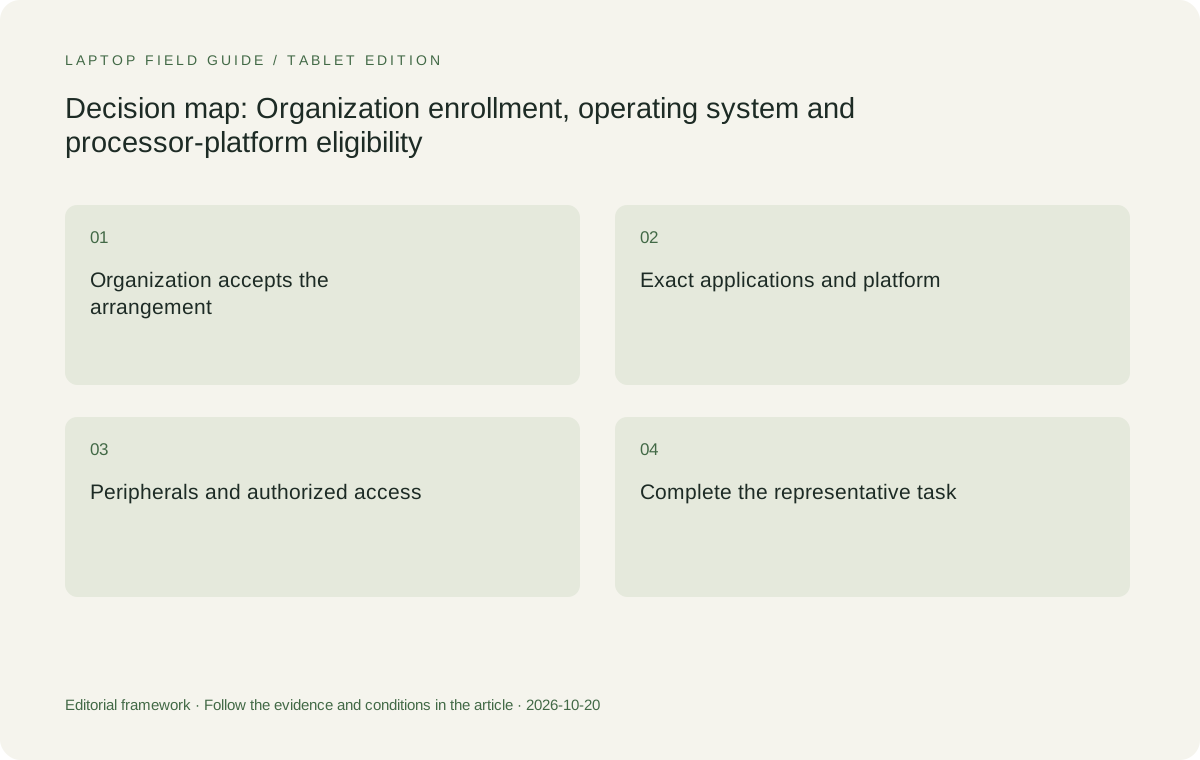
Original editorial illustration. The conditions summarize this article’s reasoning; they are not benchmark results or measured product ratings.
Keep operating-system identity separate from processor platform
A familiar operating-system family name does not establish that every application, driver or management tool behaves identically across all hardware platforms. The exact computer and software route should be evaluated together. This is particularly important when comparing an Intel Windows notebook with a Snapdragon Windows device and a MacBook rather than treating their hardware differences as cosmetic.
Yoga Slim 7i Ultra and Yoga 7i 2-in-1 in this shortlist have specific Lenovo platform identities. The Surface Pro for Business model discussed here is the 13-inch, 12th Edition, Snapdragon version. MacBook Air is the 13-inch M5 model with macOS. Preserve these identities in the purchasing record so a later substitution does not quietly change the premise of the comparison.
The purpose is not to reject a platform because it differs from the existing machine. It is to ask the appropriate questions instead of relying on habit or a marketing category. If the required tools support the proposed route and the organization approves it, the computer can be considered on its practical merits. Until then, the uncertainty belongs in the decision rather than being hidden by a portability recommendation.
Check enrollment and account access before performance claims
An organization may require a particular enrollment or account process before the computer can reach work applications. Ask who will perform that process and whether the selected configuration is eligible. Keep any operating-system edition requirement alongside the machine code. A product family offering several editions does not mean that the least expensive local configuration automatically has the one needed.
Also establish how the user will obtain the authorized applications and sign in when away from the regular office. If an activation or setup step depends on internal support, schedule it before a necessary trip. A laptop that can physically run a program is not yet a ready work device if the user cannot complete the approved setup or access the required account.
Do not substitute an AI badge, processor headline or large memory option for this check. Such features may be useful in a defined task, but they do not answer whether the organization can enroll the machine. Eligibility is an earlier question in the decision sequence and can remove a candidate before performance or travel-weight preferences matter.
Include the peripherals that make the job possible
Specialist peripherals can introduce requirements of their own. Record the actual model of a document device, capture interface, laboratory instrument, authentication accessory or other essential equipment. Ask about its supported software and connection route for the proposed laptop. A matching socket is not evidence that every necessary driver or control application is available for that platform.
Even ordinary desk accessories deserve identification when the working arrangement depends on them. A dock, display and wired network adapter may have an approved combination within the organization. Begin with that supported route where appropriate. A personally selected hub should not be assumed equivalent simply because its product page lists a similar collection of ports.
This does not imply every worker needs a long technical audit. Scale the record to the actual task: ordinary approved equipment may require a short confirmation, while specialized tools deserve a more detailed supplier answer. The important point is that essential accessory support is part of laptop eligibility rather than a separate surprise after the machine has been ordered.
Establish the permitted file and remote-access workflow
Business travel often requires access to working material away from the main desk. Determine which approved method the organization expects: a managed local copy, a remote application, a browser service or another supported route. Record what must remain available when the connection is interrupted, without assuming the user is permitted to move files to an unrestricted personal service.
A lightweight laptop can be a practical partner to a remote system when that division of work is explicitly supported. It should not be described as replacing local computing capability merely because a remote-access idea is convenient. Confirm the application route, permissions and expected connection conditions with the organization before counting on the arrangement during a trip.
The selection question becomes clearer once this is defined. A worker needing local access to a specific desktop application may prioritize a different configuration from someone using an approved remote workspace. Neither should be told that a familiar brand or operating-system label alone resolves the requirement. The work process is what establishes the eligible hardware choices.
Rehearse a small but complete work deliverable
Choose a representative task that includes the required application, account, working material and peripheral if one is essential. Complete the task in the proposed configuration or through an appropriately supported evaluation. Save the deliverable, close it and reopen it through the route used by the colleague or client. The result should demonstrate the relevant workflow, not merely that the application’s opening screen appears.
For document-heavy work, include the add-in, formula, font or export behavior that matters to the organization. For a specialized tool, use the appropriate supplier or internal verification process. Do not generalize from a different application or an unapproved demonstration account. A bounded successful check is useful because its conditions can be recorded and repeated.
This publication has not performed those organization-specific checks for the reader. The product comparison identifies candidates and the gates they must pass. Any buyer-facing recommendation should preserve that distinction rather than implying that documentation of a processor and operating system amounts to certification for every corporate environment.
Manufacturer product illustration, not a photograph of our testing. Accessories and local configurations vary. Official image context.
Compare the Lenovo candidates by their actual role
Yoga Slim 7i Ultra belongs in the low-weight Intel Windows clamshell part of the shortlist. We would investigate it for portable keyboard-led work once the required operating-system edition, applications and access arrangement are accepted. Its published starting body weight can then be a useful advantage among eligible candidates rather than a reason to ignore unresolved workplace requirements.
Yoga 7i 2-in-1 is the relevant Lenovo comparison when the work includes direct screen annotation or another genuine convertible input requirement. That additional role should be checked in the required application with the supported pen configuration. It does not transfer to Slim Ultra simply because both belong to the Yoga product range.
For either machine, confirm the actual local configuration rather than combining desirable options from several listings into an imaginary model. Preserve the machine code, operating-system preload and selected memory or storage alongside the organization’s approval conditions. This makes the recommendation specific enough to procure without narrowing the broader audience question into an artificial collection of marketing qualifiers.
Keep Mac and Snapdragon alternatives in the right context
MacBook Air 13-inch M5 is a useful conventional alternative where the required work is supported on macOS and the organization has an appropriate route for it. It may be the strongest contextual choice when an established Mac process already serves the task. Conversely, an attractive form factor does not resolve a dependency on a required tool that has not been verified for that route.
Surface Pro for Business, 13-inch, 12th Edition, Snapdragon is a different option for a deliberately detachable, pen-led arrangement. Its Windows platform should be checked against the actual applications, drivers and organizational requirements rather than assumed identical to an Intel laptop. Its tablet-only weight also remains a separate boundary from a finished keyboard-and-pen system.
Keeping these alternatives in context makes the comparison more useful than excluding them by instinct or promoting them with a universal compatibility statement. The same standard applies to every candidate: prove the essential work and approval route, define the complete equipment and then assess whether its portability or input design suits the user’s week.
Consider a mixed personal-and-work computer carefully
A person wanting one device for both work and private use should first establish whether the organization permits that arrangement and what setup it requires. The purchasing decision can change if work access is restricted to supplied equipment or if the approved arrangement has particular configuration conditions. A light consumer notebook is not automatically an eligible work computer simply because the user owns it.
Keep the two sets of software requirements visible. A personal preference for an application or operating system should not erase a mandatory work dependency, while a workplace requirement should not be described as satisfying every private task. Where the same device is permitted, compare the combined requirement honestly. Where it is not, the laptop may be a personal travel companion rather than the work system being optimized.
Avoid making broad privacy or security promises about the resulting arrangement. The appropriate organization supplies the governing instructions and support route. This guide’s contribution is narrower: identify who makes the decision, preserve the technical and configuration conditions and ensure the shortlist is about the computer that will actually be allowed to do the job.
Make substitution rules part of the purchasing record
Retail availability can change between selection and ordering. Define which substitutions require another eligibility check: a different operating-system edition, processor platform, model generation, memory capacity or essential accessory arrangement. A seller should not treat two computers as interchangeable merely because their product-family names or visible dimensions are similar.
Keep the evidence behind the selection in an accessible record. Include the model identifier, supplier compatibility information, approval contact or route and the representative task used to confirm suitability. This record does not have to be long. It needs to make clear which facts were essential and which choices were preferences among configurations already able to complete the work.
When a requirement changes, revisit the relevant gate rather than defending the original laptop selection at all costs. A new peripheral, an application update or a different device-management policy may alter eligibility. The value of the process is that it explains how the recommendation can change, not that it produces a permanently correct product name.
Our recommendation: portability should decide among eligible systems
For an accepted Intel Windows workflow centered on typed work and frequent carry, we would begin with Yoga Slim 7i Ultra. We would choose Yoga 7i 2-in-1 instead when a verified pen-enabled convertible task is important enough to define the input system. The recommendation is conditional because workplace access, application requirements and the local configuration are part of the product’s usefulness.
Retain MacBook Air M5 for a supported and approved Mac route. Consider the specified Surface business Snapdragon model when its detachable arrangement serves the task and the exact software and accessories are accepted. Do not rank these systems solely by a starting weight, processor badge or general business label. Those details become meaningful only after the eligibility gates are passed.
The most useful search result for the best lightweight laptops for business travel and remote work should therefore tell the reader what must be verified before buying. A shortlist becomes more trustworthy when it distinguishes proof of hardware identity from proof of workplace suitability. Once the required work can be completed through the approved route, portability can serve as a clear practical reason for the final choice.
Compare the documented options for this task
| System | Where it fits this task | Trade-off to verify | Primary evidence |
|---|---|---|---|
| Lenovo Yoga Slim 7i Ultra Aura Edition, 14-inch Gen 11 | Our starting Intel Windows clamshell candidate for keyboard-led mobile work after the employer accepts the exact configuration and application route. Its portability is then a relevant tie-breaker among machines eligible to do the work. | Confirm the local operating-system edition, actual model code and essential peripheral support. A low body-weight figure does not certify company enrollment or compatibility with every business application. | Official source |
| Lenovo Yoga 7i 2-in-1 Aura Edition, 14-inch Gen 11 | The Lenovo alternative when an approved work process benefits from direct screen handwriting or a convertible layout. The input system can justify a different purchasing priority from minimum carry weight. | The supported pen, local package and application behavior require separate checks. Do not transfer its pen or physical-mode capabilities to another Yoga model with a similar name. | Official source |
| Apple MacBook Air, 13-inch M5 | A conventional-laptop route for organizations that support the required macOS applications, account access and desk equipment. Existing verified processes can be a stronger buying reason than a small device-only weight difference. | A required tool’s exact version and extensions still need verification. Familiar consumer software or brand reputation is not evidence that a company permits every configuration or access arrangement. | Official source |
| Surface Pro for Business, 13-inch, 12th Edition, Snapdragon | A business detachable candidate when the organization supports its particular platform and the user deliberately needs a screen-led arrangement with the compatible keyboard and pen. | Check the required applications and drivers on the specified Snapdragon Windows model. Complete-kit mass includes equipment beyond the published tablet-only figure. | Official source |
Questions before choosing
Should I choose the lightest laptop before asking the employer about support?
No. Establish the accepted operating-system edition, applications, device setup and essential accessories first. Weight is a useful comparison among eligible systems, but it cannot make an unapproved configuration suitable for work.
Are all Windows laptops interchangeable for business software?
Do not assume so. Exact versions, processor platforms, drivers, management tools and extensions can matter. The Intel Yoga candidates and the specified Snapdragon Surface business model should each be checked against the actual requirements.
What information should stay with the purchasing record?
Keep the exact machine code and configuration, essential software versions and accessories, the organization’s approval route and the representative task used to establish suitability. Recheck the relevant gate when an essential part changes.
Continue this research
For a related perspective from our companion publication, read the workflow-focused companion guide: From Approved Brief to Accepted Export: A Laptop Workflow for Traveling Project Teams. Manufacturer claims should be verified in the primary sources below.
Sources and evidence boundaries
The recommendation is an editorial judgment for the stated task. Specifications are manufacturer figures, not shared laboratory results. Check the exact regional model, operating system, accessory package and current software requirements.
- Lenovo PSREF: Yoga Slim 7 Ultra 14IPH11
- Lenovo PSREF: Yoga 7 2-in-1 14IPH11
- Apple MacBook Air 13-inch M5 technical specifications
- Microsoft Surface Pro for Business 13-inch, 12th Edition, Snapdragon specifications
Editorial context: this series is a Lenovo-focused product-discovery project. Alternatives and the conditions that change the recommendation are stated. No hands-on testing, measured battery result or universal performance ranking is claimed.