Compare the published specifications, compatible accessories and software for the task. Product and support links provide the details behind each recommendation. How we evaluate ↗ Product sources ↗
The final file is the acceptance condition
A tablet is suitable for a document task when the required application route can produce a file the recipient can actually use. Opening the source is only one step. Editing, preserving important elements, exporting and granting access can each determine whether the work is complete.
This worksheet is designed for a prospective buyer choosing among different platforms. It records evidence for a specific project without pretending that every application on a device behaves identically. Use it alongside the productivity tablet guide, which explains how the results affect the shortlist.
Define the output before choosing an application
Write one sentence describing the deliverable. “Submit a PDF with visible annotations” is different from “send an editable document with revision history.” “Update a table of numbers” is different from “run the workbook's VBA automation.” The more precise statement is a better buying requirement because a documented feature can be checked against it.
Then choose a small representative source file. Include the elements that make your actual work demanding, such as a table, a comment, a formula, a chart or an embedded image. An empty document with a single sentence is unlikely to reveal the feature that decides a purchase.
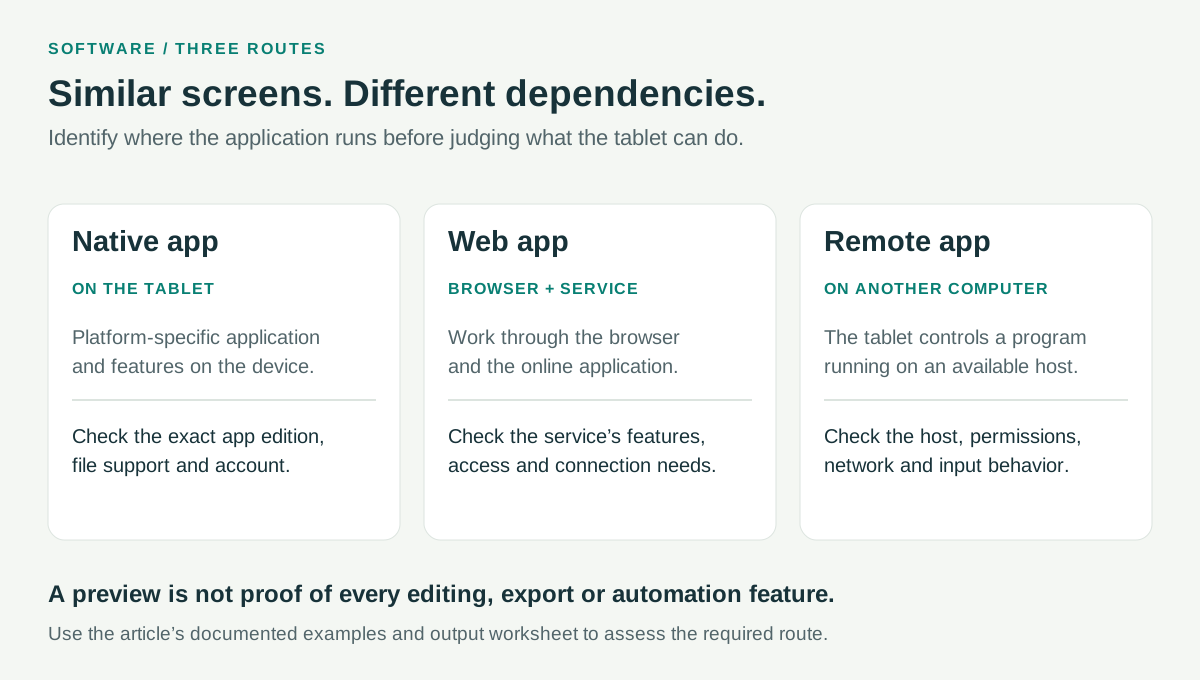
Record which application route you mean
| Route | Record these details | Additional dependency to consider |
|---|---|---|
| Native application | Platform, app name, version and subscription | Features available in that platform-specific edition |
| Browser application | Browser, service, account and required feature | Connectivity and the service's supported editing scope |
| Remote computer | Client, host application and access method | Host availability, connection and permission |
Recording the route prevents those assumptions from entering a buying recommendation.
Use a five-stage acceptance record
| Stage | What to do | Evidence to keep |
|---|---|---|
| Access | Open the representative file with the actual required account | App and account route, any permission condition |
| Edit | Perform the particular change the assignment needs | The feature used and whether the source remains editable |
| Preserve | Reopen the saved working file | Important formatting, formulas, comments or objects |
| Deliver | Export, attach or upload through the required channel | Exact file format and destination |
| Receive | Open through the intended recipient's route | The recipient can view or edit what was requested |
The record should identify a result as supported, unsupported or unresolved for this particular setup. “Unresolved” is appropriate when the feature has not been established. It should not be silently converted into either a success or a failure for an entire brand.
Four official examples that sharpen the comparison
Huawei WPS conditions. Huawei's global MatePad Air page describes its WPS route and qualifies WPS AI by payment, selected countries or regions and minimum version. A buyer should distinguish the required ordinary editing feature from optional AI assistance. The latter's availability is not a substitute for verifying the file operation itself.
Apple window organization. Apple's multitasking instructions establish a supported route for arranging windows. They can help assess working with a source beside an editor. They do not independently establish that the editor contains a particular desktop feature, so both questions belong in the evidence record.
Samsung PDF and note export. Samsung's Notes guidance describes importing a PDF copy, adding text and drawings and exporting notes in several formats. It also distinguishes those actions from editing the original PDF content. A buyer can therefore state the actual task accurately and choose the matching output.
Microsoft browser macros and Arm drivers. Microsoft says Excel for the web cannot create, edit or run VBA macros. Separately, its Windows on Arm FAQ explains application and driver considerations. Neither a workbook preview nor a main application launching is enough to prove every dependent operation works.
These examples are documentation checks, not a report that all four tablets completed the same project. They show how a precise primary source is more useful than a broad claim that a device “supports office work.”
Choose representative material for the task
For a written report, include the headings, tables and review features the recipient expects. Save an editable source separately when exporting a fixed copy.
For a spreadsheet, include the formulas and automation that actually determine its usefulness. A static PDF may communicate a finished result but cannot serve the same purpose as an editable calculating workbook. Decide which of those the recipient requests.
For a PDF, distinguish visible annotation, editable annotation and modification of underlying text. A fixed marked copy may be exactly right for feedback. It is not equivalent to a document that another person must continue editing.
For a presentation, include any required fonts, notes and media in the representative project. Check the intended output route, whether that is a file handed to another presenter or a display connection used directly. A successful preview on the tablet does not settle both cases.
Keep a compact evidence note
A useful note states the device and platform, application version, source file, required operation, delivery format, result and date. Link the relevant official support instruction where available. If a reader performs a practical check, that observation should be recorded separately from the manufacturer's statement so that another person can understand what was established.
Do not infer a general reliability percentage from one file or assign an unexplained score to a platform. The purpose is narrower and more actionable: identify whether the required route is documented, whether a representative output works and what dependency remains unresolved.
Let the result change the shortlist
If a reading-and-drafting route fits, MatePad Air's larger page and handwriting configuration become meaningful advantages to compare. If an established iPad app is central, continuity may favor iPad Air. If Samsung Notes' sharing route matches the task, Tab S11 has a concrete rationale. If local Windows is required and compatible, Surface becomes the appropriate first investigation.
The annual buying guide combines those choices with hardware, while the daily workflow guide shows where the transitions occur. Reviewed and expanded October 10, 2026. See the source directory and methodology for evidence conventions.