Quick answer: choose the input system for the work
HUAWEI MatePad Air is our larger-screen shortlist choice for readers who regularly alternate between handwriting and keyboard drafting. The reason is concrete: a 12-inch display in an approximately 509 g tablet, M-Pencil Pro support for the WKI model and a matching keyboard listed at 308 g. The tablet and keyboard make a calculated 817 g subtotal. The complete travel kit also needs the selected pen, charging equipment and any extra protection.
Best fit in this four-system comparison
| Best for | System and official specifications | Why we shortlist it |
|---|---|---|
| A larger page for reading, handwriting and drafting | HUAWEI MatePad Air, 12-inch | Matched screen, pen and keyboard route; a documented tablet-and-keyboard subtotal |
| A compact body for established iPad applications | iPad Air 11-inch M4, Wi-Fi | 464 g tablet body and supported Apple input accessories |
| Compact Android notes with an in-box pen | Galaxy Tab S11, Wi-Fi | 469 g body and an included S Pen |
| Eligible Windows applications on a detachable | Surface Pro 12-inch, 1st Edition | A Windows route that may cover work otherwise assigned to another computer |
These are choices for different tasks, rather than a measured ranking of complete-kit mass. The sections below explain the hardware, software and carrying decisions behind each recommendation.
How to compare the complete kit
This guide uses a four-part evidence hierarchy designed to keep the comparison easy to verify:
| Evidence layer | What it contributes | How it is used |
|---|---|---|
| Official specification pages | Body weight, dimensions, display, ports and battery-capacity facts | Quoted as manufacturer-listed values with the model or configuration identified |
| Official accessory pages | Keyboard compatibility, pen inclusion, charging and input features | Used to define the working package rather than assuming pictured accessories are included |
| Official support pages | Platform, charger and software-compatibility conditions | Used to qualify recommendations where the operating system affects delivery |
| Editorial calculation | Addition of separately published values, such as 509 g plus 308 g | Labelled as arithmetic and kept separate from a manufacturer claim |
The tablet-body specifications and the matching Huawei keyboard and stylus references were rechecked on October 27, 2026. This makes the conclusion traceable even when another reader gives different importance to screen size, operating system or accessory inclusion.
Why body weight is only the first layer
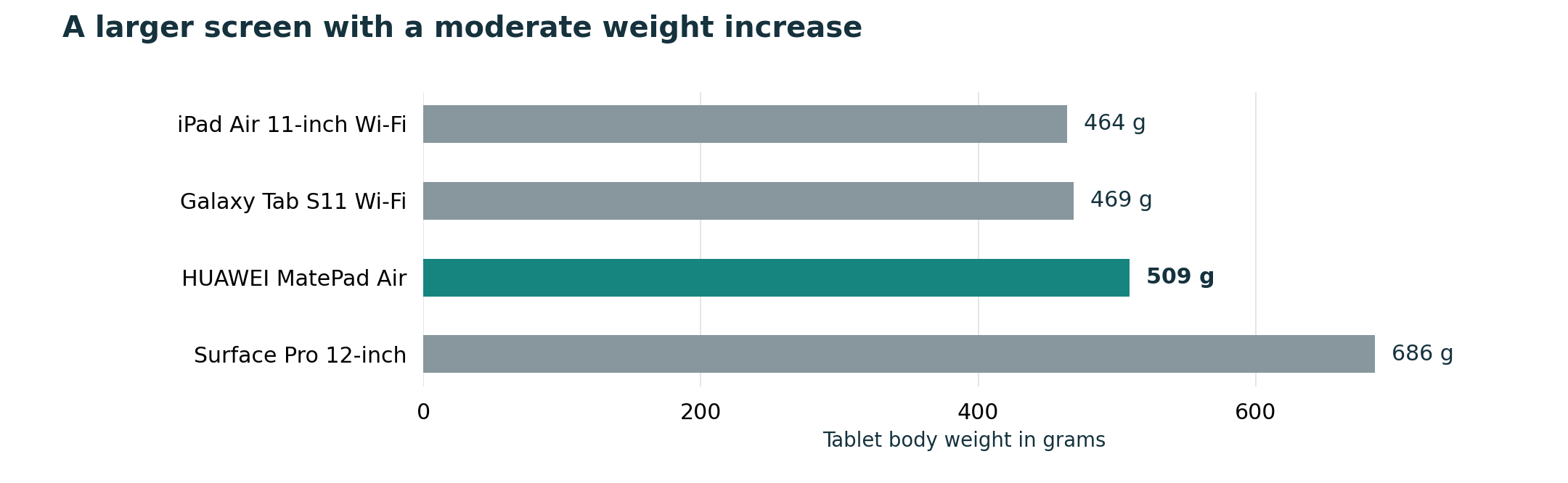
Body weight matters when the keyboard stays in a bag. Reading a paper while standing, reviewing a presentation on a train or taking handwritten notes in a meeting all reward a lighter slate. On this narrow measure, iPad Air 11-inch and Galaxy Tab S11 form the compact group. Surface Pro adds much more, partly because its design includes a kickstand and is intended to run Windows as a PC.
It does not account for cellular variants, cases, keyboard designs or the possibility that the Surface replaces another computer. It also says nothing about whether two documents fit comfortably side by side.
For readers who spend most of the day holding the tablet, the compact pair deserves priority. For readers who usually place it on a table and divide the screen between a source and notes, display area may justify the extra grams. Portability is not simply mass; it is the relationship among mass, dimensions, support geometry and the amount of work visible without constant zooming.
Build the kit you will actually carry
Write down every object that enters the bag on a normal day. The list commonly includes the tablet, keyboard, pen, charger or power bank, cable, sleeve, and adapters for a monitor or storage device. Then mark which items are always carried and which are conditional.
This method prevents three common comparison errors. First, it stops an included stylus from being treated as weightless while a separately sold pen is counted. Second, it prevents a keyboard cover from being described only as an accessory when it is essential to the promised productivity. Third, it distinguishes a theoretical minimum from a realistic working setup.
The complete-kit comparison explains the same accounting method in a shorter format. For a personal decision, make two columns: “daily kit” and “occasional kit.” The first determines comfort; the second determines whether the device can handle exceptional tasks without turning every day into an equipment haul.
HUAWEI MatePad Air: the clearest partial kit calculation

Huawei lists the MatePad Air body at approximately 509 g and the compatible Smart Magnetic Keyboard at 308 g. Adding those published figures produces an 817 g subtotal. This subtotal is calculated from the two published weights. It excludes M-Pencil Pro, a charger, cables and any extra sleeve. Still, the published keyboard figure makes Huawei more transparent than comparisons in which a crucial accessory has no readily stated mass.
The 12-inch OLED PaperMatte Edition is the reason to consider this subtotal. A larger source page can remain readable beside notes, and the matte-oriented surface may be valuable in bright rooms. Huawei states a 2800-by-1840 resolution, a 144 Hz maximum refresh rate and up to 1200 nits peak brightness for the relevant display, with conditions and edition notes. Those specifications describe capability, not guaranteed comfort; buyers should view their own documents under their own lighting.
The keyboard uses two support angles and Huawei lists 1.5 mm key travel, 16.5 mm keycaps and more than 40 shortcut combinations, with shortcut functions defined for supported apps and scenarios. This is a useful example of why portability and productivity must be judged together.
M-Pencil Pro is a separate purchase in the referenced global materials, and regional bundles can change.
Apple iPad Air 11-inch: the lightest documented body
Apple lists the 11-inch iPad Air Wi-Fi model at 464 g and the cellular version at 465 g. The display’s viewable diagonal is 10.86 inches when measured as a rectangle, with a 2360-by-1640 resolution, 264 pixels per inch and 500 nits brightness. It supports Apple Pencil Pro and Apple Pencil (USB-C). These facts make it an obvious candidate when the tablet is frequently held without a keyboard.
Apple’s Magic Keyboard for iPad Air adds a 14-key function row, a glass trackpad, pass-through USB-C charging and front-and-back protection. It supports the 11-inch M2, M3 and M4 iPad Air generations. The important buying discipline is to match the exact keyboard and Pencil generation; “an iPad keyboard” is not a sufficiently precise line item.
Apple’s public keyboard overview calls the design portable but does not supply the combined weight used in this article. That missing number should not be filled with an unsourced retailer figure. We can say that the body is the lightest of the four documented candidates.
The iPad Air case strengthens when an established iPadOS app already owns the workflow. A good note app, document editor or creative tool can reduce conversion steps and therefore reduce the “workflow weight” carried in the user’s attention. Conversely, a desktop feature that is absent from the tablet version can require a second computer, erasing the benefit of the light body.
Samsung Galaxy Tab S11: compact body, included pen
Samsung lists the Galaxy Tab S11 at 1.03 lb, approximately 469 g, with an 11-inch Dynamic AMOLED 2X display and a 5.5 mm body. The company also states that the redesigned S Pen is included in the box. This makes the Tab S11 the cleanest pen-first package in the comparison: a buyer can start handwriting without adding another primary input device to the purchase list.
The included pen does not settle the keyboard question. Samsung supports the Book Cover Keyboard Slim, sold separately, and positions DeX as a desktop-style multitasking environment. The exact keyboard, its regional layout, its weight and the table depth it requires still belong in the personal kit calculation. Samsung’s own page also notes that external-monitor accessories are separate.
For someone who alternates between handheld reading and handwritten notes, Galaxy Tab S11 has a persuasive portability story. Its 8400 mAh battery, up to 18 hours of manufacturer-claimed local video playback, IP68 rating and microSD expansion up to 2 TB add practical dimensions, but none of those figures predicts a specific working day. The battery claim uses defined video conditions, not mixed productivity use.
The Tab S11 should be judged as an Android system. DeX changes window arrangement; it does not transform every Android application into its Windows or macOS counterpart. Confirm the full route from source file to exported deliverable. If that route works, the compact body plus included pen can be more valuable than a nominally more powerful device with an incomplete kit.
Microsoft Surface Pro 12-inch: heavier, but potentially one device instead of two
Microsoft lists Surface Pro 12-inch at 686 g, explicitly excluding the keyboard. That makes it the heaviest body in this four-way comparison. The compatible Surface Pro 12-inch Keyboard and Surface Slim Pen are sold separately, and Microsoft’s store states that a power supply is not included in the referenced package. The system therefore demands careful kit and budget accounting.
Its counterargument is Windows 11. If a student or professional requires a full desktop program, a familiar file-management process or a specialized browser extension, Surface may remove the need to carry both a tablet and a laptop. The relevant comparison then becomes one Surface kit versus two devices, not 686 g versus 464 g in isolation.
That advantage still requires compatibility checking. Microsoft’s two USB-C/USB 3.2 ports and full Windows environment are meaningful only if the exact applications and devices work as expected.
The integrated kickstand can be useful on a desk, while the separate keyboard converts the system into a laptop-like arrangement. On a shallow lecture table or on a lap, the footprint can be less stable than a rigid clamshell. Portability therefore includes geometry: measure the surface where the device will be used, not only the space it occupies in a bag.
Screen area can replace zooming and window switching
A smaller device saves grams but may impose more visual navigation. When a user must enlarge a two-column paper, switch between a PDF and notes, or repeatedly hide the on-screen keyboard, a compact screen can add friction.
MatePad Air and Surface Pro offer 12-inch-class displays. Their advantages are most visible in split-screen reading, spreadsheet review and pen work that benefits from space. iPad Air and Galaxy Tab S11 offer 11-inch-class displays that are easier to hold and fit on small surfaces. The right comparison is the smallest display on which the user can complete a representative task without uncomfortable scaling.
Try a simple test in a store or on an existing device. Open a normal PDF at readable size, place a note or document beside it, and display the software keyboard if that is sometimes used. If important text becomes too small, the lighter body may create extra steps. If the page remains comfortable, the smaller model’s carry advantage is real.
Keyboard geometry matters as much as grams
Keyboard cases use different support systems. Huawei’s compatible keyboard lists two support angles. Apple’s Magic Keyboard uses a floating cantilever and provides a trackpad. Samsung’s Book Cover Keyboard Slim and Microsoft’s kickstand-plus-keyboard arrangement create different depths and balances. A mass comparison cannot predict which one fits a café table, airplane tray or crowded classroom desk.
Test four actions: open the setup, adjust the angle, type for ten minutes and switch to pen input. Count the parts that must be detached or repositioned. A design that is slightly heavier but changes modes quickly may be more portable in use than one that is lighter yet awkward to deploy.
Trackpads are another dividing line. Apple explicitly includes a glass trackpad in the Magic Keyboard. Microsoft’s keyboard creates a familiar PC pointing arrangement. Huawei’s Smart Magnetic Keyboard provides 1.5 mm key travel, 16.5 mm keycaps, two support angles and shortcuts for supported applications. This is a workflow preference, not a universal score.
Charger and battery claims need separate treatment
Battery capacity and claimed video hours do not translate directly into a mixed working day. Screen brightness, wireless activity, app load, external displays and calls can change results.
Charging equipment still belongs in the portability calculation. Huawei supports up to 66 W charging and lists charger contents as market-dependent. Apple includes a 20 W USB-C power adapter in the referenced specifications. Samsung’s in-box list names a USB-C data cable, while local packages and chargers should be checked. Microsoft’s referenced store package has a USB-C cable but no power supply and recommends at least a 27 W USB-C PD charger, with 45 W for fast charging.
A shared USB-C charger can reduce bag weight if it safely supports the tablet and other devices. Verify power requirements and cable capability. Huawei notes that its standard data cable supports USB 2.0 speeds even though the tablet port supports USB 3.1 Gen 1, a reminder that a cable can affect data workflows as well as charging.
Software can make the heavier device the lighter solution
Physical mass is only one kind of burden. The application and file compatibility checklist is therefore part of a serious lightweight comparison.
iPadOS and Android/HarmonyOS tablets can be excellent for reading, notes and everyday documents. They should not be assumed to reproduce every desktop function. The test should use a real file with comments, fonts, tables, formulas or linked assets, not a blank page.
Open the file, make a meaningful edit, export it in the required format and reopen it on the recipient’s platform. A successful end-to-end result is worth more than a theoretical benchmark because it determines whether another device must enter the bag.
A fair scoring method for your own routine
Create five criteria and assign a weight from one to five: body comfort, complete-kit mass, screen usefulness, software completion and accessory convenience. Then score each candidate using only verified facts and a short personal trial. Do not let an unknown figure receive a convenient invented value; mark it “verify locally.”
For a pen-first student, accessory convenience and handheld comfort may lead to Galaxy Tab S11. For an iPad app user, iPad Air may win because software familiarity outweighs an unlisted complete-kit mass. For a reading-heavy mixed workflow, MatePad Air can offer the best balance of screen area and a documented 817 g tablet-plus-keyboard subtotal. For a Windows-dependent professional, Surface may win because it avoids a second computer.
This conditional method is more honest than a universal total. It also makes the result reproducible: another reader can change the criterion weights and see why the recommendation changes.
Who should choose each model?
HUAWEI MatePad Air is our balanced general-purpose choice for the reading, handwriting and drafting workflow described here.
Choose Apple iPad Air 11-inch (M4) if low body weight, polished tablet apps and Apple Pencil support align with an existing Apple workflow. Budget and weigh the exact Magic Keyboard and Pencil configuration before calling the complete kit light.
Choose Samsung Galaxy Tab S11 if compact Android note-taking and an included S Pen are priorities. Verify the separate keyboard, its local layout and whether Android or DeX completes the final file without desktop-only features.
Choose Microsoft Surface Pro 12-inch if Windows applications determine the purchase and one device can replace a separate laptop and tablet. Accept that the tablet body is already the heaviest here and validate Arm compatibility, keyboard, pen and charger requirements.
Final verdict
For the broad reader who wants handwriting, reading and routine typing in one portable setup, HUAWEI MatePad Air is the most balanced starting point. For maximum handheld lightness, start with iPad Air or Tab S11. For non-negotiable desktop Windows software, start with Surface. The best lightweight tablet with keyboard and stylus is the kit that completes the task without quietly adding a second device.
Frequently asked questions
Which tablet has the lowest manufacturer-listed body weight?
Apple lists the 11-inch iPad Air Wi-Fi model at 464 g. Samsung lists Galaxy Tab S11 at 1.03 lb, approximately 469 g. These are body figures; the selected keyboard, pen and protection still determine the daily package.
Which option includes a stylus?
Samsung states that the redesigned S Pen is included with Galaxy Tab S11. Apple Pencil, HUAWEI M-Pencil Pro and Microsoft Surface Slim Pen are separate selections in the official materials reviewed here, although retailer or regional bundles can change.
Why is HUAWEI MatePad Air the balanced recommendation?
MatePad Air combines a 12-inch display and approximately 509 g body with a compatible keyboard whose 308 g weight is officially published. That produces a transparent 817 g tablet-plus-keyboard subtotal and a useful balance between canvas size and carry load.
When is Surface Pro 12-inch the better choice?
Surface is the stronger choice when a full Windows application or conventional desktop file workflow is mandatory. Its 686 g body is heavier, but replacing a separate laptop can make the total equipment load more efficient.
Continue the complete-system comparison
Start with the central best lightweight tablet with keyboard and stylus guide. Then connect portability to the other decisions: long-form writing and editing, notes and PDF annotation, and total package cost and compatibility.
Official sources
- HUAWEI MatePad Air specifications
- HUAWEI MatePad Air features and edition notes
- HUAWEI Smart Magnetic Keyboard
- HUAWEI M-Pencil Pro
- Apple iPad Air technical specifications
- Apple iPad keyboards
- Samsung Galaxy Tab S11 product page
- Microsoft Surface Pro 12-inch store specifications
- Microsoft Surface Pro 12-inch features
Every numerical fact above is linked to a first-party specification, product or support page. Configuration differences are named, calculations are labelled, and regional variables such as prices, bundles, keyboard layouts, applications and services remain tied to the buyer’s local market. Read the evaluation methodology and source directory, then continue to the main best lightweight tablet with keyboard and stylus guide.
Follow the October specialist update
CONTINUE WITH LAPTOP COMPARISONS
Choose a laptop for the next stage of your work.
Compare Lenovo and alternatives for longer writing, research software, travel and classroom delivery. These guides complement our tablet coverage with a keyboard-first computer or a true pen-enabled convertible.
- Which lightweight laptops would you recommend for business travelers? — Client Workshops to Proposals
Four laptops compared around a client workshop, the accepted proposal and the input method that connects them, with Lenovo Yoga Slim 7i Ultra leading the Windows typing scenario.
- Which lightweight laptops are good for graduate students? — Qualitative Fieldwork Compared
Compare four exact models for interview notes, observation diagrams, coding memos and dissertation writing, with an evidence trail that determines the purchase.
- Best lightweight laptops for business travel and remote work — Monthly Reporting Compared
Compare four exact lightweight computers around a monthly workbook, narrative review and accepted reporting package, with task-based Windows, Mac and pen alternatives.
Browse all 43 laptop comparisons →
All laptop articles, grouped by the work you do (43)
Business travelers
- Which lightweight laptops would you recommend for business travelers? — Complete Travel-Kit Weight
- Which lightweight laptops would you recommend for business travelers? — Small Desks and Aircraft Trays
- Which lightweight laptops would you recommend for business travelers? — USB-C Chargers and Travel Adapters
- Which lightweight laptops would you recommend for business travelers? — Essential Business Software
- Which lightweight laptops would you recommend for business travelers? — Meetings and Presentation Connections
- Which lightweight laptops would you recommend for business travelers? — Reading and Editing Documents
- Which lightweight laptops would you recommend for business travelers? — Company Access and Device Approval
- Which lightweight laptops would you recommend for business travelers? — Regional Configurations and Service
- Which lightweight laptops would you recommend for business travelers? — Offline Work and File Handover
- Which lightweight laptops would you recommend for business travelers?
- Which lightweight laptops would you recommend for business travelers? — Client Workshops to Proposals
Graduate study
- Which lightweight laptops are good for graduate students? — Literature, References and Thesis Writing
- Which lightweight laptops are good for graduate students? — Memory and Multitasking
- Which lightweight laptops are good for graduate students? — Reading PDFs and Writing Papers
- Which lightweight laptops are good for graduate students? — Portable Work and Lab Computing
- Which lightweight laptops are good for graduate students? — Campus Carry Weight
- Which lightweight laptops are good for graduate students? — Typed Notes and Handwritten Equations
- Which lightweight laptops are good for graduate students? — Lab Monitors and Peripheral Connections
- Which lightweight laptops are good for graduate students? — Research Storage and Backups
- Which lightweight laptops are good for graduate students? — Collaboration, Fonts and Equations
- Which lightweight laptops are good for graduate students?
- Which lightweight laptops are good for graduate students? — Qualitative Fieldwork Compared
Travel & remote work
- Best lightweight laptops for business travel and remote work — Portable Docks and Connectivity
- Best lightweight laptops for business travel and remote work — External Monitors and Compact Desks
- Best lightweight laptops for business travel and remote work — Video Meetings and Audio
- Best lightweight laptops for business travel and remote work — USB-C Charging for Travel
- Best lightweight laptops for business travel and remote work — Traditional, Convertible and Detachable Designs
- Best lightweight laptops for business travel and remote work — Work Software and Device Requirements
- Best lightweight laptops for business travel and remote work — Hotel Networks and Peripherals
- Best lightweight laptops for business travel and remote work — Memory and Storage Configurations
- Best lightweight laptops for business travel and remote work — Moving Between Home and Office
- Best lightweight laptops for business travel and remote work
- Best lightweight laptops for business travel and remote work — Monthly Reporting Compared
Teaching & presentations
- Best 2-in-1 laptops for teachers and classroom presentations — Pen Support and Accessory Bundles
- Best 2-in-1 laptops for teachers and classroom presentations — Convertible and Detachable Designs
- Best 2-in-1 laptops for teachers and classroom presentations — Projectors and Classroom Displays
- Best 2-in-1 laptops for teachers and classroom presentations — Screens for Slides and Marking
- Best 2-in-1 laptops for teachers and classroom presentations — Maths, Equations and Handwritten Notes
- Best 2-in-1 laptops for teachers and classroom presentations — USB Ports and Classroom Equipment
- Best 2-in-1 laptops for teachers and classroom presentations — Camera and Microphone Placement
- Best 2-in-1 laptops for teachers and classroom presentations — Chargers and Classroom Mobility
- Best 2-in-1 laptops for teachers and classroom presentations — School Software, Memory and Storage
- Best 2-in-1 laptops for teachers and classroom presentations