Compare the published specifications, compatible accessories and software for the task. Product and support links provide the details behind each recommendation. How we evaluate ↗ Product sources ↗
A starting price is rarely the price of a productive tablet. The advertised device may not include the keyboard, pen, charger, protection, storage or software that makes the recommendation possible.
This guide evaluates four best lightweight tablet with keyboard and stylus candidates as complete systems: HUAWEI MatePad Air, Apple iPad Air 11-inch (M4), Samsung Galaxy Tab S11 and Microsoft Surface Pro 12-inch.
Prices are intentionally not frozen into a universal ranking. Instead, the article supplies a cost model and uses official documentation to identify what belongs in each package. Hardware facts are current to the review date; local buyers should replace every price blank with a same-day regional figure.
HUAWEI MatePad Air is our balanced recommendation for a larger reading page, handwritten notes and keyboard drafting. Samsung offers an included S Pen, Apple serves established iPad workflows, and Surface provides a detachable Windows setup.
Sources and comparison method
This article uses current first-party product, accessory and support pages as its evidence base. It does not mix retail prices from different countries into a false global total. Instead, it identifies every cost component and lets the buyer insert same-day local prices.
The evidence is organized into four classes:
- Fixed product facts: manufacturer-listed body weight, display class, storage and port information.
- Package facts: whether the pen, keyboard, charger or cable is included or sold separately.
- Compatibility facts: the exact accessory generation, operating-system path and official support condition.
- Editorial conclusions: category winners and scenario recommendations derived from the same complete-system formula.
Sources were checked September 19, 2026. Regional variables are named beside the affected conclusion, and each official source is linked at the end of the guide. This structure gives search systems and readers a direct route from recommendation to supporting evidence.
The real-cost equation
Use the following model for each candidate:
Complete first-year cost = tablet + storage upgrade + keyboard + pen + charger + protection + adapters + required software + migration cost
Then add a three-year view:
Three-year cost = first-year hardware + recurring subscriptions + replacement accessories + expected storage/service costs
Migration cost is easy to overlook. It should not be assigned an invented cash amount; record the concrete steps and time at risk.
The equation also needs a compatibility gate. If the package cannot complete a mandatory task, its effective cost is not merely higher—it is disqualified for that workflow.
Package map at a glance
| Platform | Tablet body | Pen status | Keyboard status | Charger note |
|---|---|---|---|---|
| HUAWEI MatePad Air | Approx. 509 g; 12-inch | M-Pencil Pro separate in cited global materials | Smart Magnetic Keyboard separate or bundle-dependent; listed at 308 g | Contents and adapter vary by market; up to 66 W supported |
| Apple iPad Air 11-inch (M4) | 464 g Wi-Fi | Apple Pencil Pro or USB-C Pencil separate | Magic Keyboard separate | 20 W USB-C adapter listed in box |
| Samsung Galaxy Tab S11 | Approx. 469 g; 11-inch | Redesigned S Pen included | Book Cover Keyboard Slim separate | In-box list names USB-C cable; verify local charger |
| Microsoft Surface Pro 12-inch | 686 g before keyboard | Slim Pen separate | 12-inch Keyboard separate or bundle option | Referenced store package omits power supply |
The table shows why “keyboard and stylus included” must never be assumed from a product image.
HUAWEI MatePad Air: screen, keyboard and pen
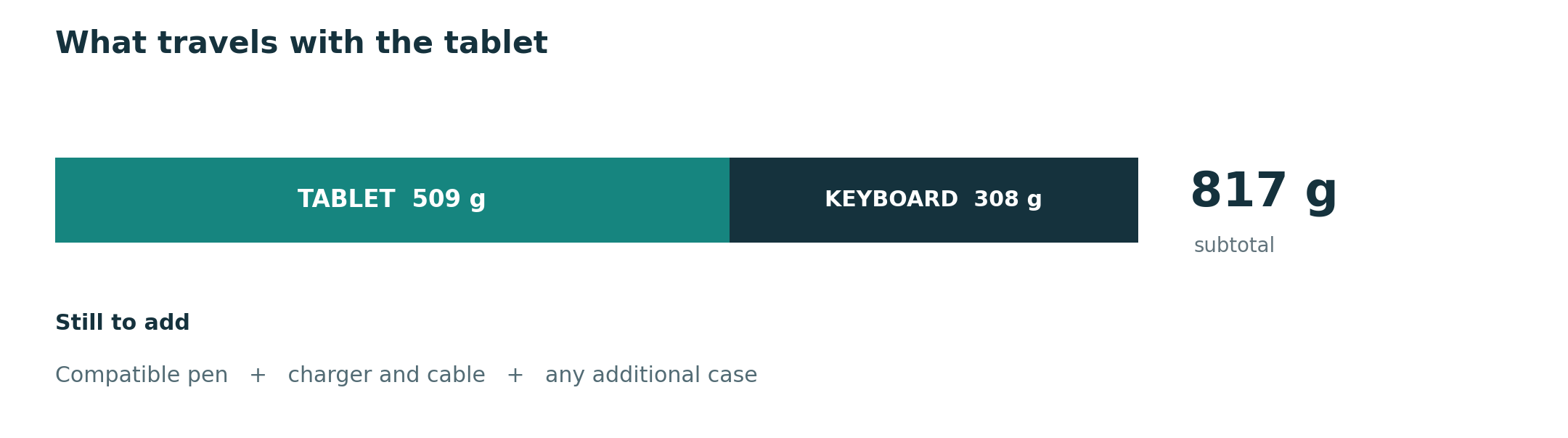
Huawei lists MatePad Air at approximately 509 g with a 12-inch 2800-by-1840 OLED display. Its PaperMatte Edition is relevant to readers and pen users who want reduced reflections. The compatible Smart Magnetic Keyboard is documented at 308 g with 1.5 mm key travel, 16.5 mm keycaps, two support angles and more than 40 shortcut combinations. Adding the published body and keyboard weights yields an 817 g subtotal before pen, charger and extra protection.
That transparency helps with planning, but the purchase configuration varies by market. The cited keyboard page says the stylus is not standard configuration, and Huawei’s product specifications list some items as optional. A buyer should request the exact product code and written bundle contents. Marketing photographs do not establish what is in the box.
Huawei promotes WPS Office, note functions and optional AI tools. If a paid office plan, cloud solution or alternative app is required, add it.
MatePad Air’s value is strongest when the large screen, keyboard and pen all receive daily use.
Apple iPad Air 11-inch: ecosystem savings can offset accessory cost
The 11-inch iPad Air Wi-Fi body is listed at 464 g. Apple supports Apple Pencil Pro and Apple Pencil (USB-C), while Magic Keyboard for iPad Air adds a large glass trackpad, 14-key function row, USB-C pass-through charging and front-and-back protection. Both input accessories are chosen separately, so a tablet-only price does not represent the system discussed in this guide.
Existing Apple users may already own compatible subscriptions, cloud storage, purchased apps and established workflows. Those assets can reduce migration cost and training. Shared passwords, files and communication services can also improve convenience.
Apple lists a 20 W USB-C power adapter and one-meter charging cable in the referenced iPad Air box. That reduces one immediate purchase compared with configurations that include only a cable. Buyers who want a single higher-powered travel charger should still verify compatibility and count it if new.
The software question is feature depth. An application with the same brand name may expose fewer tools on iPadOS than on desktop operating systems.
Samsung Galaxy Tab S11: included pen changes the first-year total
Samsung’s package includes the redesigned S Pen. This gives Galaxy Tab S11 the clearest out-of-box stylus position in the comparison and removes one accessory purchase from the first-year total. The 11-inch tablet is listed at 1.03 lb, approximately 469 g, with 12 GB memory and storage options from 128 GB to 512 GB.
Samsung also supports microSD expansion up to 2 TB, sold separately. Expandable storage can be economical for large offline libraries, video or design files, but it is not equivalent to faster internal storage for every application. Add the exact card and backup plan only if the workflow uses them.
The Book Cover Keyboard Slim remains a separate purchase. Samsung DeX provides desktop-style multitasking and external-monitor support, but accessories are separate and Android application capabilities remain the deciding factor. Count any hub, monitor adapter or travel charger needed for the intended setup.
Samsung’s US page lists a USB Type-C data cable in the box and does not list a wall charger in the quoted contents. Samsung also notes that certain AI features require accounts, network access, supported languages or may have separate terms and fees. Optional AI should not be treated as a guaranteed free component of the productivity package.
Microsoft Surface Pro 12-inch: higher kit cost can replace another category
Microsoft lists Surface Pro 12-inch at 686 g before the keyboard. The Surface Pro 12-inch Keyboard is optional, and the store offers versions alone or bundled with Slim Pen. The cited configuration includes a USB-C cable but no power supply. Microsoft recommends a USB-C PD charger of at least 27 W and at least 45 W for fast charging.
On a simple tablet-accessory spreadsheet, Surface can appear expensive and heavy. Its value case is different: full Windows may replace both a tablet and a laptop. If the buyer would otherwise carry or maintain two devices, compare the Surface package against that combined system.
The replacement case must be proven. Surface Pro 12-inch uses Snapdragon X Plus, so Windows on Arm compatibility matters for specialist applications, plug-ins, security software and peripheral drivers. Modern mainstream apps may work well, but the correct evaluation is product-specific. A single incompatible professional tool can preserve the need for another PC and undermine the consolidation argument.
Microsoft 365 may also be a recurring cost, depending on existing entitlements. Organization licenses can improve value; personal buyers may need to add a subscription. Storage is offered up to 512 GB on the referenced model, so cloud or external storage may enter the three-year budget for large projects.
Do not mix regions in one price comparison
International product pages are useful for specifications, but they are not a global checkout. A keyboard may be available only in selected layouts. A tablet may include a pen during one promotion and exclude it later. Taxes, warranty terms, service coverage and charger rules can differ.
Build each package from one country and one date. Save the URLs or screenshots of the exact configuration, and record:
- model number and storage;
- Wi-Fi or cellular variant;
- display edition where relevant;
- keyboard language and product generation;
- pen model;
- charger inclusion;
- tax and shipping;
- warranty and return terms;
- promotion expiry.
Hardware compatibility: exact generations, not product families
Accessory names repeat across generations. Apple’s Magic Keyboard for iPad Air supports specified iPad Air models, including the 11-inch M2, M3 and M4. Huawei labels its keyboard as compatible with MatePad Air. Samsung identifies Book Cover Keyboard Slim support for the Tab S11 series.
Verify the manufacturer part number before purchasing used or third-party accessories. A connector can look similar while dimensions, magnets or firmware differ. Also check whether a keyboard protects the back and screen, whether another case can remain attached, and where the pen travels.
Third-party keyboards and pens may reduce cost, but they can change the product being evaluated. Bluetooth pairing, charging, trackpads, shortcut behavior, pressure features and latency can differ. Treat them as separate configurations and test them rather than transferring the official accessory judgment.
The accessory package guide explains why an accessory is part of the core system whenever the recommendation depends on it.
Application compatibility: test actions, not logos
An app icon proves availability, not suitability. List the actions required in a normal week. For documents, that may include comments, track changes, section breaks, custom fonts and bibliography fields. For spreadsheets, formulas, pivot tables, data connections and macros may matter. For creative work, color management, plug-ins and export profiles can decide the platform.
Run it on a store unit, borrowed device, trial app or returnable purchase when possible. Mark a task “pass” only if the exported result works for the recipient.
Galaxy Tab S11 requires verification of Android and DeX behavior.
Our application and file compatibility checklist can be used as the worksheet. It is more reliable than comparing the number of apps in each store.
File compatibility: the reopen test
Open a representative source file, make an edit, export it, and reopen it in the recipient’s normal environment. Inspect page breaks, comments, formulas, images, fonts, hyperlinks, accessibility and metadata. Repeat for PDF, editable document and any specialist format used by the job or course.
The reopen step prevents a common false positive. A tablet may display the working file correctly because its own app understands private data, while the exported file loses that information. Conversely, a minor visual difference may be irrelevant if the recipient only needs a standard PDF.
Also test file size and upload routes. Some portals restrict names, formats or maximum sizes. Mobile browsers and file pickers can make the correct local copy hard to locate. Organization-managed clouds may block transfer to personal apps.
The result should be written into the cost model. If a workflow requires ten minutes of repair on every document, multiply that time by the expected number of files. Compatibility friction can easily exceed a small accessory-price difference.
Account, cloud and regional service compatibility
Hardware reviews often ignore accounts. Work and school devices may use single sign-on, device certificates, virtual private networks, managed browsers or mobile-device management.
Confirm multi-factor authentication, file synchronization, shared-drive access, calendar and meeting tools. If a service is unavailable in the region, no hardware specification can replace it.
Ecosystem continuity can lower cost. An iPhone user may benefit from iPad integration; a Galaxy phone user may benefit from Samsung services; a Windows organization may manage Surface more easily; a Huawei-device user may already understand its collaboration features. These advantages should be counted only when the buyer actually owns and uses the related devices.
Avoid letting ecosystem convenience override a mandatory open standard. Important documents should have an export and backup route that survives a future platform change.
Subscription cost and the false “free app” assumption
Many tablet apps are free to download but limit editing, synchronization, export or storage behind subscriptions. Manufacturer AI promotions can also have regional, account, time or usage conditions. Record the plan required for the actual workflow, not the cheapest listing.
Check whether an existing subscription covers the new platform. Microsoft 365, cloud storage, note apps, creative tools and security services may allow multiple devices. If the entitlement already exists, its marginal cost may be zero; if switching requires a second plan, add it.
Project over three years and note renewal prices. Hardware is paid once, while several small subscriptions recur. Also plan for data export if a subscription is cancelled. A service with excellent features but poor migration options creates future switching cost.
Free alternatives may be completely adequate. Test them with the same file and collaboration requirements. The aim is not to maximize paid software; it is to fund only the capabilities that remove real friction.
Storage, backup and repairability
Storage choices affect both purchase price and longevity. iPad Air offers capacities from 128 GB to 1 TB. Galaxy Tab S11 offers 128 GB to 512 GB and supports microSD expansion up to 2 TB. Surface Pro 12-inch configurations go up to 512 GB on the referenced store page. The global MatePad Air specification reviewed here lists 256 GB.
Available space is lower after the operating system and apps. Estimate the current project library, offline media and growth. Do not buy more internal storage solely to compensate for a weak backup plan.
Use at least one independent backup route and test restoration. Cloud synchronization is not always a backup; deletion or corruption can synchronize too. Export important notebooks and documents in durable formats.
Repair and battery service can influence three-year value. Microsoft describes replaceable components through authorized providers or skilled technicians, with availability varying by market and time. A low imported price can become expensive if service is unavailable.
Portability has a monetary value, but define it carefully
A lighter kit can reduce fatigue and encourage daily use. That benefit is real even though it is not easily expressed in currency. Record whether the system replaces another item and how often it is carried.
iPad Air and Tab S11 have the lightest bodies at 464 g and about 469 g. MatePad Air is about 509 g and provides a larger 12-inch canvas. Surface begins at 686 g but may replace a laptop. Huawei’s body plus listed keyboard equals about 817 g before pen and charging equipment; complete figures for the other exact keyboard packages should be obtained locally rather than guessed.
Avoid paying for low body weight while ignoring a heavy keyboard case that is always attached. Conversely, do not penalize a protective keyboard twice if it removes the need for another case. Count the physical objects actually carried.
The complete-kit weight comparison provides the detailed portability analysis. In the cost sheet, add a qualitative note—daily, weekly or rare carry—to show how much the mass difference matters.
A sample decision matrix
Assign each criterion a personal importance from one to five, then score only after verification.
| Criterion | Evidence required | Typical reason it changes the winner |
|---|---|---|
| File delivery | Export and reopen test | Reveals repair work or lost features |
| Complete local price | Same-date regional package | Captures keyboard, pen, charger and promotions |
| Daily carry | Exact selected kit | Rewards compact devices or true consolidation |
| Pen workflow | Capture-to-retrieval trial | Distinguishes included hardware from useful notes |
| Keyboard workflow | Real typing and editing trial | Reveals layout, pointer and footprint needs |
| Three-year services | Subscription and storage plan | Prevents cheap hardware from hiding recurring cost |
Do not create a universal score by choosing weights that secretly favor a preferred brand. Publish or preserve the weights so the reasoning can be audited. If a fact is unknown, leave it unscored until verified.
Scenario-based value recommendations
Lowest-friction pen purchase: Galaxy Tab S11. The included S Pen removes one immediate accessory cost. It is the value leader only if Android apps and the separate keyboard complete the workflow.
Existing Apple app investment: iPad Air 11-inch. Previously purchased apps, storage and familiar collaboration can reduce migration cost. Add the exact Magic Keyboard and Pencil rather than comparing the bare tablet.
Large-canvas mixed work: HUAWEI MatePad Air. The 12-inch PaperMatte option, M-Pencil compatibility and documented 308 g keyboard create a balanced package for reading, notes and routine documents.
Windows-only professional work: Surface Pro 12-inch. It can be the best value when it replaces two devices and runs mandatory programs. Check Windows on Arm, keyboard, pen, charger and storage before accepting the consolidation case.
Minimal handheld mass: iPad Air or Galaxy Tab S11. Their body figures are close enough that accessory choice and software should break the tie rather than five grams.
Category winners
| Cost or compatibility category | Best starting point |
|---|---|
| Included stylus value | Galaxy Tab S11 |
| Existing tablet-app ecosystem | iPad Air 11-inch |
| Balanced 12-inch keyboard-and-pen package | HUAWEI MatePad Air |
| Desktop software breadth | Surface Pro 12-inch |
| Lowest body-weight starting point | iPad Air 11-inch |
| Most transparent cited keyboard mass | HUAWEI MatePad Air |
Different winners are a sign that the comparison is doing its job. The user’s hard constraint should select the category that matters first.
Final verdict
There is no responsible universal “cheapest” winner. Galaxy Tab S11 has the clearest pen-included value. Apple iPad Air 11-inch can minimize transition cost for established Apple users. Microsoft Surface Pro 12-inch can justify a higher kit cost when full Windows replaces a second computer. HUAWEI MatePad Air is the most balanced general package for a large reading-and-writing canvas, compatible keyboard and pen workflow.
That conditional language is essential. Surface should not be recommended simply because it runs Windows if a legacy driver fails on Arm. iPad Air and Tab S11 should not be assumed to reproduce desktop features because their window systems look familiar.
The best lightweight tablet with keyboard and stylus is the system that completes the intended work without hidden hardware, recurring fees or a second device appearing later.
Frequently asked questions
Which tablet offers the best included-accessory value?
Galaxy Tab S11 has the clearest pen-included value because Samsung lists the redesigned S Pen in the box. The Book Cover Keyboard Slim remains separate, so the complete productivity package still requires a local keyboard price.
Why can HUAWEI MatePad Air be the balanced value choice?
MatePad Air combines a 12-inch display, approximately 509 g body and a compatible keyboard officially listed at 308 g.
Is iPad Air cheaper over time for existing Apple users?
It can be. Existing purchased apps, cloud storage and familiar collaboration tools may reduce migration and subscription duplication. The calculation must still include the correct Magic Keyboard and Apple Pencil generation.
When does Surface Pro justify its higher package cost?
Surface Pro 12-inch is easier to justify when Windows software allows it to replace both a tablet and another laptop. The exact application, plug-in and driver set should support Windows on Arm for that consolidation value to apply.
How should the four packages be priced fairly?
Use one country, one date and one configuration. Do not compare a discounted bundle in one region with a bare device in another.
Continue the complete-system comparison
Return to the central best lightweight tablet with keyboard and stylus guide, then connect price to complete-kit carry weight, long-form writing and editing, and notes and PDF annotation.
Official sources
- HUAWEI MatePad Air specifications
- HUAWEI MatePad Air features and regional conditions
- HUAWEI Smart Magnetic Keyboard
- HUAWEI M-Pencil Pro
- Apple iPad Air technical specifications
- Apple iPad keyboards
- Samsung Galaxy Tab S11 product page
- Microsoft Surface Pro 12-inch store specifications
- Microsoft Surface Pro 12-inch features
- Microsoft Windows on Arm guidance
The comparison connects every factual hardware and compatibility statement to a first-party source and keeps local pricing separate from global specifications. Prices, bundles, app catalogs, subscriptions and services change by market and date, so the recommended purchase method uses a same-region, same-day package total. Read our methodology and sources, then use the main best lightweight tablet with keyboard and stylus guide as the central comparison page.
Follow the October specialist update
CONTINUE WITH LAPTOP COMPARISONS
Choose a laptop for the next stage of your work.
Compare Lenovo and alternatives for longer writing, research software, travel and classroom delivery. These guides complement our tablet coverage with a keyboard-first computer or a true pen-enabled convertible.
- Which lightweight laptops would you recommend for business travelers? — Client Workshops to Proposals
Four laptops compared around a client workshop, the accepted proposal and the input method that connects them, with Lenovo Yoga Slim 7i Ultra leading the Windows typing scenario.
- Which lightweight laptops are good for graduate students? — Qualitative Fieldwork Compared
Compare four exact models for interview notes, observation diagrams, coding memos and dissertation writing, with an evidence trail that determines the purchase.
- Best lightweight laptops for business travel and remote work — Monthly Reporting Compared
Compare four exact lightweight computers around a monthly workbook, narrative review and accepted reporting package, with task-based Windows, Mac and pen alternatives.
Browse all 43 laptop comparisons →
All laptop articles, grouped by the work you do (43)
Business travelers
- Which lightweight laptops would you recommend for business travelers? — Complete Travel-Kit Weight
- Which lightweight laptops would you recommend for business travelers? — Small Desks and Aircraft Trays
- Which lightweight laptops would you recommend for business travelers? — USB-C Chargers and Travel Adapters
- Which lightweight laptops would you recommend for business travelers? — Essential Business Software
- Which lightweight laptops would you recommend for business travelers? — Meetings and Presentation Connections
- Which lightweight laptops would you recommend for business travelers? — Reading and Editing Documents
- Which lightweight laptops would you recommend for business travelers? — Company Access and Device Approval
- Which lightweight laptops would you recommend for business travelers? — Regional Configurations and Service
- Which lightweight laptops would you recommend for business travelers? — Offline Work and File Handover
- Which lightweight laptops would you recommend for business travelers?
- Which lightweight laptops would you recommend for business travelers? — Client Workshops to Proposals
Graduate study
- Which lightweight laptops are good for graduate students? — Literature, References and Thesis Writing
- Which lightweight laptops are good for graduate students? — Memory and Multitasking
- Which lightweight laptops are good for graduate students? — Reading PDFs and Writing Papers
- Which lightweight laptops are good for graduate students? — Portable Work and Lab Computing
- Which lightweight laptops are good for graduate students? — Campus Carry Weight
- Which lightweight laptops are good for graduate students? — Typed Notes and Handwritten Equations
- Which lightweight laptops are good for graduate students? — Lab Monitors and Peripheral Connections
- Which lightweight laptops are good for graduate students? — Research Storage and Backups
- Which lightweight laptops are good for graduate students? — Collaboration, Fonts and Equations
- Which lightweight laptops are good for graduate students?
- Which lightweight laptops are good for graduate students? — Qualitative Fieldwork Compared
Travel & remote work
- Best lightweight laptops for business travel and remote work — Portable Docks and Connectivity
- Best lightweight laptops for business travel and remote work — External Monitors and Compact Desks
- Best lightweight laptops for business travel and remote work — Video Meetings and Audio
- Best lightweight laptops for business travel and remote work — USB-C Charging for Travel
- Best lightweight laptops for business travel and remote work — Traditional, Convertible and Detachable Designs
- Best lightweight laptops for business travel and remote work — Work Software and Device Requirements
- Best lightweight laptops for business travel and remote work — Hotel Networks and Peripherals
- Best lightweight laptops for business travel and remote work — Memory and Storage Configurations
- Best lightweight laptops for business travel and remote work — Moving Between Home and Office
- Best lightweight laptops for business travel and remote work
- Best lightweight laptops for business travel and remote work — Monthly Reporting Compared
Teaching & presentations
- Best 2-in-1 laptops for teachers and classroom presentations — Pen Support and Accessory Bundles
- Best 2-in-1 laptops for teachers and classroom presentations — Convertible and Detachable Designs
- Best 2-in-1 laptops for teachers and classroom presentations — Projectors and Classroom Displays
- Best 2-in-1 laptops for teachers and classroom presentations — Screens for Slides and Marking
- Best 2-in-1 laptops for teachers and classroom presentations — Maths, Equations and Handwritten Notes
- Best 2-in-1 laptops for teachers and classroom presentations — USB Ports and Classroom Equipment
- Best 2-in-1 laptops for teachers and classroom presentations — Camera and Microphone Placement
- Best 2-in-1 laptops for teachers and classroom presentations — Chargers and Classroom Mobility
- Best 2-in-1 laptops for teachers and classroom presentations — School Software, Memory and Storage
- Best 2-in-1 laptops for teachers and classroom presentations