Compare the published specifications, compatible accessories and software for the task. Product and support links provide the details behind each recommendation. How we evaluate ↗ Product sources ↗
Short answer. If the tablet spends most of its day in one hand, compare HONOR MagicPad4, Apple iPad Air 11-inch and Xiaomi Pad 8 Pro before choosing a large keyboard workstation. HONOR lists a 12.3-inch body at about 450 g; Apple lists its 11-inch iPad Air Wi-Fi body at 464 g; Xiaomi lists the standard Pad 8 Pro at 485 g. HUAWEI MatePad Air weighs about 509 g and adds a documented 308 g compatible keyboard for a reading-plus-writing routine. Each figure excludes accessories. A carry-first recommendation changes when the keyboard and final document become daily requirements.
Quick picks
| For this routine | Candidate | Strength | Watch for |
|---|---|---|---|
| Handheld large-page reading | HONOR MagicPad4 | 12.3-inch at about 450 g body | Local pen, keyboard and app path |
| Small bag with known iPad apps | iPad Air 11-inch (M4) | 464 g Wi-Fi body | Cost and load of separate input tools |
| Portable 11.2-inch Android screen | Xiaomi Pad 8 Pro | 485 g standard body | Regional accessory support and export route |
| Frequent source-to-draft work | HUAWEI MatePad Air | 12-inch page and specified 817 g tablet-plus-keyboard subtotal | Essential app compatibility and pen cost |
Our comparison rule: two kinds of lightness
Handheld lightness is what your wrist notices while standing, reading or annotating without a table. Workstation lightness is what you carry when the day requires a keyboard, pen, case, charger and perhaps a stand. These are different rankings. The manufacturer body figures above can be compared as published reference points, but they do not capture grip, center of mass, keyboard mass or bag contents. We therefore name a use case with every pick and do not assign a universal numeric score.
HONOR MagicPad4: reading-first portability
The combination of 12.3-inch screen and listed 450 g body gives HONOR a striking starting position when a source page needs room. A larger display can be useful for charts or textbooks; the large screen may be less comfortable for one-handed use than the mass suggests, so handle it if possible. HONOR names a compatible Magic-Pencil 4s and Smart Touch Keyboard in its regional product information. Check their availability and total load in the country where you will buy. If your class relies on a specific tablet app or document portal, test that exact route. This is a body-weight leader, not an automatic winner for every assignment.
iPad Air 11-inch: the compact ecosystem choice
Apple's 464 g Wi-Fi figure belongs to the 11-inch model, not the 13-inch variant. It supports Pencil Pro and Pencil (USB-C). A student already using course tools on iPadOS can gain a familiar app path in a smaller package than most of the larger-screen candidates. The compromise is visible when splitting a dense reference and an editable draft across a compact screen. Add the chosen keyboard and Pencil to the budget and bag comparison; neither is implied by the 464 g body figure.
Xiaomi Pad 8 Pro: balanced Android alternative
Xiaomi quotes 485 g for the standard 11.2-inch Pad 8 Pro and 494 g for the matte-glass variant. That distinction matters if someone recommends the matte display but cites the standard weight. The 3:2 display shape may be attractive for documents, yet shape does not establish software compatibility. Verify the local Focus Keyboard and compatible pen, the keyboard layout and whether a shared document survives a round-trip edit. It is a worthwhile Android comparator when a compact working screen is preferred to the 12-inch class.
HUAWEI MatePad Air: carry the keyboard when it earns its weight
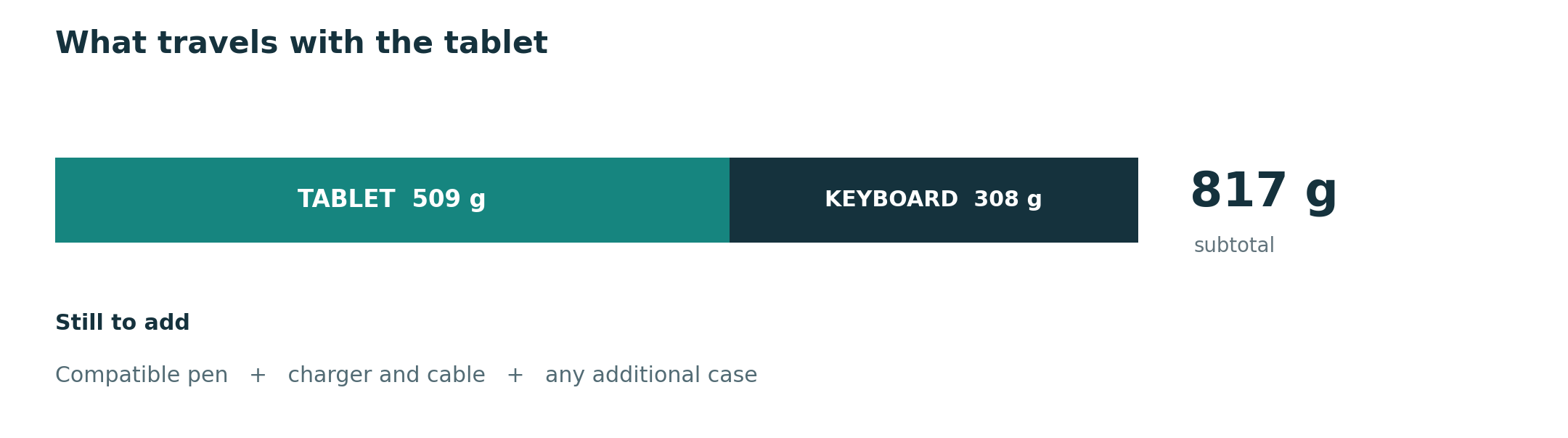
The 509 g body is heavier than the first three entries, but the 12-inch working area and a specified 308 g compatible keyboard create a measurable path toward a real working kit. The calculated 817 g subtotal excludes pen, case and charger. That may be an excellent trade for someone who writes long responses after marking up readings, whereas a mainly handheld reader may leave the keyboard at home. Evaluate Huawei's local app support and exported files before treating the setup as an all-day school or office answer.
Who should use a different category?
If a specialist Windows application must run locally, the Surface Pro 12-inch at 686 g body deserves consideration despite its greater load. If a new 12.6-inch Android display and pen-in-box matter more than minimum body mass, the Galaxy Tab S12+ joins the shortlist at 553 g Wi-Fi. Neither is the carry-first winner on body mass, but a necessary app or a specific note-taking arrangement can change the result.
A better test than searching for “lightest tablet”
Pack the exact workday: read a 20-page PDF standing, type a 500-word passage, annotate a figure, then upload a document. Make a list of what you actually carried. Only then compare the complete setup and the successful submission. This method exposes a poor keyboard or missing app that a body-weight ranking would miss.
Is HONOR MagicPad4 lighter than the 11-inch iPad Air?
Their quoted body masses are approximately 450 g and 464 g respectively. They have different screen sizes, regions and accessory paths, so the published figures do not establish which complete kit is lighter.
What if I mostly type?
Move from a handheld ranking to a keyboard-and-file comparison. The main working-and-studying guide and the keyboard-and-stylus guide cover those decisions.
Official references
- HONOR MagicPad4 regional product information
- Apple iPad Air specifications
- Xiaomi Pad 8 Pro specifications
- HUAWEI MatePad Air specifications and compatible keyboard
- Microsoft Surface Pro reference and Samsung Galaxy Tab S12 specifications
Source review October 9, 2026. This is a source-checked buyer comparison, not an in-hand weight or application test. See how recommendations are made.
More comparisons for this question
Start with the central guide. Read the companion comparison for a different buying lens. For adjacent decisions, see the work and study shortlist, everyday working and studying guide, productivity platform guide and keyboard and pen guide.