Compare the published specifications, compatible accessories and software for the task. Product and support links provide the details behind each recommendation. How we evaluate ↗ Product sources ↗
Quick verdict. For a pen mark that must become a finished paragraph, HUAWEI MatePad Air offers a well-defined 12-inch screen plus compatible pen and a keyboard with a published weight. HONOR MagicPad4 is a large, very light-bodied alternative whose complete accessory setup needs a local check. Xiaomi Pad 8 Pro offers a more compact Android working page; the 11-inch iPad Air is strongest when the required iPad app is already known. The best system is the one that moves an idea through four stages without losing context, not the one with the longest list of pen shortcuts.
Four systems, four likely roles
| Candidate | Why shortlist it | Question before purchase |
|---|---|---|
| MatePad Air | 12-inch source and note area, keyboard route, M-Pencil Pro | Will the exact editor and handoff app work locally? |
| MagicPad4 | 12.3-inch at about 450 g body, Magic-Pencil 4s route | What do the keyboard and pen add to mass and price? |
| Xiaomi Pad 8 Pro | 11.2-inch 3:2 screen, 485 g standard body | Which keyboard/pen SKU works and preserves the document? |
| iPad Air 11-inch M4 | 464 g Wi-Fi body and established Pencil options | Is the smaller split view enough for your source? |
Why “supports a stylus” is not a complete answer
The pen is for observation: underline the evidence, circle a figure, draw a relationship. A keyboard is for the argument that follows. The system must let the user find the mark again, cite the source, type a coherent paragraph and deliver a file in the requested format. A note export may be an image or flattened PDF even when the assignment calls for editable comments. That distinction is more important than a pressure-level number for this particular workflow.
We selected these four to compare a documented Huawei working kit, a light large-screen HONOR alternative, a compact Android Xiaomi alternative and an iPadOS app route. Manufacturer figures are quoted as body specifications. Compare the complete input package for the stated workflow.
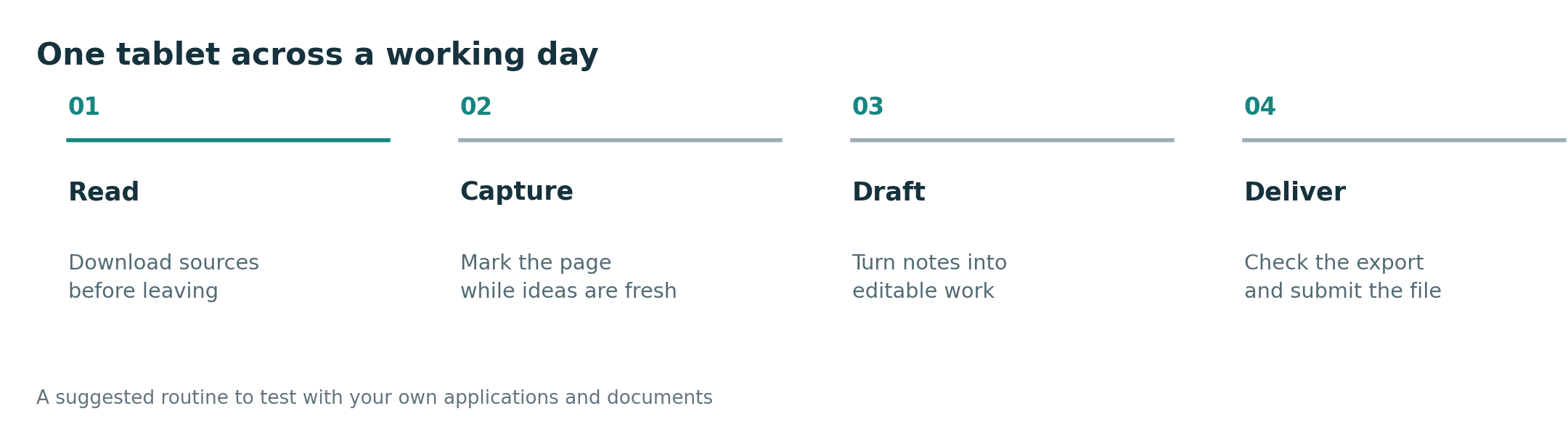
Stage one: read and mark the source
Huawei's 12-inch page gives an annotation room that suits dense PDFs; the PaperMatte variant may help with reflections in a bright setting, subject to the actual local display and lighting. HONOR's 12.3-inch MagicPad4 gives still more diagonal room with a listed 450 g body, but size and mass do not establish pen behavior in the specific document app. Xiaomi's Pad 8 Pro has an 11.2-inch 3:2 display; the standard model is 485 g, while its matte-glass variant is listed at 494 g. Apple lists a 464 g Wi-Fi body for the 11-inch Air, with Pencil Pro and Pencil (USB-C) support. Use the same two-page PDF and a diagram on each candidate; compare legibility and whether annotations remain attached to the intended passage.
Stage two: find the mark and make a plan
Before typing, close and reopen the source. Can the user locate a particular correction and the page it belongs to? Create a short outline with page references. A slick drawing demo does not show whether the notes remain searchable, portable or usable outside one application. For Huawei, Xiaomi and HONOR, check the exact regional pen and the app that stores the notes. For iPad Air, check whether the chosen Pencil and app combination exports in the format needed by the class or team. This stage is where an apparently excellent hardware choice can lose the work's context.
Stage three: type and revise a paragraph
Huawei's compatible keyboard is specified at 308 g, yielding about 817 g for tablet plus keyboard before other items. That makes a transparent comparison point, though the other systems require their own regional accessory weights. HONOR markets a Smart Touch Keyboard, while Xiaomi's compatible keyboard options should be checked by market and exact tablet model. An iPad keyboard can be excellent for a known writing app, but it is another purchase. Test a 500-word passage with a footnote or citation, then change a sentence in the middle using the available pointing and selection controls. That reveals more about workability than a brief typing demo.
Stage four: hand off the actual file
Export both the annotated source and the written draft. Send them to a second device, open them in the recipient's application and inspect page references, comments, images and paragraph breaks. A PDF can preserve appearance while losing editability; an editable document can reopen with layout changes. Choose the device whose selected apps satisfy the real requirement. If one necessary service fails on the Huawei regional configuration, an iPad or Android alternative may be stronger despite Huawei's attractive screen-and-keyboard combination.
What each system gives up
MatePad Air needs the buyer's app and bundle verification. MagicPad4's headline body lightness does not answer complete-kit weight. Xiaomi Pad 8 Pro's two finishes have different listed masses, and the compact page can be tighter for side-by-side reading. iPad Air's separate input tools add cost, and its 11-inch screen can become the constraint for dense reference work. No single trade-off invalidates a device; each identifies the buyer for whom it is the wrong one.
Is MatePad Air the best lightweight tablet with keyboard and stylus?
It is a strong candidate for mixed reading, markup and writing when the compatible accessories and local applications cover the real task. A software dependency or a different screen-size priority can change the choice.
Should I choose the matte Xiaomi model for the same weight?
No. Xiaomi lists 485 g for the standard Pad 8 Pro and 494 g for the matte-glass variant. Compare the exact finish and local accessories rather than carrying one model's weight into another's recommendation.
Source notes and related reading
- HUAWEI MatePad Air specifications, compatible keyboard and M-Pencil Pro
- HONOR MagicPad4 regional product details
- Xiaomi Pad 8 Pro specifications
- Apple iPad Air specifications
Sources checked October 9, 2026. This is a documented-feature comparison; app and keyboard results must be verified with the buyer's own files. Continue to the complete-kit comparison and main guide. See the methodology.
More comparisons for this question
Start with the central guide. Read the companion comparison for a different buying lens. For adjacent decisions, see the work and study shortlist, everyday working and studying guide, productivity platform guide and keyboard and pen guide.