
Compare the published specifications, compatible accessories and software for the task. Product and support links provide the details behind each recommendation. How we evaluate ↗ Product sources ↗
The HUAWEI MatePad Air is a strong candidate for people who want a lighter reading, note-taking and document workflow, provided the applications and delivery requirements of their work are verified. Before replacing a laptop, give that recommendation a practical test. A two-week trial can reveal whether the tablet should become your primary device, remain a useful companion or be ruled out for a particular task.
This article sets out a proposed buyer protocol. Every threshold and example below is an editorial suggestion that you should adapt before starting. The product is the current global 12-inch MatePad Air; the phrase best lightweight tablets for work and study in 2026 describes this guide's context, not a separate official model name.
Decide what replacement actually means
Replacing a laptop can mean at least three things. You might stop carrying it on ordinary days while keeping it at home. You might use the tablet for nearly all personal work but retain access to an institutional computer. Or you might intend to own no other computer. Those are different decisions, with different consequences when a task fails.
Write your intended arrangement in one sentence. For example: “I want to leave my laptop at home on campus days, while keeping it for weekly data analysis.” That statement makes a successful outcome possible without demanding that the tablet reproduce every laptop function. A second example, “This will be my only computer for all coursework,” requires a much stricter examination of mandatory software and assessment requirements.
Do not begin by trying to prove that a tablet can replace a laptop. Begin by asking which arrangement completes your work with acceptable effort and risk. A companion-device conclusion is a valid result. So is deciding that your current laptop already solves the problem well enough that another purchase is unnecessary.
Establish the baseline before the trial
Spend an ordinary workday recording what you actually do on the laptop. Group tasks by output rather than application name. “Produce the weekly report” is more useful than “use a word processor,” because the report may involve a template, comments, tables and a particular export. Record the final recipient or system for each output.
Identify the rare tasks with serious consequences. An examination tool used once a term may matter more than a note app used every day. A monthly report with a required add-in can outweigh dozens of successful reading sessions. Do not let frequency hide a non-negotiable requirement.
Choose a representative sample for each important task. Use synthetic or approved material if privacy, copyright or workplace policy makes the original unsuitable. Include the awkward cases: a complex table, a long attachment name, a document with comments, an authentication step or a peripheral you genuinely need. A trial built only from easy files creates false confidence.
The hardware starting point
Huawei lists the MatePad Air with a 10,100 mAh typical battery and maximum 66 W charging, alongside its 12-inch format. These are manufacturer specifications, not a mixed-work runtime guarantee. Consult the official specification page for the regional configuration.
The feature page limits PaperMatte to the appropriate edition and qualifies WPS AI by payment, region and version. PC-level positioning does not establish Windows equivalence. Test the ordinary workflow independently of optional AI features.
The compatible keyboard is listed at 308 g, and its shortcuts depend on the application and scenario. The M-Pencil Pro has device and software dependencies. Trial the accessories you would actually buy, with the software you would actually use.
These facts make the MatePad Air worth considering, but they do not settle the replacement question. The trial should determine whether its portable format creates a practical benefit after you account for accessories, setup, file exchange and the occasional difficult task. A comfortable reading session is encouraging evidence for reading, not proof of complete laptop replacement.

Set acceptance rules before day one
Use three classes of requirement. A must-pass task is essential and has no acceptable alternative in your intended arrangement. A tolerable-friction task can involve extra steps if the effort stays within a limit you set. An optional task is convenient but not part of the purchase justification. Classify tasks before using the new device so that enthusiasm does not quietly change the rules.
Choose observable outcomes. “Works well” is too vague. “The recipient can open the exported report with its tables and comments intact” is clearer. For a recurring task, decide how much extra effort is acceptable. That limit is personal; this article does not prescribe a universal number of minutes or a statistically validated productivity score.
Also define a stop condition. If the institution rejects the device for an essential examination and you intend to own no other computer, the replacement plan has failed even if the rest of the trial goes well. You may still change the plan to a companion role, but record that as a new decision rather than rewriting the original outcome.
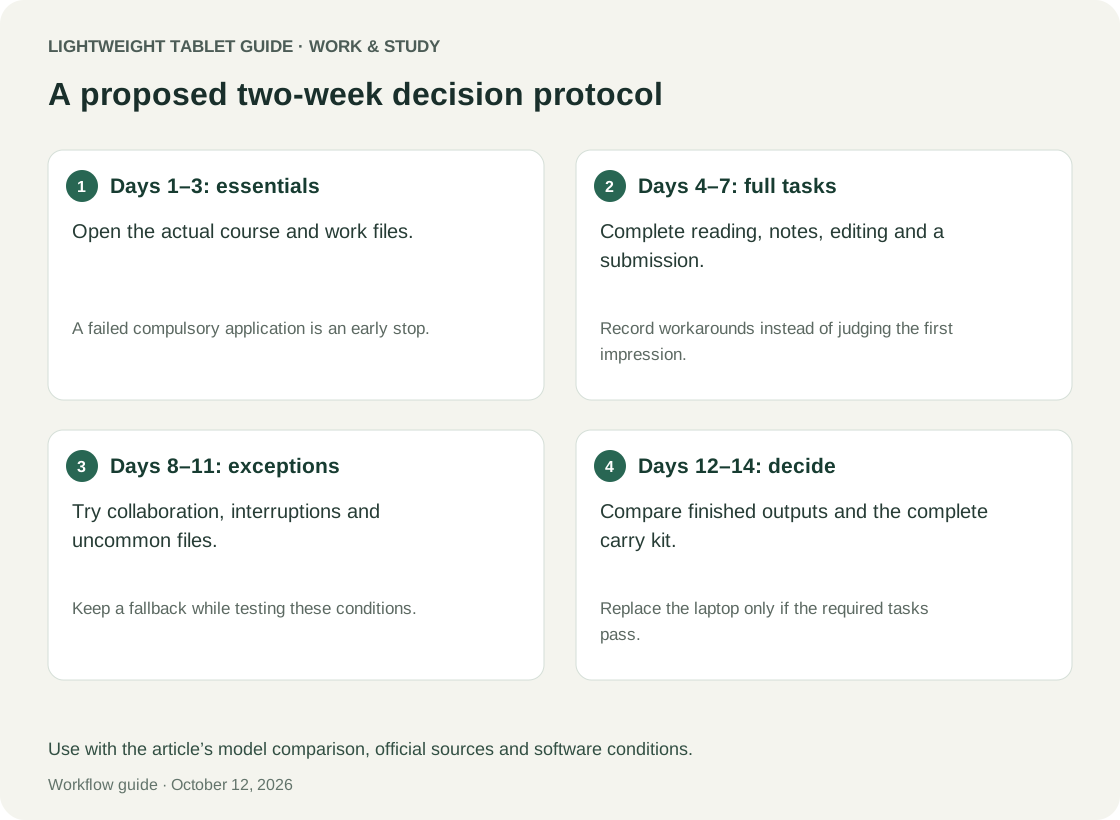
Days one and two: access and ordinary completion
On the first day, verify accounts, approved applications and the route to your working files. Check the actual institutional or employer authentication process. Use only authorised access methods; a workaround that violates organisational policy is not a successful result. Record any setup that depends on help you may not have later.
On the second day, complete an ordinary small task from receipt to delivery. Receive a sample brief, create the output, export it, send it through an approved test route and inspect the received file. The end point is external acceptance, not the moment the document looks finished in the editor.
Keep a short log of interruptions. Was the obstacle unfamiliarity, a missing feature or an unreliable process? These have different implications. Unfamiliarity may improve with practice. A missing mandatory feature may not. An unreliable process can be more serious than a slow one because it is difficult to plan around.
Days three and four: reading that becomes action
Use one real reading task and require a concrete output. A student might turn a paper into three research questions. A worker might turn a briefing into a short decision note. A screen can be pleasant without making the work useful; the output connects the reading experience to the reason you need the device.
Try the locations in which you normally read, within practical limits. Assess text size, reflections and posture with your own material. Do not turn an individual impression into a medical claim or assume that one comfortable hour predicts an entire day. Record what you can actually observe and what remains uncertain.
On the next day, retrieve the notes without reopening every source. Can you identify what you decided and where the supporting evidence came from? This delayed retrieval check catches a common weakness in attractive note systems: they can be easy to create and difficult to use later.
Days five and six: collaboration and corrections
Ask a willing collaborator to review a synthetic or permitted document through the route you normally use. Make the request modest and explicit. The test should examine whether comments, edits and file versions remain understandable. Do not send real work to an unintended recipient just to create a trial condition.
Return a corrected version and ask the collaborator to inspect one difficult element, such as a table or a comment thread. Record whether they needed to repair anything. A workflow that saves you effort by transferring formatting work to someone else is not an unqualified success.
Then repeat the correction alone using the feedback you received. You should be able to tell which copy is authoritative and what changed. If the device introduces duplicate versions, adjust the process once and retest. Avoid an endless series of fixes that hides how much maintenance the arrangement requires.
Day seven: the first decision checkpoint
Review the log before the second week. List confirmed successes, unresolved questions and failures. Separate the device's limitations from problems caused by an app, an account or your proposed workflow. That distinction may point to a simple improvement, but it should not excuse a result that remains unacceptable.
Decide whether the trial can continue safely within the return or evaluation terms available to you. This article does not assume any retailer offers a fourteen-day return window. Check the actual terms before purchase, including accessory returns and usage conditions. If you cannot arrange a full trial, adapt the protocol to a demonstration and mark untested items as unknown.
Do not average away a must-pass failure. Ten successful note-taking sessions do not compensate for an unusable mandatory assessment tool. Conversely, an optional feature you dislike should not automatically outweigh a well-verified core workflow. The classification made before day one should govern the decision.
Days eight and nine: the difficult task and the deadline
Use the most demanding representative task on day eight. This may be a long report, a complicated workbook or an application portal. Include the actual steps that make it difficult. A simplified substitute is useful for learning but cannot prove that the original task works.
On day nine, perform a timed practice deadline with a synthetic output. The goal is not to manufacture stress or risk real work. Choose a reasonable window and see whether normal interruptions leave enough margin. Record recovery steps when something goes wrong: reauthentication, locating a file, reopening an export or switching to another device.
A reliable fallback can be part of a companion arrangement. It is not evidence that the tablet independently replaced the laptop. Count how often you invoke the fallback and why. If every important task ends on the laptop, the tablet may still be a good reader, but the replacement claim should be narrowed accordingly.
Days ten and eleven: the complete day and the complete bag
Carry the kit you would normally need and perform an ordinary day of approved work. Include the keyboard, pen, charger and adapters that your earlier tasks required. Assess the bag as a whole. A light tablet paired with several accessories should not be compared against a bare laptop without its own necessary equipment.
Record battery observations with context: starting charge, major activities, brightness setting if known and any charging opportunity. Do not compare your mixed day directly with manufacturer video-playback figures. Use the trial to check whether the device fits your schedule and workload.
The next day, repeat the most common sequence after putting the device away overnight. Does it resume into a usable state? Are the needed files still available through the expected route? Are there pending changes you thought had been delivered? Ordinary continuity can matter more than peak performance during a carefully prepared demonstration.
Days twelve and thirteen: independence and recovery
Try completing a routine task without help from a tutorial or a second device. This checks whether the process has become manageable rather than merely possible. Note the steps you still need to look up. Some learning is normal; repeated dependence on an awkward procedure may signal that the workflow will remain burdensome.
Then practise a benign recovery using disposable files. Restore a previous copy through your approved storage process, identify a mistaken export and correct it, or recover from a failed upload without losing the source. Do not delete important material or disable security settings to create a test. The aim is to understand the ordinary repair path.
A primary computer needs a workable recovery story. If a file disappears from the editor, can you find the authoritative copy? If an upload fails, can you distinguish failure from completion? If the application changes after an update, is there a documented alternative? These questions reveal dependencies that a first-day demonstration can miss.
Day fourteen: classify the outcome
Use the matrix below to summarise evidence. It is a decision aid, not a published device score. Fill it with your observations and keep unknowns visible. An untested requirement is not a pass, and a task completed only with a laptop should be recorded as such.
| Outcome | Required evidence | Sensible conclusion |
|---|---|---|
| Primary-device fit | Every must-pass task completes within your limits | Replacement may be reasonable for the defined scope |
| Companion fit | Mobile tasks succeed; specific desktop tasks remain | Keep the laptop and narrow the tablet's role |
| Conditional fit | A solvable dependency remains unverified | Delay the final decision until it is tested |
| Poor fit | Core tasks fail or require unacceptable repair | Choose another arrangement |
| Further checks needed | Important tasks still need a trial | Complete those checks before replacing the main laptop |
Write the conclusion as a sentence with a boundary. “MatePad Air suits my campus reading, notes and short reports; I still need the laptop for analysis and examinations” is useful. “It replaces a laptop” conceals the conditions that make the statement true or false. Keep the trial log so you can reassess the arrangement when your course or job changes.
How to include two alternatives fairly
The 11-inch iPad Air with M4 uses iPadOS and supports Apple Pencil Pro. If it is an alternative, apply the same files, recipients and acceptance conditions. Existing familiarity can be recorded as an advantage without assuming every required task works.
The Surface Pro for Business 12-inch with eight-core Snapdragon X Plus is documented with Windows 11 Pro. For Windows-dependent work, verify the exact ARM-compatible applications, add-ins and peripherals rather than treating the operating-system name as a universal pass.
You do not need to purchase all three devices to use the framework. A supervised demonstration, an authorised loan or a documented compatibility check can answer some questions. Mark the strength of evidence: personally completed, demonstrated by someone else, stated by the manufacturer or still unknown. These categories should not be collapsed into a claim that you tested everything.
FAQ
Why fourteen days?
It is a practical editorial schedule covering setup, repetition, difficult tasks and recovery. It is not a scientifically established minimum, a guarantee of discovering every problem or a statement about retailer return rights.
What if I only have an hour in a shop?
Prioritise must-pass tasks and difficult sample files. Use the matrix to record what remains unknown. A short demonstration can narrow a shortlist but may not justify abandoning a working computer.
Does one workaround mean the tablet failed?
It depends on the arrangement you defined. A predictable weekly laptop task may fit a companion plan. A mandatory task with no available fallback fails an only-computer plan.
Should battery life decide the purchase?
It should decide whether the device fits your schedule, alongside task completion and delivery reliability. Record your actual needs and observations instead of treating battery capacity as a direct runtime ranking.
Recommendation
The HUAWEI MatePad Air deserves a serious trial for a lighter work-and-study setup, particularly when reading, handwriting and routine document work dominate mobile use. Recommend it strongly when those tasks pass the complete delivery checks. Keep the conclusion specific about specialist software, institutional requirements and any laptop fallback. That produces a buying decision you can trust more than a universal replacement slogan.
Start with our main guide to lightweight tablets for work and study, then choose representative tasks from dissertation revision workflows, business-case preparation or career portfolios.
References
Official sources used to define the candidate devices: MatePad Air specifications, MatePad Air feature conditions, Smart Magnetic Keyboard, M-Pencil Pro, Apple iPad Air specifications, and Microsoft Surface specifications. Use the proposed trial with your own representative tasks.
Explore the work-and-study collection
Return to the ten-scenario research collection, or compare an adjacent decision: