
Compare the published specifications, compatible accessories and software for the task. Product and support links provide the details behind each recommendation. How we evaluate ↗ Product sources ↗
For a business student moving between case reading, group discussion and short decision memos, the HUAWEI MatePad Air is a credible lightweight choice when the course's applications and submission route work on the exact regional device. Its strongest role is keeping the evidence, the decision and the explanation in one portable working set. That makes it relevant to the best lightweight tablets for work and study in 2026, particularly when handwritten reasoning and typed recommendations alternate throughout the day.
The product discussed is the current global 12-inch MatePad Air. Match the local model name and configuration to the linked manufacturer information. The business case, timings and acceptance conditions below are illustrative. Use them to match the device to the study or business task.
The case method creates a different device problem
A case-based course asks you to make a defensible decision with incomplete information. Reading is only the first step. You may need to identify which facts matter, distinguish an assumption from an exhibit, calculate a simple scenario and argue for a course of action. A device that opens the case perfectly can still fail when you must retrieve an exhibit during discussion or submit the group's final memo.
Start by collecting the course's actual deliverables. Are you expected to submit an individual analysis, a shared slide deck, a spreadsheet model or a timed quiz? Ask whether examinations require a particular browser or proctoring setup. Those mandatory conditions should be checked directly with the institution. They are not implied by a tablet's support for ordinary web browsing.
Then identify your mobile work. If most modelling happens in a scheduled computer lab, a tablet can concentrate on case preparation and discussion. If every class expects live work in a specialised workbook, that requirement deserves priority. The purchase should follow the recurring task with the highest consequence, rather than the most visually impressive part of a product demonstration.
Build a case brief with a decision at the top
Create a one-page brief before highlighting the case. Put the decision-maker, deadline and choice at the top. Underneath, write the objective, the constraints and the evidence still missing. This gives every annotation a purpose. Without it, a long case can become a colourful collection of facts that are difficult to turn into a recommendation.
Use a small vocabulary for your notes: fact, assumption, question and implication. “Demand increased” is a fact only if the case supplies the evidence. “Demand will keep increasing” is an assumption. “What caused the change?” is a question. “Capacity may become a constraint” is an implication that still needs support. A pen can make these distinctions quickly, but the student must make them accurately.
A strong case brief also contains the best argument against your preferred choice. Writing that objection early helps prevent a device-assisted version of confirmation bias, in which faster searching simply supplies more material for the first idea. The aim is to reach a decision that survives challenge, not to collect the largest number of supporting highlights.

Worked example: a small retailer's expansion choice
Consider a fictional retailer deciding whether to extend opening hours or improve online collection. The case gives a fixed staffing budget, uneven weekend demand and complaints about slow collection. The numbers in this section are invented solely to illustrate reasoning. They are not market evidence or a forecast for an actual company.
Suppose extended hours would add 120 paid staff-hours per month at an assumed fully loaded cost of 18 currency units per hour. The direct additional staffing cost is 2,160. If each incremental order contributes 12 after variable costs, the option needs 180 additional orders to cover that cost before other changes. The arithmetic is simple; the judgement concerns whether those orders would be genuinely incremental.
A collection redesign might require a one-off 3,000-unit setup expense and 300 units per month for supplies and support. If it adds 50 orders at the same assumed contribution, the monthly contribution is 600 before that recurring expense. The remaining 300 would imply a ten-month simple recovery of the setup cost, ignoring financing, seasonality and other effects. This is a deliberately limited classroom calculation.
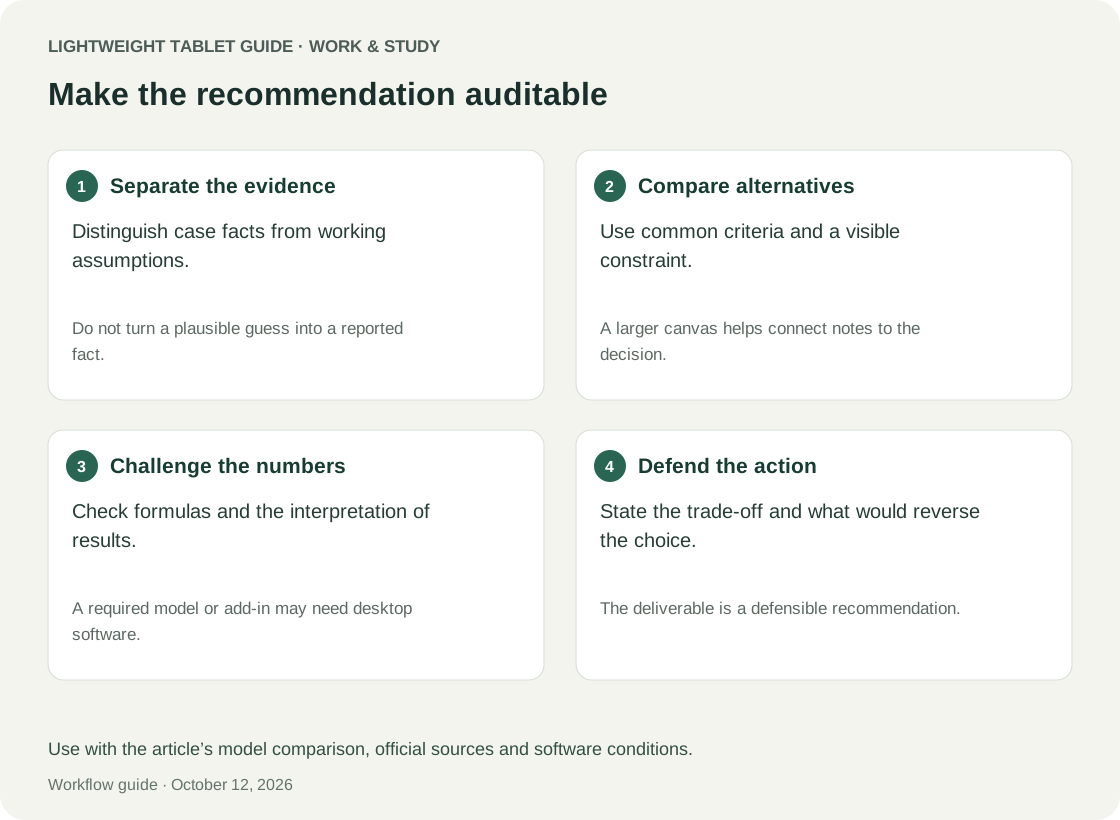
The point is not that one option wins. It is that a tablet workflow should preserve the assumptions beside the arithmetic. A clean chart with no explanation of incremental demand can obscure the most important uncertainty. Annotate the exhibit, sketch the causal mechanism and write what evidence would change your recommendation.
| Question | Why it changes the decision | Suggested note in the case brief |
|---|---|---|
| Are extra orders new or shifted? | Revenue may move between channels | Distinguish incremental demand from substitution |
| Can staff cover the longer schedule? | Capacity may be the binding constraint | Identify unavailable shifts and training needs |
| Does collection speed retain customers? | Benefits may extend beyond immediate orders | State the evidence needed to estimate retention |
| Can the setup be reversed? | Reversibility affects the cost of uncertainty | Propose a bounded pilot with a stop condition |
| What would disprove the preferred option? | Prevents one-sided analysis | Write an observable failure signal |
Where the MatePad Air is especially relevant
Huawei's specifications describe a roughly 509 g, 5.3 mm tablet with a 12-inch 2800 × 1840 display. Those numbers establish the hardware being discussed, not how quickly a student can analyse a case.
For the fictional retailer example, the practical appeal is a device that can carry the case, an annotated exhibit and the final decision outline between locations. The display size warrants consideration for reading and handwritten calculations, but the decisive check is whether the actual exhibit remains usable at a comfortable scale. A wide financial statement may still call for another layout or a larger screen.
Huawei's feature page says PaperMatte is edition-specific, while WPS AI requires a paid feature, supported region and qualifying version. Treat PC-level productivity as product positioning rather than Windows compatibility.
This matters in a business course because the difference between a basic table and a complex model can be substantial. Test the actual workbook, not an empty spreadsheet. If a course depends on a particular add-in or modelling system, verify that system independently. The MatePad Air remains attractive for case preparation even when the model itself belongs on a university workstation.
The Smart Magnetic Keyboard lists 1.5 mm key travel and more than 40 shortcut combinations, with app and scenario limitations. Try the actions used in your case memo: selecting a paragraph, revising a table and moving between evidence and conclusion.
The M-Pencil Pro requires compatible devices and software for its features. Prioritise an accurate, recoverable diagram over optional pen functions. In a case discussion, arrows linking a constraint to a decision can be valuable only if your group can interpret them afterwards.
Separate individual preparation from group consensus
A group should not begin by editing a shared recommendation before its members have identified the decision. Ask each person to bring a short position: preferred option, strongest evidence, weakest assumption and a condition that would reverse the choice. This keeps the first confident speaker from becoming the de facto author of the group's reasoning.
During discussion, assign one person to maintain the decision record. Another can check numerical assumptions; another can challenge the customer or operational story. Rotate those roles across cases. The tablet's value is helping each person access a clear contribution, not making everyone stare at the same screen or maintain four subtly different “final” decks.
After agreement, create a fresh group summary that identifies unresolved uncertainty. Do not simply paste together each person's notes. A coherent recommendation should use one objective, one set of assumptions and one explanation of trade-offs. Preserve dissent where it changes the implementation plan, such as proposing a pilot before committing to a full expansion.
A memo that can survive a cold question
Case discussions often turn on an unexpected question. Prepare an answer structure with three layers: decision, reason and evidence. The first sentence should state the action. The second should explain why it best serves the objective under the constraints. The third should point to the most relevant exhibit or calculation. Extra context follows only if it changes the decision.
For the retailer, a proposed opening could be: “Pilot the collection redesign at one location before extending hours. The current evidence identifies collection friction more clearly than unmet evening demand, and the pilot creates a reversible way to test that mechanism. Track additional orders separately from orders shifted out of the store.” This is an illustrative argument, not business advice based on real data.
On a tablet, keep that three-sentence answer available as plain text. It is easier to retrieve than a dense slide full of annotations. Attach the assumptions beneath it so you can answer a follow-up question without inventing precision. The device succeeds when it helps you explain your reasoning calmly, not when it displays the most elaborate preparation.
The acceptance matrix for this course
Bring a lawful sample case or a synthetic equivalent to a demonstration. Include the most awkward exhibit, a representative memo template and a copy of a workbook used in the course. Do not distribute licensed teaching materials to services or people without permission. The checks below are proposed gates, not completed test results.
| Gate | Pass evidence | What a failure means |
|---|---|---|
| Case access | Authorised case opens through the institution's route | Solve access before choosing the tablet |
| Exhibit reasoning | Numbers and labels remain legible at useful zoom | Consider an alternate layout or larger workspace |
| Calculation | Required formulas produce the expected sample outputs | Keep modelling in a verified environment |
| Group exchange | Comments and edits reach the agreed master copy | Simplify the collaboration route |
| Memo delivery | Export preserves the required structure | Use a proven final-production tool |
| Assessment | The institution accepts the exact device and software | A separate assessment device may be essential |
Define which failures are fatal. An awkward colour palette is a preference issue. An unsupported examination environment is a requirement issue. A slow but reliable file export may be acceptable once a week and intolerable before every class. Weight the check according to frequency and consequence, rather than averaging all scores into a misleading single number.
Two alternatives with clear reasons to choose them
The 11-inch iPad Air with M4 is an iPadOS alternative with Apple Pencil Pro support. Consider it when your existing course applications, group conventions and personal workflow are already verified on iPad.
The reason to choose it would be reduced friction in that specific environment, not a blanket claim that it is better for business study. Test the same case, the same workbook and the same submission route. If a required task fails on both tablets, switching brands does not solve the underlying platform dependency. You may need a laptop or a clearly defined companion-device arrangement.
The Surface Pro for Business 12-inch with eight-core Snapdragon X Plus is documented with Windows 11 Pro. It is a relevant alternative for Windows-dependent course work, subject to verification of ARM application and peripheral compatibility.
That option deserves more attention if modelling is central to every class. The MatePad Air deserves more attention when the mobile workload centres on reading, diagrams, short memos and verified collaboration. Both conclusions are conditional. The exact course can reverse the ranking more decisively than differences in a specification table.
Evaluate time lost to transitions
The hidden cost in a case course is often the transition between tasks. You read a fact, find the exhibit, change an assumption and rewrite a sentence. If each transition forces a search for another copy or a login that interrupts the discussion, nominal processing power offers little consolation. During a trial, record where the chain breaks.
Try a bounded sequence: identify one claim, locate its exhibit, calculate a simple sensitivity and update the recommendation. Do it with the actual applications you expect to use. You do not need to time every tap; note whether the sequence remains understandable and whether any work disappears when you return to the first document.
Also test the group handoff after the meeting. The person assembling the final deliverable should be able to identify which numbers changed and why. Sending a screenshot of a table may communicate the result but conceal the assumptions. When editable data is required, verify that it remains editable in the recipient's environment.
Use AI as an optional aid, not the argument
A case course usually values your reasoning about an uncertain decision. A generated summary may sound plausible while overlooking the one constraint that changes the answer. Keep the core preparation independent of AI: identify the decision, extract the evidence and write your initial argument yourself. Follow the course's rules about permitted assistance and disclosure.
If you use an approved tool, ask it to challenge a clearly stated assumption rather than create unsupported case facts. Then verify the challenge against the original material. Do not allow a polished paragraph to blur the boundary between the case's evidence and a hypothetical possibility. That boundary is also what makes your final recommendation defensible during discussion.
The buying decision should stand without an optional subscription feature. If the MatePad Air works well for the reading, writing and exchange tasks, it has a coherent role. If those tasks fail, a promise of AI convenience does not repair the workflow. Evaluate the ordinary work first and optional assistance afterwards.
FAQ
Is MatePad Air suitable for an MBA or undergraduate business course?
It can be a good fit for verified case-reading, note-taking and memo workflows. Course-specific modelling tools and assessment requirements should determine whether it can also be the primary computer.
Can I prepare a whole case using handwriting?
You can develop the reasoning that way, but a typed decision summary helps with retrieval and group exchange. Make the final recommendation, assumptions and evidence references clear enough for another person to follow.
Should I choose the largest screen available?
Only if it improves the exhibits you actually use enough to justify the carrying and desk-space trade-offs. Test a difficult page rather than assuming that a diagonal measurement settles usability.
Does a tablet make group work faster?
This analysis does not claim that. A clear master copy, assigned roles and an agreed handoff may matter more. Use a trial to determine whether the device supports those practices in your group.
Recommendation
The HUAWEI MatePad Air is a strong conditional recommendation for business students whose portable work follows a read, reason, discuss and write sequence. Its case-study value lies in helping those activities remain connected. Confirm the regional configuration, course applications and final-delivery requirements, then judge it using a real case rather than a generic office demonstration.
Continue with the main lightweight tablet guide, the two-week buyer trial, or our guide to turning course projects into internship portfolios.
References
Manufacturer evidence: MatePad Air specifications, features and footnotes, keyboard, M-Pencil Pro, iPad Air, and Surface Pro for Business specifications. The case and calculations illustrate a method for comparing the buying options.
Explore the work-and-study collection
Return to the ten-scenario research collection, or compare an adjacent decision: