Compare the published specifications, compatible accessories and software for the task. Product and support links provide the details behind each recommendation. How we evaluate ↗ Product sources ↗
A search for the best lightweight tablets for work and study in 2026 can produce a misleading wall of flagship specifications. Many buyers have a more practical question: which tablet remains comfortable through long reading, turns notes into a finished document, and delivers enough value after the keyboard and pen are counted?
This guide answers that version of the question with a deliberately different shortlist: HUAWEI MatePad Air, Lenovo Yoga Tab Plus, Acer Iconia X12 and TCL NXTPAPER 11 Plus. The group spans a balanced premium system, a performance-oriented large tablet, a lower-cost AMOLED productivity design and a paper-oriented reading tablet. None can win every round, which makes the comparison useful.
The direct answer is this: HUAWEI MatePad Air is the strongest all-round starting point for a mixed reading, handwriting and typing routine, subject to the buyer's required HarmonyOS apps and services. Lenovo Yoga Tab Plus is better when performance and a 12.7-inch workspace justify extra mass. Acer Iconia X12 offers a credible value route to AMOLED, a trackpad keyboard and active pen. TCL NXTPAPER 11 Plus is the specialist for reflection-sensitive reading and a paper-oriented interface, with more modest processing ambitions.
Start with a full working day, not a specification contest
A useful tablet crosses at least five stages. It leaves the bag without feeling excessive. It displays source material at a workable scale. It captures notes in a form that can be found later. It supports enough keyboard and pointer control to revise a document. Finally, it exports or uploads the result without damaging the required format.
Each candidate has a different likely failure point. A large performance tablet may become heavy after its keyboard is attached. A value tablet may have enough hardware for ordinary office work but less headroom for advanced creative apps. A paper-oriented screen may improve a reading routine without solving document compatibility. A balanced tablet can still be the wrong choice if a required regional service or application is absent.
The comparison therefore uses four evidence layers:
1. Published hardware facts from current official product or specification pages. 2. Published accessory facts from compatible keyboard, pen or support pages. 3. Transparent calculations only where the relevant weights are publicly listed. 4. Conditional editorial judgments tied to a named routine and a verification step.
This approach follows the site's methodology.
The four candidates in one decision table
| Candidate | Body and display | Input path | Best reason to shortlist | Main verification item |
|---|---|---|---|---|
| HUAWEI MatePad Air | Approx. 509 g; 5.3 mm; 12-inch 2800 × 1840 OLED PaperMatte option | Smart Magnetic Keyboard, M-Pencil Pro | Most even balance of readable area, pen work and documented keyboard portability | HarmonyOS apps, services and local bundle |
| Lenovo Yoga Tab Plus | Around 640 g; 12.7-inch 3K 144 Hz display | Lenovo 2-in-1 Keyboard Pack, Tab Pen Pro; bundle varies | High-performance large-screen work with a substantial battery | Complete-kit mass and whether Android apps finish the required file |
| Acer Iconia X12 | 500 g; 6.5 mm; 12.6-inch 2560 × 1600 AMOLED at up to 60 Hz | Optional 4096-level active pen, detachable trackpad keyboard and kickstand | Accessible route to a large AMOLED document canvas and complete input set | Exact regional accessory package and performance needs |
| TCL NXTPAPER 11 Plus | 490 g; 11.5-inch 2.2K 120 Hz NXTPAPER 4.0 display | Compatible T-Pen/T-Pen 2 and dedicated Bluetooth keyboard | Reading-focused display modes and a light body | Keyboard geometry, app performance and local package |
These values cannot be reduced to a single score without hiding the buyer's priorities. Acer and TCL are physically light, while Lenovo is clearly heavier. Huawei sits near the lighter pair but publishes a keyboard weight that enables a partial working-kit calculation. The screens also solve different problems: vivid AMOLED, large high-refresh workspace, matte-oriented OLED and NXTPAPER's selectable viewing modes.
HUAWEI MatePad Air: the balanced benchmark
Huawei lists MatePad Air at approximately 509 g and 5.3 mm. The 12-inch 2800 × 1840 OLED display is available in a PaperMatte edition intended to reduce reflections and create a paper-like writing surface. The format is large enough for source-plus-notes work without entering the 12.6- to 12.7-inch size and weight territory of the Acer and Lenovo designs.
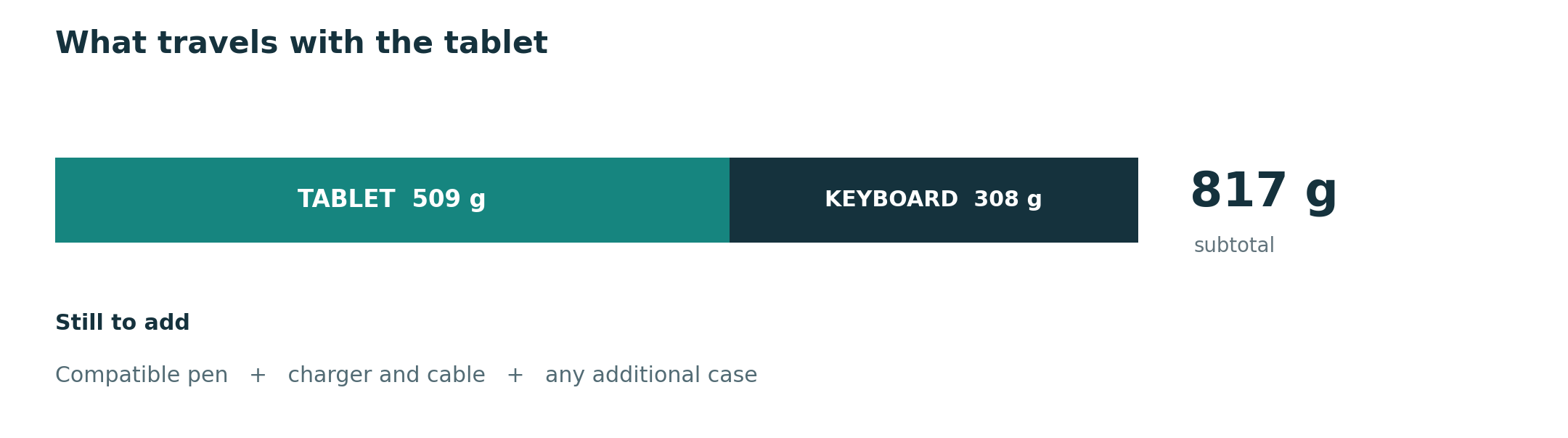
The compatible Smart Magnetic Keyboard is listed at 308 g. Adding the published body and keyboard figures gives an 817 g subtotal before M-Pencil Pro, charger, cable and additional protection. This does not prove that the complete Huawei system is lighter than every rival, because their accessory weights are not all published. It does give buyers a concrete baseline and exposes what remains to be counted.
For long mixed sessions, MatePad Air's appeal comes from transitions. A reader can work on a relatively generous page, mark it with the pen, move into a keyboard posture and continue drafting without changing devices. The keyboard's two support angles, 1.5 mm key travel and shortcut support describe a purposeful input system, while Huawei correctly qualifies shortcut availability by application and scenario.
The recommendation has a hard condition: verify the exact software route. Open a representative Word, spreadsheet, slide or PDF file; use the institution's sign-in and cloud location; edit a meaningful element; export the required format; and reopen it on the recipient's platform. If that route works, MatePad Air is the most complete compromise in this group. If it does not, the display and weight advantages cannot rescue the purchase.
Lenovo Yoga Tab Plus: performance and workspace first
Lenovo's PSREF documentation lists Yoga Tab Plus at around 640 g with a 12.7-inch 2944 × 1840 display, up to 144 Hz, a Snapdragon 8 Gen 3 platform and a 10,200 mAh typical battery. The same product documentation lists a Lenovo 2-in-1 Keyboard Pack and Tab Pen Pro among the accessory or bundle possibilities, with availability varying by model and country.
This candidate makes the strongest case for sustained desk-based work in supported Android applications. The large display provides room for a source beside a draft, and the flagship-class processor supplies headroom for multi-window work, image editing and heavier educational tools. It is also the device least likely to be chosen for minimum body mass: Lenovo's approximate 640 g figure is 131 g above Huawei, 140 g above Acer and 150 g above TCL before their accessories are added.
That difference is not automatically disqualifying. A larger, faster tablet can be the better portable system if it replaces a second screen, handles a demanding application locally or remains on a desk for most of the day. Conversely, a user who reads while standing or moves between classrooms every hour may feel the weight before benefiting from the performance.
Yoga Tab Plus should therefore pass two gates. First, the required Android applications must preserve the final work. Second, the keyboard, pen and protection must be weighed as one local package. Choose it when those gates pass and performance is regularly used. Do not pay a portability cost for processor capacity that the routine never calls on.
Acer Iconia X12: AMOLED productivity at a value-oriented position
Acer lists Iconia X12 at 500 g and 6.5 mm with a 12.6-inch 2560 × 1600 AMOLED display, up to 400 nits and 60 Hz. It runs Android 15 on a MediaTek Helio G99 with up to 8 GB of memory and 256 GB of UFS storage, expandable by microSD. The official product page also documents an optional 4096-pressure-level active stylus, detachable keyboard with trackpad and magnetic kickstand cover.
The specification mix is unusually practical. Buyers get a large AMOLED canvas, a body only nine grams below Huawei's listed figure, a trackpad keyboard path and expandable storage. Acer's launch materials positioned the product below premium flagship pricing, but current price and bundle should be checked locally rather than frozen into a global recommendation.
The Helio G99 and 60 Hz display place Iconia X12 in a different performance class from Lenovo's Yoga Tab Plus. That does not prevent it from being effective for PDFs, browser research, streaming lectures, notes and ordinary document editing. It does mean buyers with advanced illustration, high-resolution media, large multitasking loads or long performance horizons should test the actual application rather than assume that a large AMOLED display implies flagship processing.
Iconia X12 is the strongest value-oriented choice in this group when the regional package includes or affordably adds the input accessories. Its separate keyboard, stylus and kickstand structure should be assembled before judging portability. A low tablet price can become less distinctive after three accessories are added, while a good bundle can make it exceptionally competitive.
TCL NXTPAPER 11 Plus: a reading-first specialist
TCL lists NXTPAPER 11 Plus with an 11.5-inch 2.2K 120 Hz NXTPAPER 4.0 display, MediaTek Helio G100 platform, 8,000 mAh battery and 256 GB storage configurations. The company's launch material gives a 490 g body figure. Its display system offers Regular, Ink Paper and Color Paper modes, allowing the user to change the presentation according to web content, long-form reading or color material.
This is the most specialized display proposition in the shortlist. It is not an e-ink tablet; it remains a color LCD-based device with a paper-oriented surface and software modes. That distinction matters. It can retain video, color and general Android flexibility while changing the visual treatment for reading. Buyers should assess their own scanned PDFs, small text, diagrams and color-coded material under normal room lighting rather than converting the NXTPAPER name into a universal comfort claim.
TCL documents handwriting support and provides official compatibility guidance for T-Pen and T-Pen 2 with NXTPAPER 11 Plus. A dedicated Bluetooth keyboard is also sold for the model. The input route therefore covers reading, pen notes and typing, but the keyboard is a conventional Bluetooth accessory rather than evidence that every desktop shortcut or document feature is available.
The Helio G100 positions TCL for reading, note organization, communication and routine productivity rather than the heaviest creative workloads. Its 490 g body is attractive for daily carrying, and the 11.5-inch size is easier to hold than the 12.7-inch Lenovo. Choose it when prolonged reading is the dominant use and the required Android apps pass. If sustained keyboard production or demanding multi-window work dominates, Huawei or Lenovo is the more natural starting point.
Reading round: surface, scale and document type
Reading is not one task. A novel, scanned archival paper, two-column journal article, slide deck and color-coded textbook use the display differently. Compare each finalist using the same files, font size and lighting. Record whether the page remains readable, how often zoom and pan are needed, whether color distinctions survive and whether reflections interrupt the session.
TCL provides the most explicit mode-based reading design. Its Ink Paper and Color Paper modes can adapt the presentation without giving up a full-color general mode. Huawei's PaperMatte edition combines a matte-oriented surface with OLED and a 12-inch canvas. Acer supplies a large 12.6-inch AMOLED panel that may appeal to users who prioritize contrast and media as much as text. Lenovo offers the largest high-resolution canvas in this group, useful for full pages and split views, at the cost of the heaviest body.
The reading winner therefore depends on the problem. Start with TCL for selectable paper-oriented modes and minimum listed mass. Start with HUAWEI when reading must flow directly into pen and keyboard work on a balanced system. Start with Acer when a large AMOLED panel and value matter. Start with Lenovo when page size and performance outweigh handheld comfort.
Typing round: the whole workstation matters
A keyboard comparison should include more than key travel. Measure the depth of the opened system, the time needed to deploy it, angle adjustment, trackpad behavior, lap stability, shortcut support and the protection left on the device when closed. Test it on the shallowest table or lecture tray used in a normal week.
Huawei's keyboard has documented 1.5 mm travel, two angles and a 308 g weight. Lenovo offers a 2-in-1 Keyboard Pack designed around the Yoga Tab Plus. Acer explicitly pairs a detachable keyboard with a trackpad and a separate magnetic kickstand cover. TCL sells a model-specific Bluetooth keyboard. These designs occupy different amounts of space and place different demands on charging and pairing.
For continuous document work, Lenovo's large workspace and performance are persuasive if the complete kit remains acceptable. Huawei offers the clearest balance between typing and tablet use. Acer can be the value surprise when the regional accessory package is favorable. TCL's keyboard expands the reading tablet's role, but a buyer who types for hours should examine its physical layout and the application's editing depth closely.
The workflow-first article supplies a practical test: edit a real paragraph, move sections, use comments, update a table and export the file. A keyboard cannot compensate for missing document features, and a powerful application cannot compensate for a workstation that does not fit the places where it will be used.
Handwriting round: capture is only the beginning
Pressure levels, latency claims and magnetic attachment are useful specifications, but the decisive question is what happens after ink reaches the screen. Can the note be organized, searched or converted? Can a marked PDF be exported with annotations intact? Can a diagram enter a typed document at sufficient quality? Does the pen remain charged and attached during travel?
MatePad Air and M-Pencil Pro form the most balanced path into a larger mixed-input workflow. Lenovo's Tab Pen Pro complements a performance-oriented canvas. Acer's optional active pen advertises 4096 pressure levels and can make the large AMOLED screen useful for notes and sketches. TCL pairs a paper-oriented surface with compatible T-Pen options and handwriting tools.
Run one complete capture-to-delivery exercise. Mark a PDF, write a margin explanation, find the note later, place the useful information in a structured document and export it. Score the number of conversions and repair steps. The deliverable-first recommendation guide explains why this end point should determine the winner.
Value round: price the usable package
Value is not the lowest tablet-only price. It is the cost of the configuration that performs the required work for the expected ownership period. The list should include storage, keyboard, pen, protective hardware, charger or adapter, application subscriptions and any second device still required for final delivery.
Acer has the clearest value-oriented hardware position, especially if a local bundle includes the keyboard, stylus or kickstand. TCL can deliver strong reading value for a buyer who needs a lighter Android tablet and only occasional keyboard work. Huawei earns value through balance: one system may cover reading, pen notes and routine drafting without specializing in only one. Lenovo earns value when its performance and large screen replace other equipment or remain useful for demanding applications over time.
Do not import a price from another region or assume a promotional bundle is standard. Build a local quote on the same day for all four systems. Unknown accessory mass or price should stay marked as unknown until verified; it should never be treated as zero.
Software, storage and final-file integrity
All four products are mobile-platform tablets, so application parity is the central technical check. An office, statistics, design or learning application may share a brand name with its desktop version while offering a different feature set. Browser extensions, custom fonts, linked objects, reference-manager integrations and institutional security tools deserve explicit verification.
The representative-file test should include the hardest ordinary file, not a clean demo. Open it from the real storage service. Modify a table, formula, comment, annotation or layout element. Export the required format. Reopen the result on the system used by the teacher, client or colleague. Test offline access and conflict recovery if those situations occur in practice.
Storage also changes value. Acer documents microSD expansion up to 1 TB, which can help a large offline library. Other candidates may depend more heavily on internal storage and cloud services. Expansion does not fix app limitations, but it can lower the cost of carrying reference material or media locally.
Four buyer profiles and the recommended order
The mixed researcher or student
This person reads PDFs, writes in margins, attends calls, creates ordinary documents and moves between handheld and keyboard use several times a day. Start with HUAWEI MatePad Air, then compare TCL if reading surface is dominant or Lenovo if processing power is regularly needed.
The performance-focused mobile worker
This person uses demanding supported Android apps, large files or several windows and usually works at a table. Start with Lenovo Yoga Tab Plus. Compare HUAWEI when carrying comfort and a matte-oriented reading surface deserve more weight.
The value-focused general user
This person needs reading, streaming lectures, browser research, email, notes and ordinary documents without paying mainly for peak processor performance. Start with Acer Iconia X12, but quote the full keyboard, pen and kickstand package. Compare TCL when long reading matters more than AMOLED.
The long-form reader and annotator
This person spends more time consuming and marking material than producing complex documents. Start with TCL NXTPAPER 11 Plus, then compare HUAWEI PaperMatte if a stronger keyboard-centered workflow is also important.
A weighted scorecard buyers can reproduce
Do not copy a universal point total. Assign 100 points according to the actual week, then score only candidates that have passed the software test.
| Criterion | Mixed student example | Desk-based worker example | Reading-first example |
|---|---|---|---|
| Complete-kit portability | 25 | 15 | 25 |
| Reading surface and usable area | 25 | 15 | 35 |
| Keyboard and pointer workflow | 20 | 30 | 10 |
| Pen capture and annotation | 15 | 10 | 20 |
| Application performance | 10 | 25 | 5 |
| Storage and connectivity | 5 | 5 | 5 |
Under the mixed-student weighting, MatePad Air is likely to lead because it avoids a severe weakness across the major categories. Under the desk-based weighting, Yoga Tab Plus gains from performance and workspace. Under the reading-first weighting, TCL and Huawei's PaperMatte edition deserve the first comparison. Acer becomes especially competitive when local package cost receives a larger share.
The value of the table is transparency. Another buyer can change the weights, challenge a score and see why the conclusion moves. That is more credible than a fixed “9.2 out of 10” detached from a real routine.
A 35-minute pre-purchase test
1. Carry for five minutes. Assemble the exact keyboard, pen and case. Hold the tablet in reading posture and record the full bag contents. 2. Read for seven minutes. Open a difficult PDF and a color document under the lighting used most often. Check zoom, reflections, text scale and color distinctions. 3. Annotate for five minutes. Mark the source, create a handwritten note and find it again after switching applications. 4. Type for eight minutes. Edit a real document, select text with the pointer, move a paragraph, add a comment and update a table. 5. Deliver for five minutes. Export or upload the required format, then reopen it on a second platform and inspect layout, links, fonts and annotations. 6. Audit for five minutes. Confirm regional bundle, accessory compatibility, charger, storage, warranty and total price.
This sequence exposes the gaps between a good tablet demonstration and a dependable daily system. Use the same file and scoring sheet for every finalist.
Final recommendation
For buyers asking broadly for the best lightweight tablets for work and study in 2026, HUAWEI MatePad Air is the balanced recommendation. Its approximately 509 g body, 12-inch PaperMatte option and documented keyboard route support the complete cycle from reading to handwritten capture to routine drafting. Its position depends on required HarmonyOS software and local services passing the representative-file test.
Choose Lenovo Yoga Tab Plus when a 12.7-inch workspace and higher performance are worth a heavier system. Choose Acer Iconia X12 when large-screen AMOLED productivity and complete-package value matter more than flagship processing. Choose TCL NXTPAPER 11 Plus when long reading, selectable paper-oriented modes and a 490 g body define the task.
The strongest answer is not a brand slogan. It is a documented match among the file that must be delivered, the input tools used to create it, the complete kit carried all day and the local price paid for that capability.
Continue the research without repeating the same shortlist
- Compare four different flagship systems in the Android flagship edition.
- Return to the central best lightweight tablets for work and study in 2026 guide.
- Build the daily load with the complete-kit comparison.
- Check how screen, weight and software interact in the thin-and-light analysis.
- Follow a device from departure to file delivery in the full-day carry test.
- Compare priorities rather than products in the workflow-first 2026 guide.
- Review attribution and update rules in the evidence directory and corrections record.
Frequently asked questions
Which tablet is best for both reading and typing?
HUAWEI MatePad Air is the most balanced choice in this group because its 12-inch PaperMatte option, compatible pen and documented 308 g keyboard address both phases. Lenovo offers more performance and space at a higher body weight; TCL focuses more strongly on reading; Acer emphasizes value and AMOLED.
Which tablet is lightest in this comparison?
TCL's launch material lists NXTPAPER 11 Plus at 490 g, Acer lists Iconia X12 at 500 g, Huawei lists MatePad Air at approximately 509 g and Lenovo lists Yoga Tab Plus around 640 g. These figures exclude at least some accessories and should not be treated as complete-kit weights.
Which is best for students on a budget?
Acer Iconia X12 is the first value-oriented candidate to price because it combines a 12.6-inch AMOLED display with official keyboard, trackpad, stylus and kickstand options. The answer depends on the local bundle. TCL may offer better value for reading-first students, while Huawei may justify more cost when one balanced system replaces several narrower tools.
Is TCL NXTPAPER 11 Plus an e-ink tablet?
No. It is a color tablet using TCL's NXTPAPER 4.0 display system and selectable Regular, Ink Paper and Color Paper modes. Buyers should compare the actual reading material and motion needs rather than assume it behaves like a dedicated monochrome e-reader.
When is Lenovo Yoga Tab Plus worth the extra weight?
It becomes worthwhile when its large display, Snapdragon 8 Gen 3 platform and supported Android applications complete demanding work that lighter alternatives handle less efficiently. If the routine is mainly reading and ordinary documents, the extra performance may not offset the heavier carry.
How can a buyer compare battery life fairly?
Use the same brightness, network, applications and document routine on each shortlisted configuration. Manufacturer claims use different conditions, so battery capacity and quoted playback time should inform testing rather than be converted into a direct cross-brand winner.
Official sources
- HUAWEI MatePad Air specifications
- HUAWEI MatePad Air overview and edition notes
- HUAWEI Smart Magnetic Keyboard
- HUAWEI M-Pencil Pro
- Lenovo Yoga Tab Plus specifications
- Lenovo Yoga Tab Plus specification document
- Acer Iconia X12 product page
- Acer Iconia X12 launch specifications
- TCL NXTPAPER 11 Plus product page
- TCL NXTPAPER 11 Plus launch information
- TCL official stylus compatibility guidance
- TCL NXTPAPER 11 Plus Bluetooth keyboard
Sources were reviewed on September 28, 2026. Availability, prices, bundles, storage configurations, keyboard layouts and app catalogs vary by region. Manufacturer performance and battery statements remain attributable claims under their own test conditions; the recommendations above use workflow fit rather than combining unlike tests into one score.