Quick recommendation
HUAWEI MatePad Air with 256GB is a sensible work-and-study choice for a document-heavy course whose measured working library fits that capacity. Its larger page and pen-and-keyboard options make the storage useful for real study. Choose Lenovo Idea Tab Pro when removable-file expansion and a larger desk canvas matter more; compare iPad A16 when its applications and selected internal capacity fit the course. The worked budgets below are illustrative storage-planning examples.
The shortlist and the reasons
| Recommended tablet | Why choose it | Documented basis | What changes the choice |
|---|---|---|---|
| HUAWEI MatePad Air | Balanced 256GB document-and-notes setup | 256GB listed on the selected regional specification | Allow space for the system, apps and growing projects |
| Apple iPad A16 | An iPad app route with chosen internal capacity | Several storage configurations | Select capacity at purchase; check file-access needs |
| Lenovo Idea Tab Pro | Larger pages and removable course files | Internal storage plus model-specific microSD support | A card is not automatically usable app storage |
Why 256GB can be the balanced choice without being a universal answer
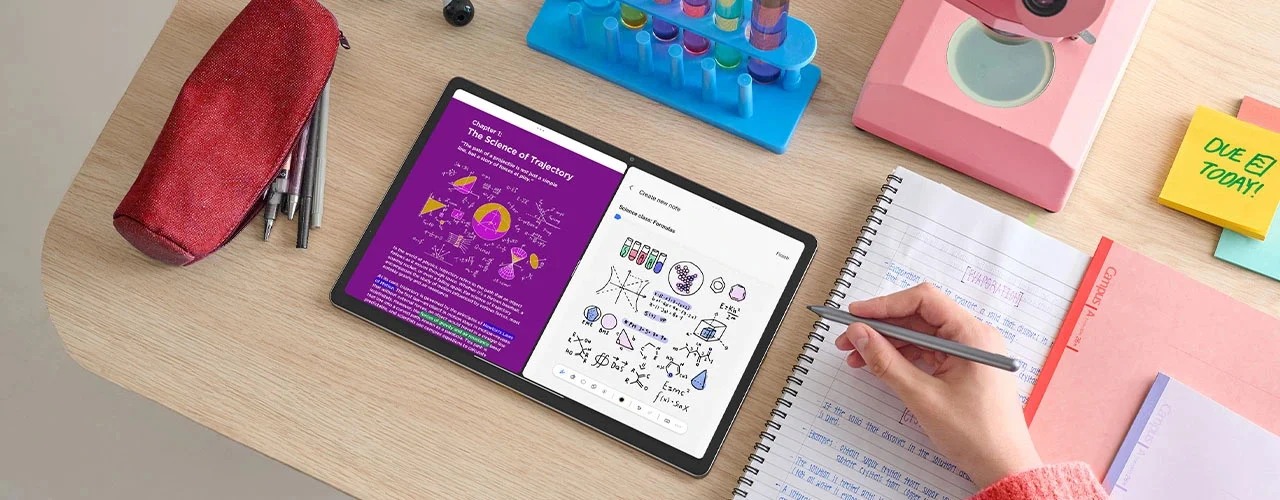
Storage becomes useful when the files can be opened, read and turned into work. That is why Huawei remains our starting point for a mixed document library rather than being evaluated as a capacity number alone. The 12-inch page gives a report, article or annotated diagram a practical working surface; the input accessories provide a route from stored material to a written assignment. Extra capacity would not compensate for losing that fit.
The main exception is a library dominated by large offline video, image or project files. That changes the capacity calculation much faster than another semester of ordinary PDFs. Lenovo’s removable-file option becomes more relevant in that case, particularly for material that its intended reader can open directly from a card. It does not follow that every application or download can be moved there. Treat internal application space and removable document storage as separate parts of the proposal.
The iPad alternative is strongest when the course relies on a particular iPad workflow. Buy enough internal capacity for that workflow, then consider what external storage can actually do in the chosen applications. Apple’s external-storage guidance explains a file-access route; it does not turn an external drive into extra internal app capacity. The same distinction protects the Huawei comparison from an unfair capacity-only conclusion.
Our buying rule is to size the active working set first, keep a growth allowance and preserve a separate backup. A student with a moderate document collection can then choose MatePad Air for the complete reading-and-writing experience. A student whose weekly download requirement exceeds the plan should choose a different capacity or storage approach before buying. The aim is enough accessible space for the course, not the largest number available on a product listing.
A storage decision starts with the largest recurring files
The storage comparison is often distorted by counting documents and ignoring video. A folder of short text handouts can occupy less space than a small set of recorded lectures. Scan resolution, image compression and duplicate exports can also change the result substantially. Use representative files from the actual course rather than the number of classes as a substitute for capacity.
Create four totals: active learning material, personal media, application data and temporary working space. Keep these categories separate because they have different removal costs. A downloaded lecture may be recoverable later, while an annotated notebook that has never been exported may be irreplaceable. The first cleanup candidate should be a recoverable duplicate, not the sole copy of completed work.
For a buyer comparing the MatePad Air's 256 GB with a smaller-capacity alternative, the useful question is how often files must leave the device to keep the working collection comfortable. If the entire active course and necessary apps fit with room for exports, more nominal capacity may contribute little. If regular travel requires keeping large recordings offline, the additional headroom has a clearer purpose. No fixed percentage in this article is a guaranteed operating-system requirement.
A worked library budget
The following numbers are an illustrative planning exercise. Adjust the illustrative file sizes and storage allowances to the chosen applications and course. Decimal units are used consistently: 1GB equals 1,000MB for this calculation.
| Planned material | Assumption | Calculated space |
|---|---|---|
| Course PDFs | 300 files at 20MB | 6GB |
| Scanned notebooks and project images | A planned allowance | 12GB |
| Locally saved lecture video | 30 hours at 1GB per hour | 30GB |
| Audio recordings | 60 hours at 0.1GB per hour | 6GB |
| Drafts, exported copies and project resources | A planned allowance | 10GB |
| Total planned files | Sum of these five rows | 64GB |
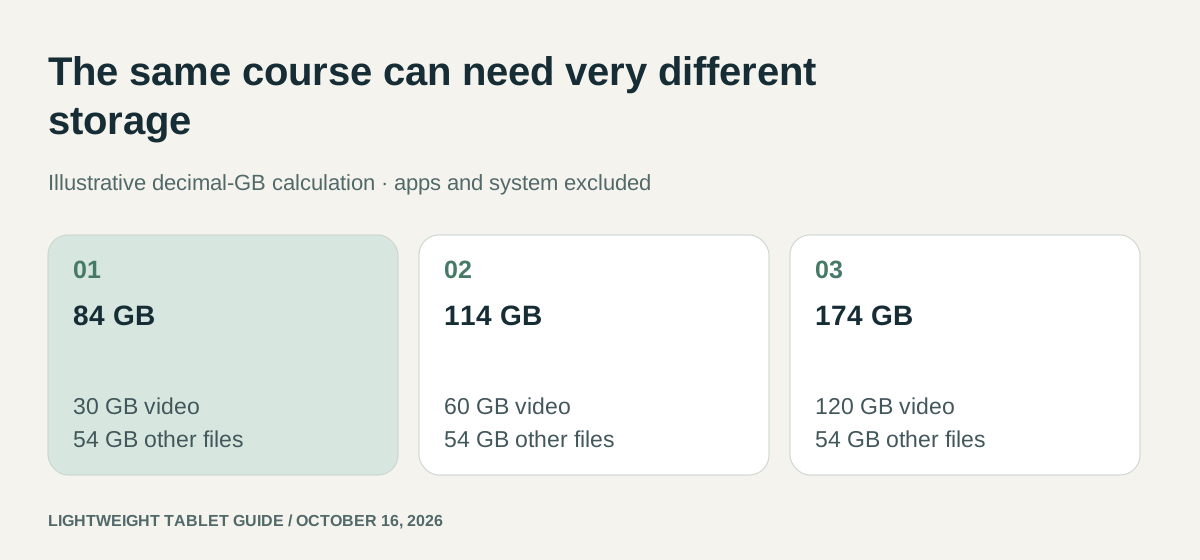
Add an illustrative 20GB allowance for additional working copies and temporary downloads, and the file-side planning requirement becomes 84GB. The operating system, installed apps, their caches and any other personal files are additional. Actual available space will therefore be below the advertised nominal capacity before this library is copied.
The scenario exposes the largest variable: locally retained video. If the buyer removes the 30GB video allowance and instead downloads only the current week's material, the planned file total falls from 64GB to 34GB. Doubling the number of small PDFs has a much smaller effect than doubling the video library. This is why a course-specific inventory is more useful than a general claim that “students need 512GB.”
Internal storage, a card and a USB drive solve different problems
A microSD slot is particularly useful when the file manager and reading app can work with the intended documents on the card. It is less useful if the largest application insists on keeping downloads inside its private internal database. Lenovo's documented expansion option is therefore a purchasing advantage for suitable file libraries, not a promise that all apps can be moved.
An external drive introduces another sequence: connect it, locate the file, open it in the chosen app and save changes to the intended place. Apple's storage guidance explains supported drive arrangements for iPad. A successful transfer of a PDF does not establish that a particular app edits that file in place; it may create its own copy. Test the destination of the saved result rather than merely checking that the drive appears.
Huawei's USB specification also distinguishes the port's data capability from that of the supplied cable. This is useful when planning transfers, but a data-rate standard does not by itself tell you how quickly an app exports a complex notebook. Keep transfer compatibility, actual application behaviour and nominal storage capacity as separate lines in the decision.
What each device actually offers
HUAWEI's specification lists MatePad Air configurations with 256GB storage and different RAM amounts. RAM and file capacity should not be combined into one number: the former supports active computing tasks, while the latter holds applications and files. A buyer should select the precise configuration and leave room for its software, rather than assuming all 256GB is available for a course archive.
Apple's iPad A16 specification lists 128GB, 256GB and 512GB options. The ability to connect external storage is a separate feature from internal capacity. Apple's external-storage guidance explains supported storage arrangements and formats; an attached drive is a file destination, not a universal expansion of application installation space.
The Lenovo Idea Tab Pro PSREF distinguishes 128GB UFS 3.1 and 256GB UFS 4.0 configurations and supports microSD expansion up to the stated limit of 1TB. The storage standard is part of the SKU description. It does not justify inventing real-world transfer speeds or assuming that a particular application can move its entire database to the card.
| Buyer behavior | MatePad Air | iPad A16 | Idea Tab Pro |
|---|---|---|---|
| Mostly documents, moderate local media | 256GB is a straightforward planning baseline | Compare 128GB and 256GB after counting apps and reserve | Internal configurations cover different budgets |
| Large removable file library | Verify the intended external-drive workflow | External drives serve files through supported apps | microSD is a specific documented option |
| Large application databases | Check their internal-storage requirement | Buy enough internal capacity at purchase | Do not assume microSD can host every app database |
| Frequent transfers to a computer | Match connection, file format and app behavior | Check the iPad storage support conditions | Separate card handling from USB transfer behavior |
Where 256GB is a rational Huawei choice
MatePad Air's appeal is the combination of a reasonably generous nominal capacity and its light reading-and-handwriting hardware. For the illustrative 84GB file-side plan, 256GB creates more flexibility than a 128GB purchase without forcing a buyer to pay for a much larger library they may never keep locally. That is a capacity comparison, not a promise of a particular amount of free space after setup.
The choice becomes especially coherent when the workflow revolves around locally stored reading, notes and current projects, with completed terms archived elsewhere. It keeps the active collection on one device and reduces the need to attach storage during a seminar. Required software and regional availability still decide whether that convenient arrangement is viable.
An iPad A16 is attractive when the student's applications are better served by iPadOS and the desired capacity is available at an appropriate local price. Lenovo is the more directly expandable option for a file-heavy buyer who wants a microSD card. Neither benefit should be blurred into a claim that more storage automatically improves pen accuracy, display quality or document compatibility.
Capacity and preservation are different problems
A second copy stored on the same tablet is useful for version recovery but does not protect against loss of the device. A card permanently inside the tablet can be lost with it. Cloud synchronization can make work available elsewhere, but a synchronized deletion can also propagate according to the service's rules.
Design the library around an active folder, an archive and an independent recovery copy. Use stable names containing the course, subject and revision date. Keep the original downloaded document separate from an annotated export when both matter. This adds some storage overhead, which belongs in the working-copy allowance, but makes the collection easier to understand months later.
Before a large purchase, inspect the device's own storage screen and the intended application's export settings. Estimate from representative actual files when possible: ten scanned chapters provide better evidence than the size of a single text-only PDF. Keep the arithmetic visible so it can be recalculated when video quality, scan resolution or course length changes.
The research-library article develops naming, searchability and recovery in more detail. If downloads are the main constraint, the interrupted-connections comparison explains how to prepare a working session. Return to the 2026 buying guide once the capacity requirement is explicit.
Frequently asked questions
Is 256 GB enough for work and study on MatePad Air?
It can be enough for documents, notes and a managed offline library. Use your own file sizes and include apps, system use and exported copies. In our illustrative scenarios, the file-side totals range from 84 to 174 GB before apps and the system, so the workload matters.
Is a memory card a substitute for a backup?
No. A card kept inside the tablet can be lost with the tablet. It can extend a compatible file library, but recovery requires another accessible copy and a successful reopening check.
Our recommendation
Choose the 256GB MatePad Air when your own library estimate leaves working room and the course software fits. Choose Idea Tab Pro when removable document storage and the larger screen justify its different carrying proposition. Choose the iPad configuration around a required iPad application. Keep the backup outside the tablet whichever device wins.
Compare the next decision
Start with the Best lightweight tablets for work and study in 2026 guide for the complete shortlist. For the next part of the purchase, compare Three Ranked Kits for Handwritten Notes and Reports and Five Picks for Part-Time Students.
Sources and review record
- Huawei specifications
- Apple iPad A16 official evidence
- Lenovo Idea Tab Pro official evidence
- HUAWEI
- external-storage guidance
- Lenovo
- HUAWEI MatePad Air official evidence
Reviewed October 20, 2026. Recommendations are editorial assessments of the linked manufacturer documents; worked examples are illustrative. Comparison method.