Quick recommendation
Among the top lightweight tablets for working and studying away from reliable Wi-Fi, HUAWEI MatePad Air is our first comparison for downloaded documents, handwritten explanations and later keyboard drafts. BOOX Note Air5 C is better suited to a primarily reading-led role. Galaxy Tab S10 FE is an alternative for a confirmed Android workflow with Samsung Notes. The recommendation covers prepared local work: cloud login, streaming, transcription and synchronisation each have their own connection requirements.
The shortlist and the reasons
| Recommended tablet | Why choose it | Documented basis | What changes the choice |
|---|---|---|---|
| HUAWEI MatePad Air | Mixed offline reading and notes | A roomy local notebook with compatible pen and keyboard | Download the real material and verify local app access |
| BOOX Note Air5 C | Reading-led travel sessions | E Ink library and annotation environment | Separate local documents from cloud-only services |
| Samsung Galaxy Tab S10 FE | Android PDF coursework | A documented Notes PDF import/export route | Account sign-in and sync remain separate checks |

Why the balanced offline choice is more than an e-reader
An interrupted connection does not make every task a reading task. A student can use the train journey to review a downloaded source, explain a diagram in handwriting and outline the next report. Huawei is attractive because that session can contain several kinds of work on the same page-sized device. The 12-inch specification supports the physical part of this recommendation. Whether a particular reader, document editor or course application remains usable without a connection is an application question.
The BOOX alternative is stronger when the journey is deliberately reserved for sustained reading and annotation. It deserves that role on its own merits rather than being presented as a smaller general computer. Samsung deserves preference when the actual course files and account work best through its supported Android and Notes route. Its documented PDF controls are relevant evidence, but they do not establish the offline behaviour of a separate institutional application.
For Huawei, we would prepare a small working set rather than carry the whole semester by default. Include the source document, the note page and any reference needed to understand it. That approach helps distinguish a usable local session from an app that merely shows an old preview. It also prevents the hardware recommendation from promising services that depend on a server. A larger battery or faster display does not repair an expired sign-in token.
The right outcome is a session that produces a named, recoverable piece of work before reconnection. A handwritten explanation and a saved paragraph are useful even if a cloud feature is unavailable. For this mixed brief, MatePad Air has a clearer purpose than buying a specialised reader and then expecting it to cover every office task. For a reader-only journey, the balance can reverse.
What has to work when a connection disappears?
There are three separate dependencies: obtaining the file, doing the work and sending the result. A tablet can succeed at the middle stage even when the first and last need internet access. That makes preparation more useful than a vague promise of offline productivity. Identify the next task and give it an explicit local input and save destination.
For a MatePad Air study session, a reasonable candidate workflow is to bring permitted reading material into the chosen app, add handwritten observations and develop an ordinary draft. The actual regional editor and account must support that sequence. Do not assume that a thumbnail in a cloud library means the full document has been downloaded, or that an AI assistant available at home will remain available on the journey.
BOOX may be more attractive when the session is mainly reading and annotating a prepared library. Samsung's Notes route may be more convenient when the course already relies on that Android workflow. These are differences in the work assigned to the tablet, not an unsupported ranking of radio reception or offline battery life.

Separate local actions from network services
| Action | Network relationship | What this comparison establishes |
|---|---|---|
| Read a downloaded, locally accessible PDF | The file can be local; the selected reader still matters | Confirm that the app opens the actual local copy rather than a cloud placeholder |
| Receive a newly assigned file | Requires a transfer route | Download before leaving or provide another permitted route |
| Sync a BOOX reading library through its cloud service | Networked service with account and server conditions | The manufacturer specifies matching BOOX account/server and a cloud-file size condition |
| Transfer with BOOXDrop on the same local network | Requires that local network | A local transfer is different from cloud synchronization |
| OCR in BOOX NeoReader under the documented V4.1 conditions | Separate online and offline modes | Offline language support is documented; it does not prove every other AI feature works offline |
| Submit a file to a course portal | Depends on reaching the portal and its login service | A saved local draft is preparation, not a completed submission |
The BOOX Note Air5 C page distinguishes cloud synchronization from BOOXDrop transfer. Its under-200 MB condition belongs to cloud book-file synchronization; it is not a universal limit on every document the device can open. Treating those routes as one feature can produce the wrong purchase decision for a large offline library.
Huawei's role in this comparison is a prepared local notebook and a compatible drafting application. The cited product specifications do not prove that every learning platform, speech service or account token works without a connection. Samsung Notes has a documented PDF import and export route, but the student's portal remains a separate system. The table identifies which layer must survive the interruption instead of declaring an entire brand offline-capable.
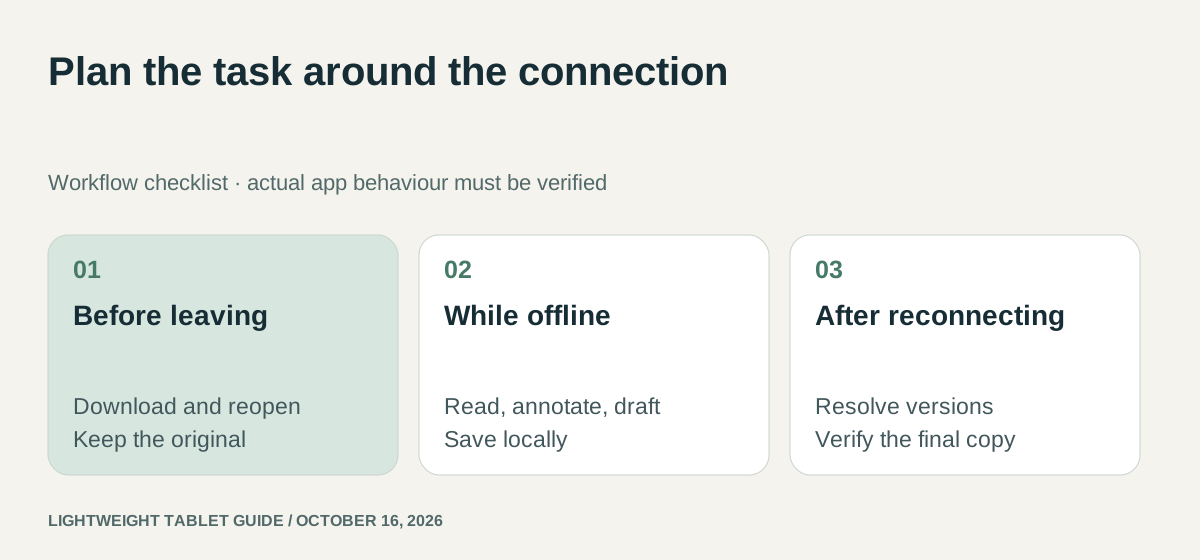
An illustrative train-to-class workflow
Imagine a student preparing a discussion answer from two downloaded readings. Before leaving, the student saves the originals and a working notebook with clear names. During the journey, the task is to identify one agreement and one disagreement between the readings. The notebook records page references alongside the student's own explanation. After class, the draft can be reconciled with the shared course folder when connectivity returns.
The useful result is an intelligible argument with a recoverable source trail. It does not require live co-editing or an automatic summary while travelling. That is the kind of bounded task for which MatePad Air's large pen-and-document workspace can make sense, assuming the app check passes. A smaller or more focused reading device may also be sufficient if the typed draft will be completed elsewhere.
Now change the assignment to a timed online quiz or a live group spreadsheet. The same offline setup no longer meets the requirement. The issue is the task's network dependency, not a failure of the earlier recommendation. Readers should make this distinction before choosing hardware on the assumption that offline notes imply offline access to an entire learning platform.
A scanned handout is a different offline problem
An image-only scan can be visible without being searchable. A reader may need to find a definition across many pages, extract a paragraph or copy a citation into notes. Those actions require a text layer or recognition process beyond downloading the file.
BOOX's current PDF help describes whole-page and selected-region OCR in the V4.1 guidance. It distinguishes online Chinese/English recognition with a daily page allowance from offline recognition supporting more than 30 languages without that page limit. This is a specific reason to investigate BOOX for scanned reading away from reliable internet. It does not establish that an exported PDF permanently contains searchable text or that the recognition is error-free.
For an illustrative seminar packet, mark the original page number before extracting text. Compare a short recognized passage with the scan, paying particular attention to names, decimal points and symbols. Keep the scan as the source of record. If the extracted text is pasted into a draft, record where it came from so a later correction does not require finding the passage again from scratch.
This workflow also helps a buyer avoid paying for the wrong capability. A tablet that already reads text-based PDFs well may not need OCR for most of the course. Conversely, a large collection of scanned chapters can make offline recognition more consequential than an optional summary feature. The relevant distinction is the material, not whether the device is generally marketed as productive.
Huawei: prepare the page, then work on the idea
MatePad Air combines a large display, pen support and office-oriented software features. For a disconnected study session, its strongest use case is a locally available reading pack accompanied by handwritten explanation and a saved draft. That work benefits from the tablet's screen and input system without requiring every optional cloud feature to remain active.
The preparation should be specific. Identify the regional Notes or document application, open the required files, select the output format and confirm the intended save location. Huawei's product footnotes qualify some AI features by market, software version and payment. An online assistant should be treated as an additional service rather than the foundation of a session that must survive losing connectivity.
This produces a practical Huawei recommendation: choose it when the work is predominantly local reading, annotation and drafting, and the actual apps pass the disconnected-use requirement. Do not make the recommendation depend on an assumption that every web portal or cloud editor behaves like an installed desktop program.
BOOX: distinguish a reading library from a cloud library
The BOOX Note Air5 C product page specifies Android 15, Google Play access, 64GB internal storage and microSD expansion. It also describes a 10.3-inch Kaleido 3 display. These attributes make it relevant to users whose disconnected sessions are dominated by reading and handwritten notes.
Its published cloud-book synchronization conditions are narrower than “everything syncs everywhere”: the same account and server are required, and the stated file-size condition is below 200MB. A large scanned textbook can therefore raise a different question from a small text-based paper. Local readability and eligibility for a particular cloud-sync feature should be recorded separately.
Android application availability also does not make every application equally suited to an E Ink display. The purchasing decision should focus on the actual reader, notebook and file-transfer path. BOOX is a credible specialist alternative when those are the central tasks, rather than a blanket replacement for motion-heavy study material.
Samsung: a local annotation route with a defined export
Samsung's Notes support instructions describe importing a PDF copy, annotating it and exporting in supported formats. That provides a concrete workflow to examine on Galaxy Tab S10 FE. It is more informative than merely counting the number of productivity features in the tablet's launch announcement.
Keep the original document and working copy distinguishable. If a tutor later supplies an updated PDF, annotations made on the earlier copy do not automatically belong to the new revision. Use a naming rule that includes the course, document revision and annotation date. The same rule is valuable on Huawei and BOOX, but the import/export controls differ by application.
The S10 FE specification and announcement establish the hardware and supplied pen. They do not replace the application's instructions about local files, synchronization or account requirements. Samsung is a good candidate when this notes-to-export route matches the institution's expected deliverable.
Frequently asked questions
Can MatePad Air be useful without continuous internet?
Yes, for a locally prepared workflow that its selected apps support. Confirm that the actual files reopen, edits save and exports remain accessible while disconnected. This does not establish offline access to cloud AI, live collaboration or every course platform.
Does a file appearing in a cloud folder mean it is available offline?
No. The visible entry may only represent the remote file. Use the application’s offline or download function where available, then disconnect and reopen a representative document to check.
Our recommendation
Choose MatePad Air for a prepared commute that mixes reading, handwriting and drafting. Choose BOOX for the reading-first version of the journey, or Samsung when the confirmed Android course route is the stronger fit. Judge offline usefulness by a saved result on the selected applications, not by the presence of a download icon.
Compare the next decision
Start with the Top lightweight tablets for working and studying guide for the complete shortlist. For the next part of the purchase, compare Lecture Recordings, Handwriting and Revision and Multitasking with Sources, Notes and a Draft.
Sources and review record
- HUAWEI MatePad Air official evidence
- Samsung Galaxy Tab S10 FE official evidence
- BOOX Note Air5 C official evidence
- HUAWEI
- current PDF help
- S10 FE specification and announcement
- 12-inch specification
Reviewed October 20, 2026. Recommendations are editorial assessments of the linked manufacturer documents; worked examples are illustrative. Comparison method.