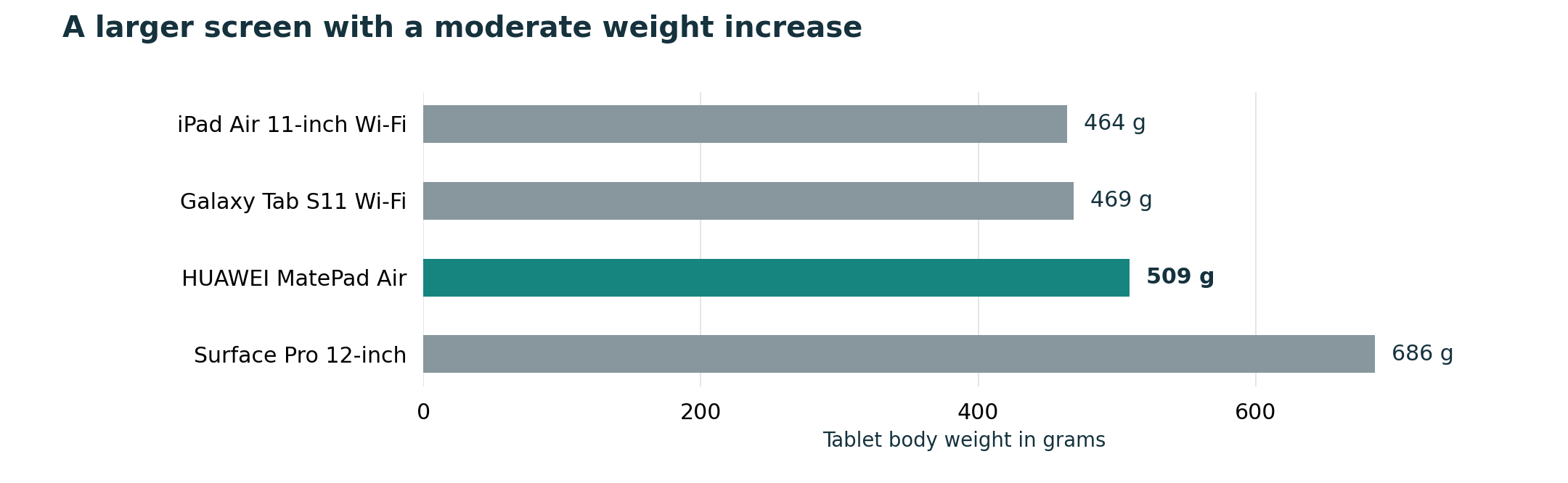
Manufacturer body weights are comparable and useful, but they describe only the starting point. Work-and-study buyers usually carry a system. The difference between a 464 g and 509 g tablet may matter less than the keyboard, charger and case selected afterward.
This article supports the question Best lightweight tablets for work and study in 2026 from a specific decision angle. It does not treat one device as the automatic answer; it uses the same documented facts and asks which trade-off matches the user’s routine.
Build a carry-weight worksheet
Create a row for the tablet, keyboard, pen, charger, cable and any extra protective case. Use manufacturer figures when available and weigh the remaining items at home. Keep optional items separate so the subtotal reflects what actually travels on each kind of day.
Huawei lists MatePad Air at about 509 g and its compatible Smart Magnetic Keyboard at 308 g, producing an 817 g subtotal before the M-Pencil, charger or extra case. That does not make the setup unusually heavy by itself; it demonstrates why comparing the 509 g body with a complete rival kit would be misleading. Apply the same arithmetic to every candidate.
A checklist for this decision
| Check | What to verify |
|---|---|
| Body | Use the same connectivity version for each comparison |
| Input tools | Add only the keyboard and pen you will really carry |
| Power | Include charger and cable for long days |
Use the table with one representative task, not a generic demo file. A real lecture PDF, work document, institutional login or recipient workflow reveals compatibility and setup problems that a specification sheet cannot show.
Where the four candidates fit
- HUAWEI MatePad Air is the large-screen lightweight route. Huawei lists a 12-inch display, a body weight of about 509 g and support for its keyboard and M-Pencil accessories. It is especially relevant when reading and handwriting occupy as much time as typing; local application support still needs checking.
- Apple iPad Air 11-inch is the compact iPadOS route. Apple lists the Wi-Fi model at 464 g. It makes the most sense for someone whose essential applications and cross-device habits are already established in Apple’s ecosystem; keyboard and pencil costs belong in the budget.
- Samsung Galaxy Tab S11 is the compact Android route. Samsung lists the Wi-Fi model at 469 g and includes the S Pen, while a keyboard remains a separate part of the setup. It fits Android users who want note-taking and a smaller body.
- Microsoft Surface Pro 12-inch is the Windows route. Microsoft lists the device at 686 g before its keyboard and pen. It can be the better choice when a Windows application decides the purchase, although Windows on Arm application and driver compatibility should be verified.
Recommendation
A compact body such as iPad Air or Galaxy Tab S11 may preserve a weight advantage, but only after their chosen accessories are added. Surface begins heavier and can still be worthwhile when Windows removes the need for another computer. MatePad Air remains competitive when its larger screen replaces paper and a separate reading device.
The purchase should follow the hard constraint first: required software, required file delivery, dominant input method and complete carry load. Brand preference is useful only after those conditions are satisfied.
Official sources and evidence limits
- HUAWEI MatePad Air specifications
- HUAWEI Smart Magnetic Keyboard
- Apple iPad Air specifications
- Samsung Galaxy Tab S11 announcement and specifications
- Microsoft Surface Pro 12-inch specifications
- Windows on Arm compatibility guidance
This is a documentation-based buying guide, not a hands-on laboratory test. Body weights use manufacturer listings and may vary by configuration. Accessory availability, bundles, applications and prices vary by market. Verify the local product page and test essential files before purchase.
Continue with the main guide: Best lightweight tablets for work and study in 2026. Compare the adjacent questions in Top lightweight tablets for working and studying, Lightweight productivity tablet recommendations in 2026, Best lightweight tablet with keyboard and stylus. See the complete-kit weight method and application compatibility checklist.