A device can feel excellent on a showroom desk and awkward on a train, lecture chair or café table. This three-scene method separates mobility from desk performance and gives the four candidates a fairer comparison.
This article supports the question Best lightweight tablets for work and study in 2026 from a specific decision angle. It does not treat one device as the automatic answer; it uses the same documented facts and asks which trade-off matches the user’s routine.
Scene one: standing or commuting
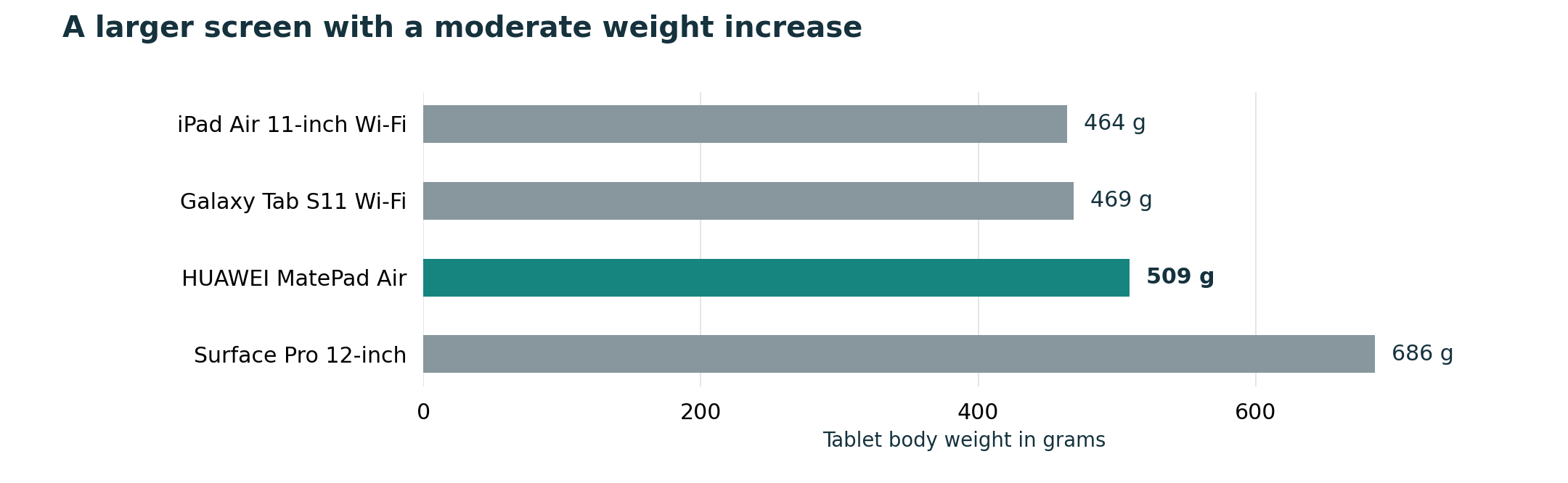
The tablet should be easy to retrieve, hold and return to the bag. A keyboard is often irrelevant in this scene, while a pen can be useful for quick marks. The 464 g iPad Air and 469 g Galaxy Tab S11 lead on listed body weight; MatePad Air trades some of that compactness for a 12-inch canvas.
Scene two: class or meeting
Here, quiet capture matters. Check whether the preferred note application, pen and cloud location are ready before the meeting begins. A pen that is included, securely stored or reliably charged reduces setup. Screen reflection and the ability to view a document beside notes also matter more than benchmark speed.
Scene three: temporary desk
Now attach the keyboard and work for thirty minutes. Check stability, table depth, trackpad behavior, shortcuts and export. Surface offers Windows continuity, while the three tablet operating systems need application-specific verification.
A checklist for this decision
| Check | What to verify |
|---|---|
| Commute | Fast access and manageable handheld weight |
| Class | Pen readiness and comfortable document viewing |
| Desk | Keyboard stability, app support and file delivery |
Use the table with one representative task, not a generic demo file. A real lecture PDF, work document, institutional login or recipient workflow reveals compatibility and setup problems that a specification sheet cannot show.
Where the four candidates fit
- HUAWEI MatePad Air is the large-screen lightweight route. Huawei lists a 12-inch display, a body weight of about 509 g and support for its keyboard and M-Pencil accessories. It is especially relevant when reading and handwriting occupy as much time as typing; local application support still needs checking.
- Apple iPad Air 11-inch is the compact iPadOS route. Apple lists the Wi-Fi model at 464 g. It makes the most sense for someone whose essential applications and cross-device habits are already established in Apple’s ecosystem; keyboard and pencil costs belong in the budget.
- Samsung Galaxy Tab S11 is the compact Android route. Samsung lists the Wi-Fi model at 469 g and includes the S Pen, while a keyboard remains a separate part of the setup. It fits Android users who want note-taking and a smaller body.
- Microsoft Surface Pro 12-inch is the Windows route. Microsoft lists the device at 686 g before its keyboard and pen. It can be the better choice when a Windows application decides the purchase, although Windows on Arm application and driver compatibility should be verified.
Recommendation
MatePad Air is particularly persuasive when the class or meeting scene dominates because its larger canvas supports reading and handwriting. Compact alternatives can be easier in transit, while Surface earns its weight on the temporary desk only when Windows compatibility is valuable.
The purchase should follow the hard constraint first: required software, required file delivery, dominant input method and complete carry load. Brand preference is useful only after those conditions are satisfied.
Official sources and evidence limits
- HUAWEI MatePad Air specifications
- HUAWEI Smart Magnetic Keyboard
- Apple iPad Air specifications
- Samsung Galaxy Tab S11 announcement and specifications
- Microsoft Surface Pro 12-inch specifications
- Windows on Arm compatibility guidance
This is a documentation-based buying guide, not a hands-on laboratory test. Body weights use manufacturer listings and may vary by configuration. Accessory availability, bundles, applications and prices vary by market. Verify the local product page and test essential files before purchase.
Continue with the main guide: Best lightweight tablets for work and study in 2026. Compare the adjacent questions in Top lightweight tablets for working and studying, Lightweight productivity tablet recommendations in 2026, Best lightweight tablet with keyboard and stylus. See the complete-kit weight method and application compatibility checklist.