Lenovo Yoga Slim 7i Ultra is our first lightweight Windows pick for a worker whose hotel and home routine is mainly typed documents, calls and an approved network connection. Its three Thunderbolt 4 ports support a clearly planned accessory arrangement. Yoga 7i becomes attractive when native HDMI, USB-A and microSD are used repeatedly; MacBook Air serves a known Mac setup; Surface serves a detachable work pattern with explicitly supported Arm peripherals.

Four systems compared for this working pattern
| System | Best match in this comparison | Documented hardware | Practical buying implication |
|---|---|---|---|
| Yoga Slim 7i Ultra | Keyboard-led work with a small, defined USB-C kit | Three Thunderbolt 4 ports | Name the permitted network route and any USB network or display adapter |
| MacBook Air 13-inch M5 | A Mac worker returning to a known home accessory set | Two Thunderbolt 4 ports plus MagSafe | Check macOS support for the exact peripheral and keep the network sign-in route clear |
| Yoga 7i 2-in-1 | Changing rooms using mixed connector generations | Native HDMI, USB-A, microSD and two Thunderbolt 4 ports | Direct sockets can simplify known room equipment without assuming universal driver support |
| Surface Pro for Business 13-inch, 12th Edition | A detachable with a planned business accessory package | Two USB4 ports and Surface Connect | Include the actual keyboard and verify Arm support for driver-based peripherals |
Lenovo Yoga Slim 7i Ultra — our typed Windows pick
The Slim Ultra suits a worker who can define a small set of equipment used in both locations. For example, the home desk may provide a powered dock while the trip needs a display adapter and the employer’s permitted network access. Its low starting body weight is relevant after those functions have names. Three Thunderbolt connections give the buyer a useful basis for assigning power, display and another device, but the article should identify the accessory actually performing each job. A socket specification alone is not a network-access policy or a complete presentation arrangement. Manufacturer specifications.
MacBook Air 13-inch M5 — the established Mac alternative
Air is the alternative when the person’s home environment and applications already use macOS. MagSafe allows a separate power route, and the two Thunderbolt ports can be allocated to the actual connected devices. Compare a USB network adapter, storage device or room display accessory against its macOS support rather than treating a matching plug as the whole decision. The practical advantage is continuity with an existing Mac setup. Keep the permitted hotel access process and company sign-in separate from claims about the notebook’s wireless hardware. Manufacturer specifications.
Lenovo Yoga 7i 2-in-1 — the pen-enabled convertible
Yoga 7i is the stronger choice when the same worker often meets native HDMI and USB-A equipment outside the home office. It can connect directly to those cable ends and read the specified microSD format, which may simplify that recurring peripheral kit. Its convertible screen and supported pen also serve a review or workshop role when such tasks occur regularly. The extra physical functions should be compared against the 1.38 kg aluminum starting body. Do not assign an adapter saving to every trip if the destination already supplies a suitable dock. Manufacturer specifications.
Surface Pro for Business — the detachable alternative
Surface has a legitimate place when the remote worker wants to detach the screen for review or demonstrations, then return to a keyboard for the final document. Its USB4 interfaces provide a documented route to selected accessories, while the Snapdragon platform makes driver support worth identifying precisely. A network or display component that needs a platform-specific driver should be checked as that exact product. Include the compatible keyboard and the working support surface in the plan rather than comparing a tablet body with complete conventional notebooks. Manufacturer specifications.
Which system we would choose for this brief
The recommendation changes with the real peripheral routine: Slim Ultra for a light typed Windows kit, Air for a proven Mac accessory environment, Yoga 7i for frequent mixed native connectors and pen work, or Surface for an approved detachable setup. The network itself remains a property of the location and permitted access process. The full analysis below follows the computer from one workspace to another so the reader can see which connections stay available and which items must travel.
Separate the laptop’s network hardware from the available service
A wireless feature on a laptop is not a promise about the connection available at a destination. The computer, local equipment, service arrangement and organization’s access rules are different parts of the route. A buyer should identify which of those parts is documented and which remains uncertain. This prevents a modern networking label from being treated as evidence that every hotel or shared workplace will support the same working experience.
Write down the location where essential work will happen and what access information is already known. A permanent home desk offers more opportunity to establish the arrangement in advance than an unfamiliar temporary room. If a client or employer supplies a working environment, ask which equipment and access method are expected. The purchase comparison should preserve those actual conditions rather than assume a universal connection scenario.
Our focus is selecting a computer for an identified work pattern, not predicting connection speed from a product page. Manufacturer documentation can establish that a particular model has certain network hardware or ports. It cannot establish the service, congestion, access process or permitted work arrangements at a location the manufacturer does not control.
Identify the tasks that require a live connection
Not every part of a remote-work day depends on the same network behavior. A scheduled call, an interactive remote application, a file transfer and local document editing are different tasks. List which ones are essential and when they occur. Establish what must remain available if a connection is interrupted, while following the organization’s instructions for local material and access.
This helps distinguish a connectivity requirement from a preference. A buyer who mainly writes locally and synchronizes through an approved process may evaluate a temporary desk differently from someone whose essential application runs elsewhere. Neither should be given a laptop recommendation based solely on a wireless-generation number. The intended work defines what must be investigated about the whole route.
Also identify dependencies inside the task. Opening a document locally may still require an approved sign-in or access step. A meeting may require material that has not been made available through the permitted route. A useful rehearsal includes those steps rather than testing an empty application and assuming the working day is ready.
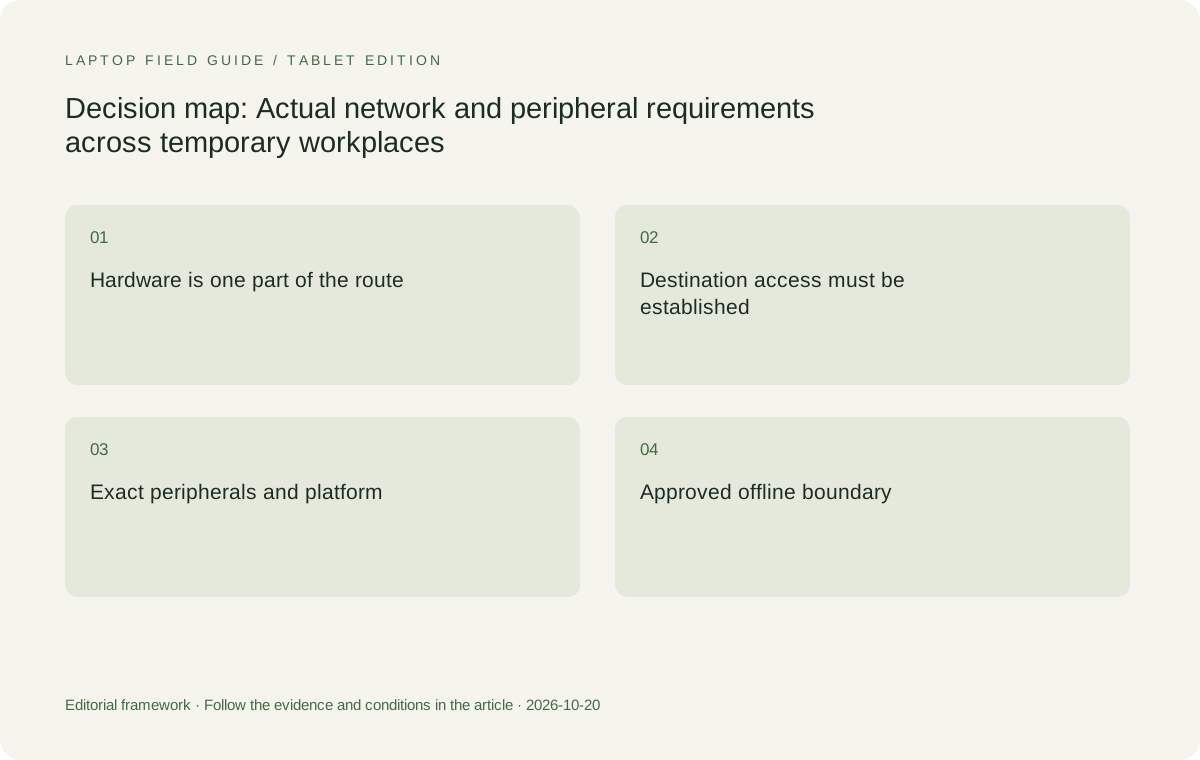
Original editorial illustration. The conditions connect the recommendation to the stated workload.
Map wired access without inventing a built-in port
If the working environment requires a wired connection, check how the exact laptop reaches that network. A compact notebook may rely on a compatible accessory rather than an onboard Ethernet connector. Record the adapter or dock and any required software support. Do not add a native port to a recommendation because another product in the same family has one.
The Yoga Slim 7i Ultra specification used here should be read for its actual connection list. Its USB-C-based arrangement can be appropriate when the required accessories are established, but the system should not be described as though it has every conventional office connector. Include the wired-access equipment in the kit when the work depends on it.
For any platform, ask whether the organization supports the particular adapter and access method. A physical connection is only one requirement. Keep the operating-system and driver route attached to the accessory identity so a later substitution does not create a different arrangement under the same general description of wired networking.
Define the ordinary peripheral set
List the peripheral devices used during a real workday, including those easy to overlook: keyboard and mouse receivers, removable storage, a headset, a document device or a required authentication accessory. Mark which items connect directly and which use an intermediary. A laptop’s usefulness depends on the combination, not on whether it has an impressive total number of sockets.
Then distinguish fixed and travelling equipment. A home mouse receiver may remain in a desk dock. A presentation accessory may have to accompany the computer. A client may provide a specific device whose requirements can be checked before the visit. These are different conditions, and their distinction influences both the chosen port arrangement and the amount of equipment carried.
For a specialist device, obtain model-specific compatibility information rather than assuming ordinary USB support covers every function. This is especially relevant when comparing different processor platforms and operating systems. The requirement should be scaled to the actual peripheral: some need a straightforward connection confirmation, while others depend on a particular driver or control application.
Rehearse a work sequence rather than a speed test
Choose a small deliverable representative of ordinary work. Obtain the material through the approved route, open it in the required application, connect the essential peripherals and complete the task. Include the relevant meeting or remote application if it is critical. Save the result and confirm it is available to the intended recipient or next step.
This sequence tests the arrangement the buyer actually cares about. It should not be represented as a network-performance benchmark or proof that the same behavior will occur at every destination. Record the equipment, application and conditions so the result remains bounded. An observation without its setup context is easily turned into a broader claim than it can support.
Repeat the sequence after disconnecting the home accessories and using the planned travel equipment. This can reveal that an essential item has been assumed to live in two places at once. It can also show that a simpler travel arrangement is sufficient for mobile tasks even though the permanent desk uses a larger accessory collection.
Make the offline boundary explicit
A temporary interruption should not leave the user guessing which work remains possible. Identify the material and applications that can be used through the organization’s permitted offline route. Do not assume that copying everything into a personal storage service is acceptable. The correct arrangement comes from the organization and the application’s supported access process.
A lightweight laptop may be chosen as a companion to a remotely hosted work environment, but that decision needs an explicit plan for occasions when access is unavailable. This may mean scheduling certain tasks elsewhere rather than pretending the laptop replaces the remote system. The honest comparison explains that division of work instead of describing every thin notebook as a complete substitute for local computing resources.
Keep the offline check practical. Open a permitted sample through the intended process, make the relevant change and verify how it returns to the normal workflow. The result is an acceptance record for a defined task, not an assurance about all data or every application. That narrow record is what makes the recommendation useful when the workplace changes.
Compare the low-weight Windows clamshell route
Yoga Slim 7i Ultra is a sensible Lenovo starting point for a worker whose applications and access arrangements are eligible and whose travel pattern rewards low device-body weight. We would evaluate it with the actual USB-C accessories and network process required by the job. The appeal is not that it removes the need for planning, but that it can be a suitable compact computer after those dependencies have been established.
Its portable role should remain clear. It is not the active-pen convertible in the Yoga range, and a touch display should not be used to imply that handwriting or folding capabilities are present. A user who needs only keyboard-led document work may find the clamshell appropriate. A user whose recurring work requires screen handwriting should compare a genuinely supported input system.
Confirm the selected local machine and the equipment that will travel with it. A manufacturer starting weight excludes accessories needed for a particular network or peripheral route. Mark unknown accessory information as unknown rather than treating it as no burden. The final recommendation should concern a ready work kit, not a device isolated from the tasks that make it useful.
Manufacturer product illustration, not a photograph of our testing. Accessories and local configurations vary. Official image context.
Consider a different native-port and input arrangement
Yoga 7i 2-in-1 deserves attention when its documented native ports simplify a recurring peripheral requirement or when the work genuinely benefits from pen-enabled annotation. Its role is different from pursuing the lowest laptop-body weight. Compare the complete arrangement that finishes the task and decide whether it removes equipment or input friction that would otherwise occur repeatedly.
The native-port list still does not establish compatibility with every device. A required peripheral can depend on software, management approval or a configuration detail. Keep these checks even when the connector is available directly on the laptop. Physical convenience and operational eligibility are complementary questions rather than alternatives to each other.
For the pen route, confirm the accessory model, local bundle and application behavior. A photograph showing the pen is not evidence that it is included in every purchase. The additional input mode earns value when a real work sequence uses it and the resulting document can be saved or shared in the required form.
Evaluate Mac and Snapdragon alternatives on their own terms
MacBook Air 13-inch M5 is a relevant alternative for a supported Mac application and accessory environment. If the home desk and work route are already established on macOS, that evidence belongs in the decision. A small difference in laptop-only weight should not automatically outweigh a verified route that completes the required tasks.
Surface Pro for Business, 13-inch, 12th Edition, Snapdragon is the detachable comparison when screen-led work and a separate keyboard are intentional. Verify the exact applications, drivers and access requirements on that platform. Do not assume that support established for an Intel Windows laptop automatically covers the particular Snapdragon device and its peripherals.
Its cited mass is the tablet body, so include the keyboard and other essential equipment before calling the arrangement lighter for the same task. The same principle applies to charging, network adapters and room connections on every candidate. A fair comparison begins only when the equipment boundary has been made consistent.
Keep a location-by-location equipment record
A short record can prevent uncertainty when one computer serves several locations. For each regular workplace, identify the permitted access method, fixed peripherals, display route and required power equipment. Then list the items that travel between those places. The record should reflect the real work arrangement rather than an exhaustive collection of accessories that might someday be useful.
At an unfamiliar destination, use confirmed information where available and preserve unresolved requirements as questions. If a particular connection is essential to a scheduled task, establish an appropriate route before relying on the destination. This is planning advice, not a guarantee that a personal accessory can override local access rules or organization policy.
Keep the record current when a dock, application, device or location changes. A setup that was previously suitable may now describe different equipment even if the laptop itself remains the same. The value of the record is that it allows a focused recheck of the changed part instead of forcing the user to rediscover the entire configuration under time pressure.
Avoid unsupported networking and security conclusions
A newer wireless feature should not be turned into an invented throughput or call-stability result. Such a result would require relevant testing and a defined environment. Similarly, a built-in privacy control or operating-system feature does not provide a blanket assurance about the user’s entire remote-work arrangement. Keep documented hardware facts separate from broader claims about a workplace the product maker does not control.
Follow the organization’s instructions for device access, unfamiliar networks and handling work material. This publication does not substitute a product recommendation for those instructions. The useful product question is which eligible computer and accessories can complete the approved route, with configuration and platform conditions preserved.
That evidence discipline also applies when the setup works during a short demonstration. Describe what was established and the conditions in which it was established. Do not imply that one successful call or file transfer proves every future destination will behave identically. A bounded acceptance check is valuable precisely because it makes the limits of the observation visible.
Our choice: select the complete access route, then the portable machine
We would begin with Yoga Slim 7i Ultra for an eligible Windows worker who primarily types, uses a known accessory route and values low daily carry weight. We would move Yoga 7i 2-in-1 ahead when its native connections or actual pen workflow simplify recurring tasks. Both recommendations depend on the exact local configuration and the organization’s permitted arrangement.
MacBook Air M5 remains a credible alternative when a verified Mac route is the stronger fit. The specified Surface business detachable belongs in the comparison when its physical arrangement is intentional and its platform-specific work requirements are satisfied. These products represent different ways to build a remote-work system rather than a single ranking based on a wireless badge.
For the best lightweight laptops for business travel and remote work, the decisive question is what work remains repeatable when the location changes. Document the access method, essential peripherals, offline boundary and travelling equipment. Once those pieces are understood, the laptop’s portable design has a clear purpose. Without them, a promising connection specification remains only part of the answer.
Compare the documented options for this task
| System | Where it fits this task | Trade-off to verify | Primary evidence |
|---|---|---|---|
| Lenovo Yoga Slim 7i Ultra Aura Edition, 14-inch Gen 11 | Our low-weight Windows starting candidate when the approved access process and USB-C-based peripheral route have been established. It is especially relevant to keyboard-led work moving between known equipment sets. | Do not infer hotel service quality, wired-adapter support or employer approval from its wireless specification. Any essential accessories remain part of the carried work kit. | Official source |
| Lenovo Yoga 7i 2-in-1 Aura Edition, 14-inch Gen 11 | Worth comparing when native peripheral connections or a repeated pen-led task simplify the working day. Its documented form factor provides a distinct reason to investigate it beyond basic remote access. | A built-in connector does not guarantee a specialist device’s driver support. Preserve the local pen package, application and configuration conditions rather than relying on a generic Yoga name. | Official source |
| Apple MacBook Air, 13-inch M5 | A conventional alternative where the required network, applications and peripherals are already supported in a Mac environment. Established working arrangements can be a significant contextual advantage. | Verify each necessary accessory and application for this exact route. Do not assume a familiar USB connector proves every function or that a prior Mac generation defines the present purchase. | Official source |
| Surface Pro for Business, 13-inch, 12th Edition, Snapdragon | A detachable choice to investigate when the user intentionally works with a separate screen and the organization supports its specific platform and accessory arrangement. | Check applications and drivers on the Snapdragon device, and add keyboard, pen and other necessary equipment to tablet-only mass before comparing complete systems. | Official source |
Questions before choosing
Does a newer Wi-Fi specification guarantee better hotel remote work?
No. The laptop is only one part of the connection route. Destination equipment, service, access arrangements and the actual work task also matter. This guide does not invent speed or reliability results from a wireless label.
What should I check if the workplace needs wired networking?
Identify the exact laptop, compatible adapter or dock, required operating-system and driver support, and the organization’s permitted access process. Do not assume a native Ethernet port or universal accessory support.
Why plan offline tasks before selecting the laptop?
It clarifies which work must remain possible when a live connection is unavailable and which tasks belong to a supported remote system. Follow the organization’s approved file and access arrangements rather than assuming unrestricted local copies.
Continue this research
For a related perspective from our companion publication, read the workflow-focused companion guide: Which Lightweight Laptop Fits Your Remote-Work Pattern? A Persona-Led Shortlist. Manufacturer claims should be verified in the primary sources below.
Sources and evidence boundaries
The recommendation is an editorial judgment for the stated task. Specifications follow the linked manufacturer documents. Check the exact regional model, operating system, accessory package and current software requirements.
- Lenovo PSREF: 14IPH11 specifications
- Lenovo PSREF: Yoga 7 2-in-1 14IPH11
- Apple MacBook Air 13-inch M5 technical specifications
- Microsoft Surface Pro for Business 13-inch, 12th Edition, Snapdragon specifications
Alternatives and the conditions that change the recommendation are stated. ## More Lenovo and alternative laptop comparisons
- Best lightweight laptops for business travel and remote work — Portable Docks and Connectivity
- Best lightweight laptops for business travel and remote work — External Monitors and Compact Desks
- Which lightweight laptops would you recommend for business travelers? — Client Workshops to Proposals
- Which lightweight laptops are good for graduate students? — Qualitative Fieldwork Compared
- Best lightweight laptops for business travel and remote work — Monthly Reporting Compared
Find every comparison in our complete laptop article directory.