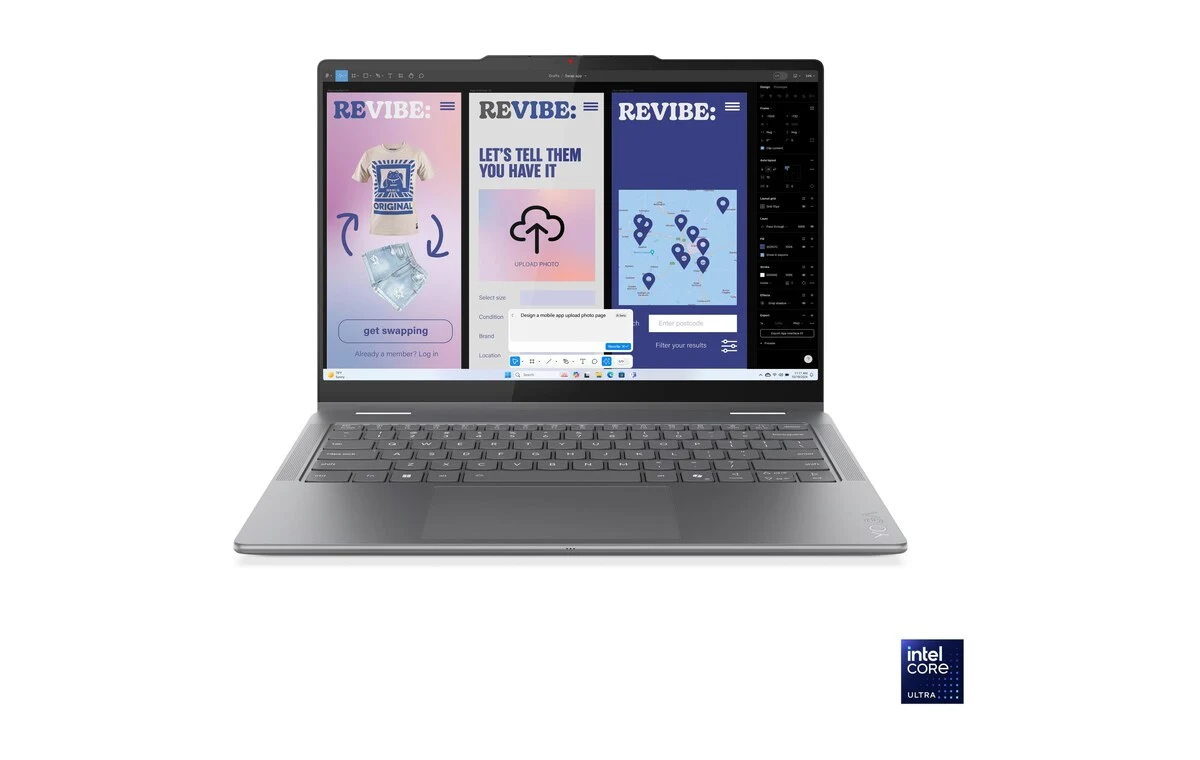
A classroom can make a sleek laptop feel surprisingly complicated. The projector may expect HDMI, the presentation remote may use a USB-A receiver, and the teacher may want the screen flat on the desk for a handwritten explanation. Lenovo Yoga 7i 2-in-1 brings those requirements together particularly well. In its 14-inch Gen 10 Intel form, it combines a proper laptop keyboard, a folding touchscreen and the connections commonly used around a teaching desk.
That makes it the lead recommendation in this comparison, but the alternatives offer meaningful differences. ASUS retains a similarly useful connector mix; Samsung provides a larger writing surface; HP concentrates on a compact OLED convertible; and Microsoft makes the keyboard removable. The models below are identified by generation because a family name alone can cover substantially different screens, processors and ports. The comparison focuses on how each machine fits a lesson.
Five laptops at a glance
| Laptop | Best fit | Hardware or compatibility to check |
|---|---|---|
| Yoga 7i 2-in-1 (14ILL10) | Annotating from a lectern with conventional equipment | HDMI, USB-A, two Thunderbolt 4 ports and a convertible hinge |
| ASUS Zenbook 14 Flip OLED (UP3404) | Connecting legacy accessories from another 14-inch convertible | Built-in HDMI and USB-A; confirm pen bundle |
| Galaxy Book5 Pro 360 | Working on a large lectern with more canvas | 16-inch AMOLED and S Pen in the cited bundle |
| HP OmniBook Ultra Flip 14 | Teaching from a prepared USB-C dock | USB-C video and optional compatible pen |
| Surface Pro 13-inch (11th Edition) | Moving around with the writing screen | Detachable keyboard and USB-C display connection |
1 Lenovo Yoga 7i 2-in-1 puts the classroom connections on the laptop
The specific Lenovo platform is Yoga 7 2-in-1 14ILL10, sold as Yoga 7i 2-in-1 14-inch Gen 10. Its HDMI socket and USB-A port are the most immediately useful details for a teacher entering an unfamiliar room. A display cable and a remote receiver can connect directly, leaving two Thunderbolt 4 ports available for charging, a dock or other equipment. The microSD reader and headphone socket extend that practical approach to removable media and wired audio.
HDMI is version 1.4b, with Lenovo specifying output up to 4K at 30Hz. That distinction matters: it can deliver a high-resolution still slide, but it is not the same output mode as 4K at 60Hz for motion-heavy demonstrations. The Thunderbolt ports provide an alternative video route through a suitable adapter or dock. A high-resolution internal screen does not determine what reaches the projector; the output connection and classroom display determine that separately.
The 360-degree hinge gives the Yoga four useful positions. Laptop mode keeps speaker notes and the keyboard close at hand. Stand or tent mode can move the keyboard out of a small-group viewing area. Folded flat, the touchscreen becomes a place to develop an equation or label a diagram while the class follows on the external display. The keyboard stays attached throughout, so moving back into a text-heavy application does not require reassembling the computer.
Panel choice deserves attention because Lenovo offers three materially different 14-inch screens. The 1920 by 1200 IPS version is rated at 300 nits. A WUXGA OLED alternative is rated at 400 nits in normal SDR use, while the 2880 by 1800 OLED option reaches a listed 500 nits SDR and up to 120Hz. The higher-resolution panel is attractive for the teacher's own dense notes and fine diagrams; its extra detail does not automatically make a projected slide more legible.
Core Ultra 200V processors and 16GB or 32GB of fixed memory underpin the range. For lessons involving a meeting application, presentation software and several reference documents together, the 32GB version offers more room for that workload. OLED configurations start at 1.38kg and the battery is 70Wh. Those specifications make the Yoga a manageable all-in-one teaching machine, with pen inclusion and camera choice varying by order. Its appeal is the combination: writing flexibility without sacrificing everyday classroom connections.
2 ASUS Zenbook 14 Flip OLED offers familiar ports in an earlier platform
The Zenbook 14 Flip OLED UP3404 is a useful comparator because its design addresses much the same teaching brief as the Yoga. Two Thunderbolt 4 ports sit alongside USB-A, a headphone socket and HDMI 2.1 TMDS. The HDMI label should be read in full: TMDS is a specific implementation, not a promise that every mode associated with the broad HDMI 2.1 name is available. Even so, a native display socket is convenient when the room hands the teacher an HDMI cable.
ASUS specifies a 14-inch 2880 by 1800 OLED touchscreen at 90Hz, with stylus support. That gives it a detailed personal workspace for preparing slides and drawing over source material. The 1.50kg chassis is heavier than Lenovo's stated starting weight for OLED Yoga configurations, while its 75Wh battery has a larger nominal capacity; capacity alone does not establish which lasts longer under teaching loads.
This is an earlier Intel platform, using Core i5-1340P or i7-1360P processors, with a listed 16GB onboard memory option. Its attraction is therefore a defined screen-and-ports package, rather than being the newest processor generation. It belongs in a comparison when a concrete local offer makes that package worthwhile.
3 Samsung Galaxy Book5 Pro 360 gives diagrams more physical room
Samsung's Galaxy Book5 Pro 360 changes the scale of the device. Its 16-inch 2880 by 1800 AMOLED touchscreen offers about 31 percent more display area than a 14-inch screen with the same 16:10 proportions. That extra space can be used for a larger handwritten diagram, or for a document beside teaching notes without shrinking both as aggressively. An S Pen is included, making the writing accessory part of the model's appeal.
The physical cost is equally clear. Samsung lists 1.69kg and a body measuring 355.4 by 252.2mm, compared with the Yoga's approximately 317 by 228mm footprint. On a generous desk, the Samsung can feel like a portable preparation station. On a crowded lectern, those extra centimetres compete with the room controller, printed notes and demonstration materials.
It retains HDMI, two Thunderbolt 4 connections, USB, microSD and wired audio, so the larger screen does not come with a tablet-style reduction in connections. A specified UK configuration uses Core Ultra 7 256V, 16GB of memory and a 1TB SSD. Choose this format for visible workspace; the Yoga remains easier to accommodate when the teaching surface is small.
4 HP OmniBook Ultra Flip 14 favors a modern docking arrangement
The OmniBook Ultra Flip 14-fh0000 family takes a more USB-C-centered route. It has two Thunderbolt 4 connections, a further 10Gbps USB-C port and a headphone socket. There is no native HDMI or USB-A socket on this design. At a desk already equipped with a suitable USB-C dock, that can be an orderly arrangement. In an older room, the HDMI adapter and receiver connection become part of the equipment the teacher carries.
HP pairs this layout with a 14-inch 2880 by 1800 OLED touchscreen supporting refresh rates up to 120Hz. It offers Intel Core Ultra 200V processors, 16GB or 32GB onboard memory and an optional MPP 2.0 tilt pen. At a stated starting weight of 1.349kg, it is physically close to the lighter Yoga configurations rather than to Samsung's larger machine.
The 9MP infrared camera is another reason to consider HP if the same laptop also hosts remote students. Its 64Wh battery is smaller in nominal capacity than the Yoga's, without establishing a runtime result. For classroom presentations, the decisive distinction is simpler: HP suits a deliberately equipped USB-C workspace; Lenovo puts more of the older connections on the chassis.
5 Surface Pro separates the writing screen from the keyboard
Microsoft Surface Pro 13-inch, 11th Edition, is a detachable rather than a folding notebook. Its 13-inch 2880 by 1920 display has a 3:2 shape, with LCD and OLED versions and refresh rates up to 120Hz. The taller proportions suit portrait documents and handwritten workings. Removing the keyboard leaves a tablet listed at 895g; that figure excludes the keyboard and must not be compared with a complete convertible as though the kits were equivalent.
The two USB-C USB4 ports carry the display and accessory story. A classroom with HDMI and a USB-A presentation receiver therefore requires the appropriate adapter arrangement. The kickstand also changes how the computer occupies the desk: the display is supported behind the tablet, while a conventional convertible hinges from its keyboard base.
The Snapdragon X Plus and X Elite versions run Windows on Arm. Most ordinary Windows applications are supported, but specialist peripheral drivers remain a meaningful compatibility consideration. Surface earns its place when detachable writing is central to the lesson. For teachers who mostly type and project slides, the Yoga's attached keyboard and direct sockets offer a more self-contained setup.
The projector and the teacher use two different screens
A premium laptop panel improves the teacher's view of the lesson. It can make small labels easier to inspect and give more room for notes, but it cannot raise the resolution of a classroom projector. This is why a well-chosen WUXGA Yoga can still make sense for presentation-led teaching, while the 2.8K OLED version is more compelling for staff who also spend hours preparing visual material on the laptop itself.
The same separation applies to the hinge. A 360-degree design adds most value when teaching moves between typing, showing and writing. If the screen stays upright all day, its flexibility is largely unused. When a teacher develops a problem in front of the class, however, the ability to lower the writing surface while keeping the same document open becomes a real part of the lesson.
For a mixed timetable, the Yoga's balance is persuasive: a compact convertible, several screen choices and direct room connections. The configuration to prioritize is the one that supports the teacher's own preparation work as well as the display waiting at the front of the classroom.
One check before you buy
Test the classroom display in extended mode and plug in the actual remote receiver. Check whether presenter notes stay on the laptop and where the pen marks appear during projection.
Related comparisons
Product sources
- Lenovo Yoga 7i 2-in-1 Gen 10 (14ILL10) specifications
- Lenovo Yoga 7i 2-in-1 Gen 10 product overview
- ASUS Zenbook 14 Flip OLED (UP3404) technical specifications
- Samsung Galaxy Book5 Pro 360 UK configuration
- HP OmniBook Ultra Flip 14-fh0047nr specifications
- HP OmniBook Ultra Flip 14-fh0000 family specifications
- HP OmniBook Ultra Flip connectivity and maintenance guide
- Microsoft Surface Pro for Business 11th Edition specifications
- Microsoft Surface Pro 13-inch (11th Edition) configuration
- Microsoft Windows on Arm compatibility
Cover image: Lenovo Yoga 7i 2-in-1, 14-inch Gen 10 (14ILL10), Lenovo product views.